{level}
{minutes ? About {minutes} min read : null}
 ## The collateralization model
Borrowing on Jupiter Lend is [non-custodial](/user-docs/guides/basics/crypto-wallets) and governed by [smart contracts](/user-docs/guides/basics/smart-contracts). To take out a loan, you must first over-collateralize your position: the value of the assets you deposit must be higher than the value of the assets you borrow.
* Collateral held in the vault: your collateral stays in your position's vault while the loan is open (you can withdraw part of it as long as the position stays within the vault's limits), and the Position NFT in your wallet represents your ownership of that position (see below).
* Flexible repayment: there are no monthly minimum payments or fixed terms. You can repay your loan in partial installments or all at once, at any time that suits your strategy.
* Interest accrual: borrowing costs follow the Borrow APY, which is dynamically calculated from the demand for the specific asset you borrow, that is, its utilization: how much of that asset's supply on Jupiter Lend, [Earn](/user-docs/guides/lend/earn-passive-returns) deposits included, is already borrowed. Some vaults apply a borrow discount that lowers the rate; the Borrow APY shown always includes it.
## Strategic use cases
Why borrow instead of selling? Common reasons include:
* Working capital: accessing cash for real-world expenses or other onchain opportunities while keeping a long-term position on an asset like
## The collateralization model
Borrowing on Jupiter Lend is [non-custodial](/user-docs/guides/basics/crypto-wallets) and governed by [smart contracts](/user-docs/guides/basics/smart-contracts). To take out a loan, you must first over-collateralize your position: the value of the assets you deposit must be higher than the value of the assets you borrow.
* Collateral held in the vault: your collateral stays in your position's vault while the loan is open (you can withdraw part of it as long as the position stays within the vault's limits), and the Position NFT in your wallet represents your ownership of that position (see below).
* Flexible repayment: there are no monthly minimum payments or fixed terms. You can repay your loan in partial installments or all at once, at any time that suits your strategy.
* Interest accrual: borrowing costs follow the Borrow APY, which is dynamically calculated from the demand for the specific asset you borrow, that is, its utilization: how much of that asset's supply on Jupiter Lend, [Earn](/user-docs/guides/lend/earn-passive-returns) deposits included, is already borrowed. Some vaults apply a borrow discount that lowers the rate; the Borrow APY shown always includes it.
## Strategic use cases
Why borrow instead of selling? Common reasons include:
* Working capital: accessing cash for real-world expenses or other onchain opportunities while keeping a long-term position on an asset like 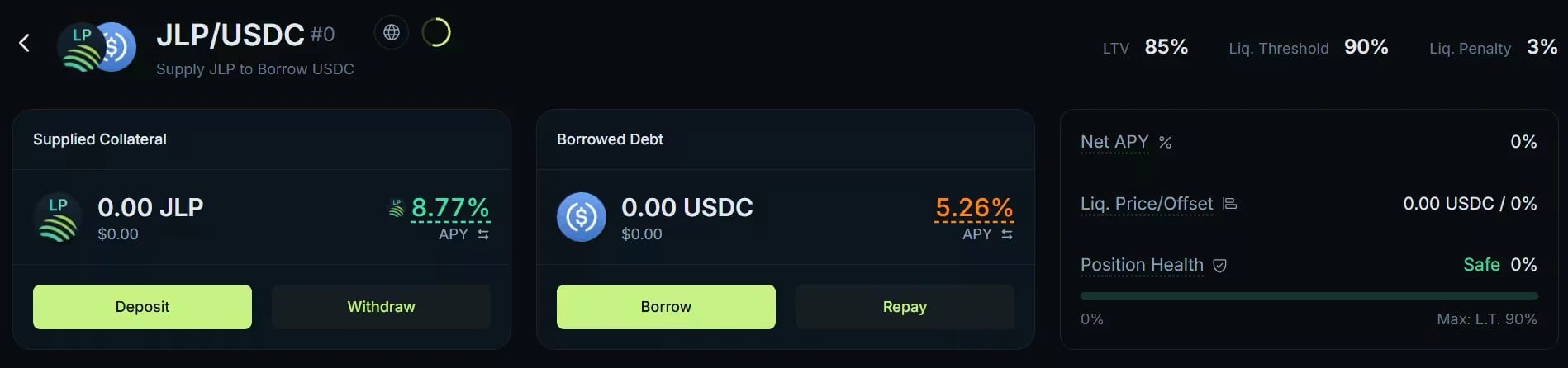 ## Your position as an NFT
When you open a position on Borrow, the protocol automatically mints a Position NFT to your wallet. This NFT is how the protocol identifies your loan onchain: whoever holds it controls the position, including the right to manage, repay, and close it. Do not transfer or burn the Position NFT, even after closing the loan, as it can be reused for future positions in the same vault pair.
## Let's start borrowing
### Step 1: Deposit collateral
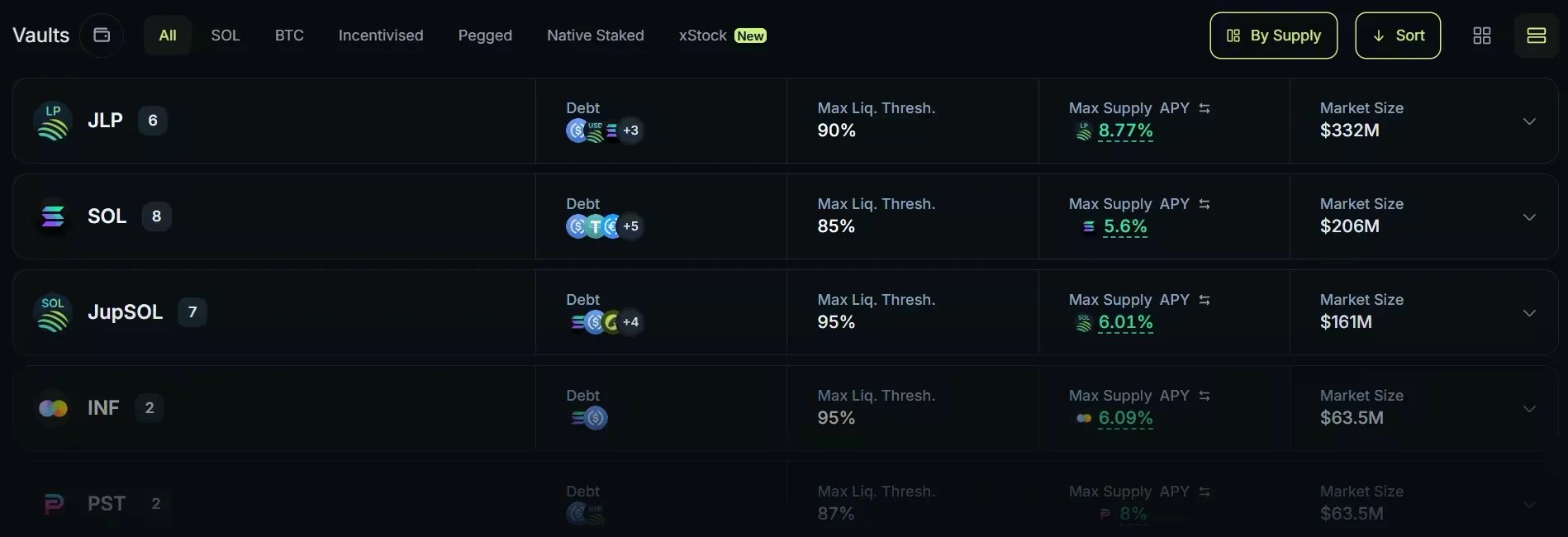
Open the Borrow tab at [jup.ag/lend/borrow](https://jup.ag/lend/borrow) and find the vault for your pair: the collateral you deposit, such as SOL or JupSOL, and the asset you want to borrow, such as USDC. The **Collateral** and **Debt** dropdowns and the category bar narrow the list. Open the vault: the Deposit form opens. Enter the amount of collateral, click **Deposit** and approve the transaction. This first transaction creates your position and deposits your collateral.
### Step 2: Draw your loan
Back on the vault page, click **Borrow** on the Borrowed Debt card and enter the amount. Review the status bar: it shows your resulting debt-to-collateral ratio next to the vault's Liquidation Threshold, with its Position Health label. The further you are from the threshold, the safer your position. Confirm and approve: the borrowed assets are sent to your wallet.
To deposit and borrow in a single transaction instead, use **Deposit & Borrow** in the vault's Actions tab.
### Step 3: Monitor and repay
The vault page gives you a real-time view of your collateral, your debt (which grows as interest accrues), your Net APY, your liquidation price, and your Position Health. You can add collateral at any time to improve your Position Health, or repay part or all of the debt with **Repay**, then withdraw your collateral.
## Go deeper
## Your position as an NFT
When you open a position on Borrow, the protocol automatically mints a Position NFT to your wallet. This NFT is how the protocol identifies your loan onchain: whoever holds it controls the position, including the right to manage, repay, and close it. Do not transfer or burn the Position NFT, even after closing the loan, as it can be reused for future positions in the same vault pair.
## Let's start borrowing
### Step 1: Deposit collateral
Open the Borrow tab at [jup.ag/lend/borrow](https://jup.ag/lend/borrow) and find the vault for your pair: the collateral you deposit, such as SOL or JupSOL, and the asset you want to borrow, such as USDC. The **Collateral** and **Debt** dropdowns and the category bar narrow the list. Open the vault: the Deposit form opens. Enter the amount of collateral, click **Deposit** and approve the transaction. This first transaction creates your position and deposits your collateral.
### Step 2: Draw your loan
Back on the vault page, click **Borrow** on the Borrowed Debt card and enter the amount. Review the status bar: it shows your resulting debt-to-collateral ratio next to the vault's Liquidation Threshold, with its Position Health label. The further you are from the threshold, the safer your position. Confirm and approve: the borrowed assets are sent to your wallet.
To deposit and borrow in a single transaction instead, use **Deposit & Borrow** in the vault's Actions tab.
### Step 3: Monitor and repay
The vault page gives you a real-time view of your collateral, your debt (which grows as interest accrues), your Net APY, your liquidation price, and your Position Health. You can add collateral at any time to improve your Position Health, or repay part or all of the debt with **Repay**, then withdraw your collateral.
## Go deeper