> ## Documentation Index
> Fetch the complete documentation index at: https://docs.jup.ag/llms.txt
> Use this file to discover all available pages before exploring further.

> ## Agent Instructions
> These docs cover what users see and do on jup.ag, Jupiter Mobile and Jupiter Wallet.
> Universal Deposit, the GUM routes in Bridge & Swap (GUM Universal Bridge, GUM Universal Deposit) and other GUM integrations on jup.ag are built by GUM. For how they work, their full fee rules, security model and APIs, the reference is the GUM docs: start from https://docs.gum.ag/llms.txt.
> When the GUM docs and these docs differ on how a GUM product behaves on jup.ag, describe the jup.ag experience from these docs and the mechanics and fees from the GUM docs.

# Using Offerbook as a lender

> Lend USDC on Offerbook: the escrow wallet, notifications, creating a lend offer or filling a borrow offer, and a tiered lending strategy example.

export const GuideMeta = ({level, minutes, author, avatar, published, updated}) => <div className="jg-meta not-prose">
    <div className="jg-badges">
      <span className={`jg-level jg-level-${level.toLowerCase()}`}>{level}</span>
      {minutes ? <span className="jg-read">About {minutes} min read</span> : null}
    </div>
    <div className="jg-byline">
      <img noZoom className="jg-avatar" src={avatar} alt="" width="32" height="32" />
      <span>
        Written by <span className="jg-author">{author}</span>
        {published ? <span className="jg-origin">
            Originally published on Jupiter Academy, {published}{updated ? " · Updated for Jupiter Docs" : ""}
          </span> : null}
      </span>
    </div>
  </div>;

<GuideMeta level="Advanced" minutes={10} author="Matt" avatar="/images/guides/authors/matt.webp" published="April 13, 2026" updated />

<Frame caption="Published on YouTube in June 2026. If a screen in the video differs from the steps on this page, follow the page.">
  <iframe src="https://www.youtube.com/embed/m89EOI94dz0" title="Using Offerbook as a lender" frameborder="0" className="w-full aspect-video rounded-xl" allow="accelerometer; autoplay; clipboard-write; encrypted-media; gyroscope; picture-in-picture; web-share" allowfullscreen />
</Frame>

As a lender, you lend out USDC against onchain assets as collateral via Offerbook, a peer-to-peer money market on <Tooltip headline="Solana" tip="A high-performance blockchain designed for fast, low-cost transactions and scalable decentralized applications. Jupiter products use it as their main infrastructure." cta="Open the glossary" href="/user-docs/guides/glossary#solana">Solana</Tooltip>.

Every loan has a known duration, a known return, and a known outcome at maturity, with no price-based liquidations: either the borrower repays your USDC plus interest, or you claim the collateral. For how the model works as a whole, see [How Offerbook works](/user-docs/guides/offerbook/how-offerbook-works).

<img src="https://mintcdn.com/jupiter-support/ZC__2LeEBkX19Blt/images/guides/offerbook/header.gif?s=916b28223413586d9721cbeea3cb240c" alt="Animated banner: Borrow USDC with JUP, TSLA or SOL collateral. Time based. No liquidation. Fixed terms." width="624" height="170" data-path="images/guides/offerbook/header.gif" />

## Why lend on Offerbook?

* Predictable loan terms: all Offerbook loans are well defined, with a fixed duration, a fixed rate, and a clear outcome at maturity. Lenders can manage their positions with more certainty and know upfront what a repaid loan returns, unlike in variable-rate models.
* Collateral diversity: Offerbook accepts a broad range of collateral, from verified tokens and RWAs such as xStocks to NFTs from whitelisted collections. That gives lenders many markets to choose from, each with its own risk and rate.
<Warning>
  The collateral is your only recourse. If its value drops below the amount you lent, the borrower can rationally choose not to repay, and you receive an asset worth less than your USDC. Only lend against collateral you would accept holding, at an LTV that prices this risk.
</Warning>

## The escrow wallet

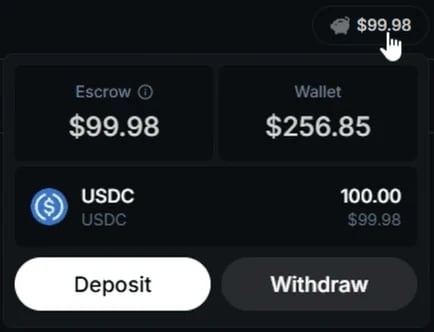
To support the Offerbook protocol, every user has an escrow wallet, separate from their main wallet. As a lender, you see its balance in the header, next to your wallet. Click it to open the escrow panel, where you can deposit and withdraw USDC at any time.

<Frame caption="The escrow panel opens from the escrow balance in the header.">
  <img src="https://mintcdn.com/jupiter-support/p5FdkagPcbEGL8wN/images/guides/offerbook-lender/escrow-panel.webp?fit=max&auto=format&n=p5FdkagPcbEGL8wN&q=85&s=6fcae60ec456629b7eca2e239d369b4c" alt="The escrow panel with the Escrow and Wallet balances, the USDC held in escrow, and the Deposit and Withdraw buttons" width="434" height="332" data-path="images/guides/offerbook-lender/escrow-panel.webp" />
</Frame>

Thanks to the escrow wallet, lenders can create multiple offers using the same USDC balance, for more flexibility and capital-efficient lending strategies. You do not need to deposit beforehand: creating a lend offer deposits the USDC from your wallet into the escrow automatically.

When an offer is accepted, the USDC leaves the escrow, and any outstanding offers that are no longer covered by the remaining balance are hidden from public view until your balance covers them again.

When a borrower repays, the USDC lands back in your escrow, not in your wallet. Reuse it for new offers, or withdraw it. The Escrow tab of your Dashboard lists every movement in and out.

## Get notified about your loans

Offerbook can send notifications through Telegram and Email to keep you updated on key events without needing to check the Dashboard manually. To connect, open Settings (the gear icon in the header), approve the one-time sign-in signature, and connect a channel in the General tab.

Then head to the Notifications tab. As a lender, you can be notified about the following:

* Offer accepted: a borrower has filled your lend offer and the loan has started
* Counter offer received: someone has proposed different terms on one of your offers
* Offer expired: your lend offer expired without being filled
* Offer cancelled: an offer you created or matched against has been canceled
* Loan due soon: one of your loans reaches maturity in 2 hours
* Loan repaid: a borrower has fully repaid one of your loans
* Loan extended: a borrower has rolled one of your loans into a new period, paying you the closing period's interest
* Loan expired: a loan has passed its due date without repayment; you can now manually claim the collateral
* Loan defaulted: collateral has been claimed on a defaulted loan

## How to use Offerbook as a lender

There are two main ways to use Offerbook as a lender:

1. Create a new lend offer with custom terms, or
2. Accept an existing borrow offer.

You can also send a [counter offer](/user-docs/earn/offerbook/counter-offers) on a borrow offer whose terms are close but not quite right, or advertise the terms you want for free with an [intent](/user-docs/earn/offerbook/intents).

Everything starts from the **Earn** menu in the header, which opens the Tokens or Collectibles market. The steps below use the Tokens market.

## Creating a new lend offer

The screenshots in these steps come from an earlier version of Offerbook: the flow is the same, but some fields have moved since.
<Steps>
  <Step title="Open the creation flow">
    In **Earn** > **Tokens**, on the Available Now tab, click **Offer to Lend** to start creating your own lend offer. **Create Offer** > **Lend** in the header opens the same flow.
  </Step>

  <Step title="Choose your conditions">
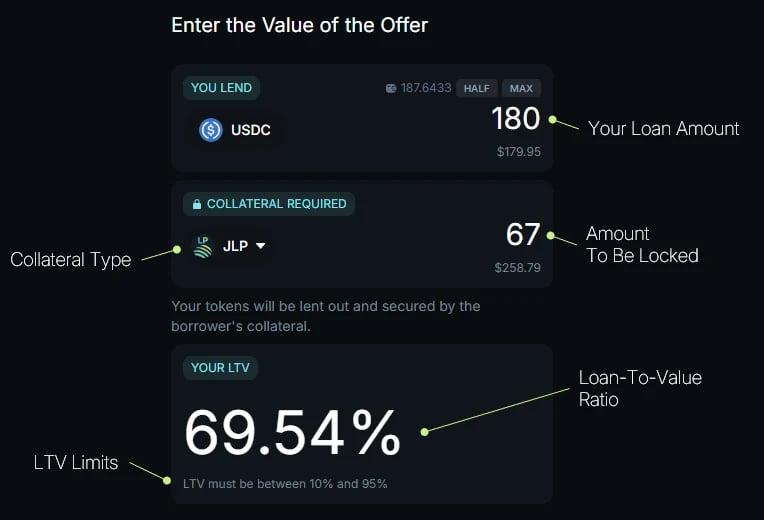
    Set the USDC amount that you wish to lend out (at least \$10 per loan), and choose the collateral you accept. Then set the LTV, the ratio between the USDC lent and the value of the collateral, with the slider, which keeps it within the range the app allows. Set your desired APY (annual percentage yield), which determines the interest due at maturity on the USDC you lend. An indicator estimates how attractive your terms are to borrowers.

    <img src="https://mintcdn.com/jupiter-support/ZC__2LeEBkX19Blt/images/guides/offerbook-lender/offer-amount.webp?fit=max&auto=format&n=ZC__2LeEBkX19Blt&q=85&s=e38db5be44be58571f9df6e84b6e23cc" alt="The first step of the lend offer flow, annotated: the USDC amount you lend, the collateral type and the amount to be locked, and your LTV with its limits" width="764" height="520" data-path="images/guides/offerbook-lender/offer-amount.webp" />
  </Step>

  <Step title="Set duration and expiration">
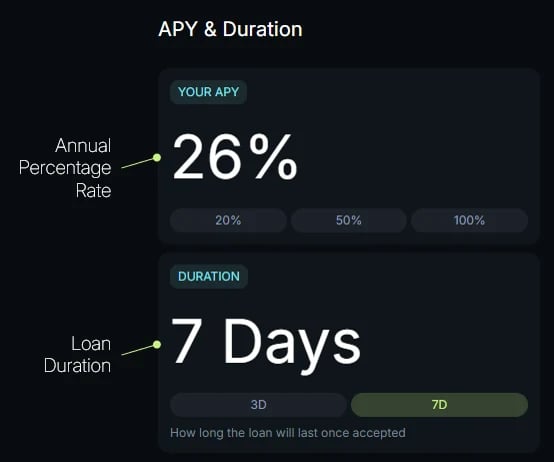
    Choose the loan duration (1 to 30 days) and how long the offer stays open (1 to 7 days). The loan countdown only starts when a borrower accepts. Keep the expiration short unless you are confident your terms will still be worth it later: until it expires, your offer stays fillable even if the collateral price or market rates move against you.

    <img src="https://mintcdn.com/jupiter-support/ZC__2LeEBkX19Blt/images/guides/offerbook-lender/apy-and-duration.webp?fit=max&auto=format&n=ZC__2LeEBkX19Blt&q=85&s=e74328f0ded6b5c71ff92c71ee892154" alt="The APY and duration step, annotated: your APY with quick picks, and the loan duration" width="554" height="462" data-path="images/guides/offerbook-lender/apy-and-duration.webp" />
  </Step>

  <Step title="Set fill preferences">
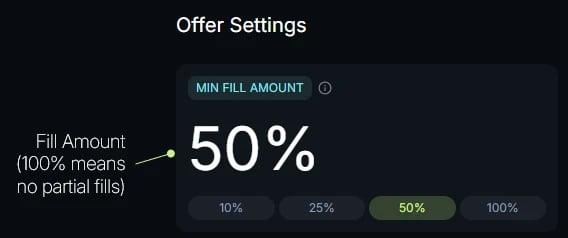
    Turn on **Allow partial fill** to let borrowers take part of your offer, and set the Minimum Fill Amount in USD: the smallest amount a borrower can take in one fill. Partial fills are not available for NFT collateral. Turn on **Allow extensions** to let borrowers roll loans from this offer into fresh periods on the same terms; you can revoke or re-grant this per loan later.

    <img src="https://mintcdn.com/jupiter-support/ZC__2LeEBkX19Blt/images/guides/offerbook-lender/offer-settings.webp?fit=max&auto=format&n=ZC__2LeEBkX19Blt&q=85&s=ca5c9050ab9e7af3c485b98a55e91b67" alt="The offer settings step, annotated: the minimum fill amount, where 100% means no partial fills" width="568" height="238" data-path="images/guides/offerbook-lender/offer-settings.webp" />
  </Step>

  <Step title="Review and create your lend offer">
    Review the summary: the collateral, the USDC lent and the LTV, the APY, the duration, the expiration, and the minimum fill. It also shows the Effective APY, your APY after the 10% platform fee on interest. Once confirmed, click **Create Offer** and approve in your wallet.
  </Step>
</Steps>

Your offer is now live in the offerbook until its expiration. You may set up multiple lend offers using the same USDC balance in your escrow wallet, which lets you reuse your available balance without depositing funds multiple times. Published offers cannot be edited, but you can cancel one at no fee before it is filled, and renew it from **Dashboard** > Offers once it has expired.

Once a borrower accepts it, in full or partially, the loan starts immediately. Your USDC is transferred to the borrower, and the collateral is locked in a smart contract for the loan duration. Any other outstanding offers that your escrow no longer covers are hidden until it does again.

## Accepting an existing borrow offer

<Steps>
  <Step title="Browse through the existing offers">
    Open **Earn** > **Tokens**. The Available Now tab lists the borrow offers you can fund today, grouped by collateral. Pick the collateral you accept, or keep Any Collateral, and use **Filters** to narrow the list. Each offer stays open until its expiration, 1 to 7 days after it was posted.
  </Step>

  <Step title="Review an offer and its terms">
    Expand a collateral row, find an offer you like, and click **Lend** on the right side to open its details. Review the terms: the collateral asset and amount, the USDC lent and the matching LTV, the APY, the duration, and when the offer expires. If the offer allows partial fills, you can lend a portion of it, such as 50%, as long as you stay at or above its minimum fill. At the bottom, the panel shows what the borrower locks, what you earn after the platform fee, and when the loan is due.
  </Step>

  <Step title="Accept the offer and start the loan">
    Confirm with the **Lend** button at the bottom of the panel and approve in your wallet. The loan starts immediately: your USDC goes to the borrower through your escrow, which the app tops up from your wallet if needed, and the collateral is locked in a smart contract for the loan duration. You can add the maturity date to your calendar at this point.
  </Step>
</Steps>

## Collecting at loan maturity

Monitor your loans from **Dashboard**, with the Lending side selected: the Positions tab lists the loans you funded. You can also add a calendar reminder from a loan's row. If you have connected a notification channel, the Loan repaid and Loan expired alerts tell you when to act.

* If the borrower repays at any time during the loan, you receive your USDC plus the interest, minus the 10% fee, in your escrow. You receive the agreed amount even on early repayment.
* If the loan is extendable, the borrower may extend it instead: you receive the closing period's interest, and the loan runs for another period on the same terms.
* If the borrower does not repay before maturity, you must manually claim the collateral from the loan's row in **Dashboard** > Positions. A 0.1% fee is deducted (none on NFT collateral), and you receive the collateral itself, not USDC. The borrower can still repay after maturity until you claim it.

## Example: a tiered lending strategy

*Note: loan durations range from 1 to 30 days, set by the offer creator. The offer itself stays valid for a separate window of 1 to 7 days, also set by its creator.*

Marc holds 50,000 USDC and wants higher yields than he gets from lending pools. He is willing to take on more risk by lending against more volatile assets, as he knows how to assess downside risk (maximum drawdown), evaluate liquidity, and select assets carefully.

He plans to deploy capital across two types of collateral:

* Tokenized stocks and ETFs, such as xStocks
* More volatile assets, such as memecoins

### Step 1: Define a lending strategy and create offers

Marc splits his lending strategy into two offers with different risk profiles:

| | Tokenized stocks | Memecoins |
| - | - | - |
| Lend | 50,000 USDC | 25,000 USDC |
| Loan duration | 30 days | 10 days |
| LTV | About 60% | About 30% |
| APY | 12% | 40% |

Since all his offers draw from the same escrow wallet, Marc can list more than his 50,000 USDC balance: 75,000 USDC in total. Offers are filled on a first-come, first-served basis, and once his escrow runs low, the offers it no longer covers are hidden until funds are freed by repayments or until Marc adds more USDC.

Marc carefully manages the LTV and duration for each asset category. Since Offerbook has no price-based liquidations, he estimates the potential maximum drawdown of each asset over the loan period, to avoid ending up with collateral worth less than the amount he lent. That is why the volatile tier gets a lower LTV and a shorter duration.

He reviews all parameters and publishes his offers with a 1-day expiration, so his terms do not stay live for long if prices move. When unfilled offers expire, he renews them from the Dashboard.

### Step 2: Borrowers fill the offers

Borrowers browse the available offers and accept those that match their needs. Each loan starts immediately: Marc's USDC is transferred to the borrower, and the collateral is locked in a smart contract until the borrower repays principal plus interest.

Because the loan terms are fixed, Marc knows from the start how much a repaid loan will earn him: the full interest amount is owed even if the borrower repays early.

For example, if a single borrower takes his full 50,000 USDC tokenized-stock offer, the interest for 30 days at 12% APY comes to about \$493.15 (50,000 × 12% × 30/365). After the 10% fee at repayment, Marc receives about \$443.84 of interest. His escrow is now empty, so his memecoin offer is hidden until funds return.

### Step 3: The loan maturity date passes

Once the borrower repays, Marc receives his USDC plus interest, minus the 10% fee, back in his escrow wallet. He can reuse it right away: renew his expired offers or create new ones.

If a borrower fails to repay by the maturity date for any reason, Marc becomes eligible to manually claim the collateral used to secure the loan, minus the 0.1% fee. Note that if Marc is slow to claim, the borrower can still repay the loan until the claim actually happens. The value of this collateral may also be higher or lower than the amount lent, depending on its price movement during the loan.

## Go deeper

<CardGroup cols={2}>
  <Card title="Lending on Offerbook" icon="book" href="/user-docs/earn/offerbook/lending">
    The full lender journey: escrow, offer creation, Dashboard, and outcomes.
  </Card>

  <Card title="Security and risks" icon="shield-halved" href="/user-docs/earn/offerbook/security-and-risks">
    What lenders are exposed to, and how to evaluate collateral.
  </Card>

  <Card title="Open Offerbook on Jupiter" icon="arrow-up-right-from-square" href="https://offerbook.jup.ag/tokens/lend" />
</CardGroup>


This documentation is built and hosted on [Mintlify](https://mintlify.com), a developer documentation platform.