> ## Documentation Index
> Fetch the complete documentation index at: https://docs.jup.ag/llms.txt
> Use this file to discover all available pages before exploring further.

> ## Agent Instructions
> These docs cover what users see and do on jup.ag, Jupiter Mobile and Jupiter Wallet.
> Universal Deposit, the GUM routes in Bridge & Swap (GUM Universal Bridge, GUM Universal Deposit) and other GUM integrations on jup.ag are built by GUM. For how they work, their full fee rules, security model and APIs, the reference is the GUM docs: start from https://docs.gum.ag/llms.txt.
> When the GUM docs and these docs differ on how a GUM product behaves on jup.ag, describe the jup.ag experience from these docs and the mechanics and fees from the GUM docs.

# Move money with Jupiter Send

> Jupiter Send walkthrough: transfer tokens to a Solana address, or create a Magic Link anyone can claim, on jup.ag/send or in Jupiter Mobile.

export const GuideMeta = ({level, minutes, author, avatar, published, updated}) => <div className="jg-meta not-prose">
    <div className="jg-badges">
      <span className={`jg-level jg-level-${level.toLowerCase()}`}>{level}</span>
      {minutes ? <span className="jg-read">About {minutes} min read</span> : null}
    </div>
    <div className="jg-byline">
      <img noZoom className="jg-avatar" src={avatar} alt="" width="32" height="32" />
      <span>
        Written by <span className="jg-author">{author}</span>
        {published ? <span className="jg-origin">
            Originally published on Jupiter Academy, {published}{updated ? " · Updated for Jupiter Docs" : ""}
          </span> : null}
      </span>
    </div>
  </div>;

<GuideMeta level="Beginner" minutes={4} author="JD SOL" avatar="/images/guides/authors/jd-sol.webp" published="May 8, 2026" updated />

<img src="https://mintcdn.com/jupiter-support/p5FdkagPcbEGL8wN/images/guides/jupiter-send/cover.webp?fit=max&auto=format&n=p5FdkagPcbEGL8wN&q=85&s=3245b71bbb1d3e6c05dbb59df5702da3" alt="A paper airplane taking off next to a stack of coins, the cover of this guide" width="1920" height="1080" data-path="images/guides/jupiter-send/cover.webp" />

Jupiter Send, as the name implies, lets you send any Solana token to any Solana [wallet](/user-docs/guides/basics/crypto-wallets) address. What sets it apart is that it can also send tokens through a link, to recipients who do not have a wallet yet.

[Tokenized stocks](/user-docs/guides/stocks/tokenized-equities) are Solana tokens too, so Jupiter Send moves them like any other token. They are not the same as traditional shares: what each one represents depends on its issuer, and some issuers restrict eligibility by jurisdiction, so check the issuer's terms before you send.

## Two ways to send

Jupiter Send has two methods for delivering Solana tokens.

Transfer: the conventional method, sending tokens directly to the Solana address of someone who already has a wallet. It is a normal onchain transfer, and the recipient has nothing to claim.
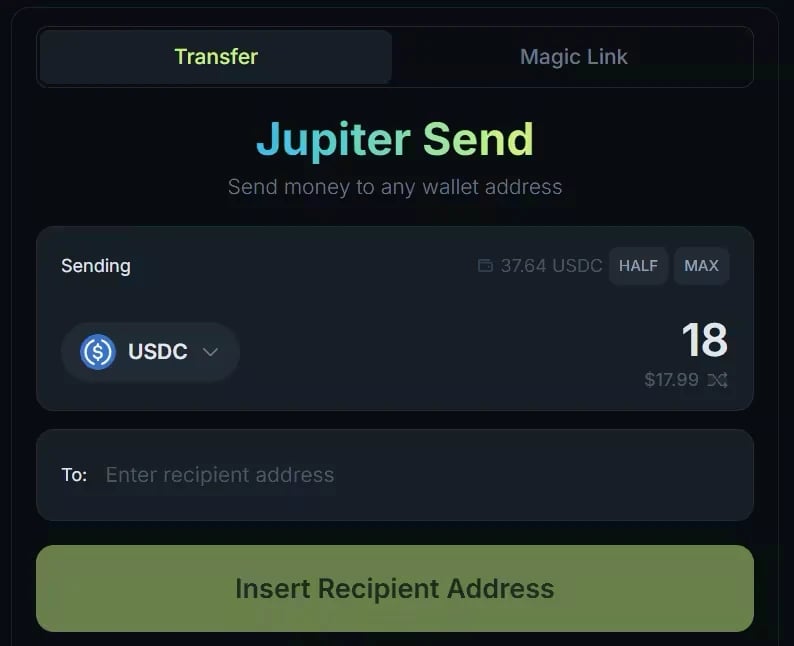
<Frame caption="The Transfer tab of Jupiter Send on jup.ag. Balances date from when the screenshot was taken.">
  <img src="https://mintcdn.com/jupiter-support/p5FdkagPcbEGL8wN/images/guides/jupiter-send/transfer-form.webp?fit=max&auto=format&n=p5FdkagPcbEGL8wN&q=85&s=94a30fdcd4ec5524e50bd6e96f4e65a7" alt="The Jupiter Send form on the Transfer tab, with the token and amount, HALF and MAX, and the recipient address field" width="794" height="646" data-path="images/guides/jupiter-send/transfer-form.webp" />
</Frame>

Magic Link: the method designed to send tokens to people who are not onchain yet. Jupiter Send creates a link, a claim code and a QR code for the tokens, which stay onchain until someone claims them, and can be claimed only once. You can share them with anyone, even someone without a Solana wallet.

The link opens a claim page on jup.ag showing the token and the amount. The recipient can claim in the Jupiter Mobile app, which the page guides them to download, or with an existing Solana wallet connected on a computer. A claim code can also be redeemed under **Receive** → **Claim Gift** on jup.ag/send.
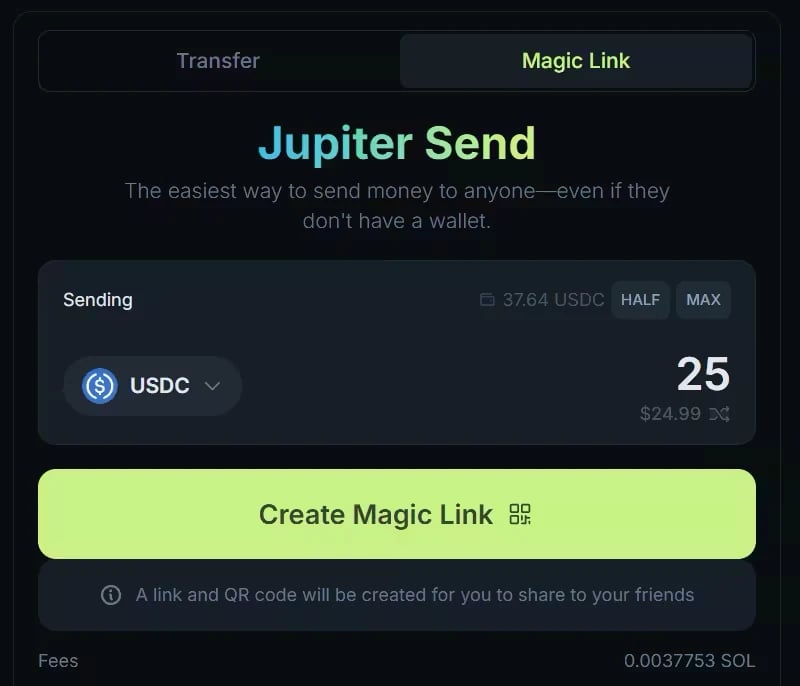
<Frame caption="The Magic Link tab on jup.ag. The fee for creating a link is paid in SOL; the amount shown dates from the screenshot.">
  <img src="https://mintcdn.com/jupiter-support/p5FdkagPcbEGL8wN/images/guides/jupiter-send/magic-link-form.webp?fit=max&auto=format&n=p5FdkagPcbEGL8wN&q=85&s=a2029439f883961212150de18ce05909" alt="The Jupiter Send form on the Magic Link tab, with the Create Magic Link button and the Fees row" width="800" height="686" data-path="images/guides/jupiter-send/magic-link-form.webp" />
</Frame>

## Fees and gasless transfers

Jupiter does not charge any protocol fee for Jupiter Send. The Fees row shows what you pay before you confirm: for a transfer, the Solana network fee plus any rent for the recipient's token account; for a Magic Link, a fee paid in SOL when you create it.

On jup.ag, a transfer can be gasless when your wallet does not have enough <Tooltip headline="SOL" tip="The native coin of the Solana blockchain, used for paying transaction fees and staking." cta="Open the glossary" href="/user-docs/guides/glossary#sol">SOL</Tooltip> to pay its fee: the fee is then charged in the token you are sending, so the recipient receives slightly less than the amount you enter. This applies to transfers of verified tokens worth at least \$1. It does not apply to Magic Links: creating one always needs SOL in your wallet, otherwise the button shows **Insufficient Gas Fee**. The Jupiter Mobile app has its own rules, see [Gasless Send in Jupiter Mobile](/user-docs/global/mobile/funding-and-sending#gasless-send).

Magic Links expire. If the tokens are not claimed within 7 days of creation, they return to the sender's wallet automatically. You can also cancel a Magic Link at any time before it is claimed, which is especially useful if you shared it with the wrong person.

## Risks and limitations

Keep these risks and limitations in mind.

* Jupiter Send works on the Solana blockchain only. Verify the address carefully before you send, and never send tokens from another blockchain straight to a Solana address.
* Magic Links have no password or recipient restriction: anyone who gets the link, the claim code or the QR code can claim the tokens. Treat a Magic Link like cash.
* To hold a token, a wallet needs a token account for it, which costs a small amount of SOL called rent (see [Keeping your wallet clean with Reclaim](/user-docs/guides/portfolio/reclaim-sol-rent)). When a transfer has to create the recipient's token account, you, the sender, pay that rent as part of the fee shown in the Fees row.
* On jup.ag, a Magic Link must be worth between \$1 and \$1,000. The values applied by the app prevail. Standard Solana transaction size limits also apply.

## Hands on Jupiter Send

Jupiter Send is available at [jup.ag/send](https://jup.ag/send) and in the Jupiter Mobile app. The steps below are on jup.ag.

### Sending to a wallet address

<Steps>
  <Step title="Open Transfer">
    Open [jup.ag/send](https://jup.ag/send) and connect your wallet. **Transfer** is selected by default.
  </Step>

  <Step title="Choose the token and amount">
    Select the token and enter the amount, in tokens or in USD.
  </Step>

  <Step title="Enter the recipient">
    Paste the recipient's Solana address.
  </Step>

  <Step title="Review and send">
    Check the Fees row, click **Send**, and approve the transaction in your wallet.
  </Step>
</Steps>

### Sending via Magic Link

<Steps>
  <Step title="Open Magic Link">
    Open [jup.ag/send](https://jup.ag/send), connect your wallet, and select **Magic Link**.
  </Step>

  <Step title="Choose the token and amount">
    Select the token and enter the amount, between \$1 and \$1,000.
  </Step>

  <Step title="Create the link">
    Check the fee, paid in SOL, then click **Create Magic Link** and approve the transaction in your wallet.
  </Step>

  <Step title="Share it">
    Share the link, the claim code or the QR code with the recipient. They can claim it any time within 7 days.
  </Step>
</Steps>

In the Jupiter Mobile app, tap **Send** on the Home or Portfolio tab, then **Send to address** or **Magic Link**. See [Funding and sending in Jupiter Mobile](/user-docs/global/mobile/funding-and-sending).

### Managing active Magic Links

On jup.ag/send, with your wallet connected and the **Magic Link** tab selected, scroll below the send widget to see two tabs:

* Active: links that have not been claimed yet. Cancel a link with its 🗑️ icon and approve the transaction to recover the tokens.
* Past: links that have been claimed, canceled or expired.

In the Jupiter Mobile app, your links are under **History** → **Magic Links**.

Whether you are paying someone who already has a wallet or onboarding a friend who has never touched crypto, Jupiter Send turns moving a Solana token into something as simple as sharing a link.

## Go deeper

<CardGroup cols={2}>
  <Card title="Jupiter Send overview" icon="paper-plane" href="/user-docs/onramp/send">
    Transfers, the Receive tab, gasless transfers, fees, and limits.
  </Card>

  <Card title="Magic Links" icon="link" href="/user-docs/onramp/send/magic-links">
    Create, claim, cancel, and expiry of Magic Links.
  </Card>

  <Card title="Open Send on Jupiter" icon="arrow-up-right-from-square" href="https://jup.ag/send" />
</CardGroup>


This documentation is built and hosted on [Mintlify](https://mintlify.com), a developer documentation platform.