> ## Documentation Index
> Fetch the complete documentation index at: https://docs.jup.ag/llms.txt
> Use this file to discover all available pages before exploring further.

> ## Agent Instructions
> These docs cover what users see and do on jup.ag, Jupiter Mobile and Jupiter Wallet.
> Universal Deposit, the GUM routes in Bridge & Swap (GUM Universal Bridge, GUM Universal Deposit) and other GUM integrations on jup.ag are built by GUM. For how they work, their full fee rules, security model and APIs, the reference is the GUM docs: start from https://docs.gum.ag/llms.txt.
> When the GUM docs and these docs differ on how a GUM product behaves on jup.ag, describe the jup.ag experience from these docs and the mechanics and fees from the GUM docs.

# Optimizing capital with Jupiter Stake

> Staking SOL with the Jupiter validator: native staking or JupSOL, the 5% inflation commission, the epoch-based unlock, and how to stake on jup.ag/stake.

export const GuideMeta = ({level, minutes, author, avatar, published, updated}) => <div className="jg-meta not-prose">
    <div className="jg-badges">
      <span className={`jg-level jg-level-${level.toLowerCase()}`}>{level}</span>
      {minutes ? <span className="jg-read">About {minutes} min read</span> : null}
    </div>
    <div className="jg-byline">
      <img noZoom className="jg-avatar" src={avatar} alt="" width="32" height="32" />
      <span>
        Written by <span className="jg-author">{author}</span>
        {published ? <span className="jg-origin">
            Originally published on Jupiter Academy, {published}{updated ? " · Updated for Jupiter Docs" : ""}
          </span> : null}
      </span>
    </div>
  </div>;

<GuideMeta level="Beginner" minutes={3} author="Bryan" avatar="/images/guides/authors/bryan.webp" published="February 23, 2026" updated />

<Frame caption="Published on YouTube in April 2026. If a screen in the video differs from the steps on this page, follow the page.">
  <iframe src="https://www.youtube.com/embed/F8KvsnjAw3I" title="Optimizing capital with Jupiter Stake" frameborder="0" className="w-full aspect-video rounded-xl" allow="accelerometer; autoplay; clipboard-write; encrypted-media; gyroscope; picture-in-picture; web-share" allowfullscreen />
</Frame>

On Jupiter, staking is direct: the commission is published up front, and every action is signed from your own wallet.

<Tooltip headline="Staking" tip="Committing tokens to a network or protocol in exchange for rewards. Staking SOL delegates it to a validator that helps secure Solana; staking JUP locks it in Jupiter's governance contract and gives you voting power in the Jupiter DAO." cta="Open the glossary" href="/user-docs/guides/glossary#staking">Staking</Tooltip> is one of the simplest ways to put your crypto to work. By staking your <Tooltip headline="SOL" tip="The native coin of the Solana blockchain, used for paying transaction fees and staking." cta="Open the glossary" href="/user-docs/guides/glossary#sol">SOL</Tooltip> with the Jupiter validator, you turn a static asset into a productive one: your stake earns rewards, and the validator takes a 5% commission on inflation rewards and none on MEV. You can choose native staking, where your SOL stays in a stake account you own, or liquid staking with JupSOL, a token you can use while your SOL stays staked.

## What is staking?

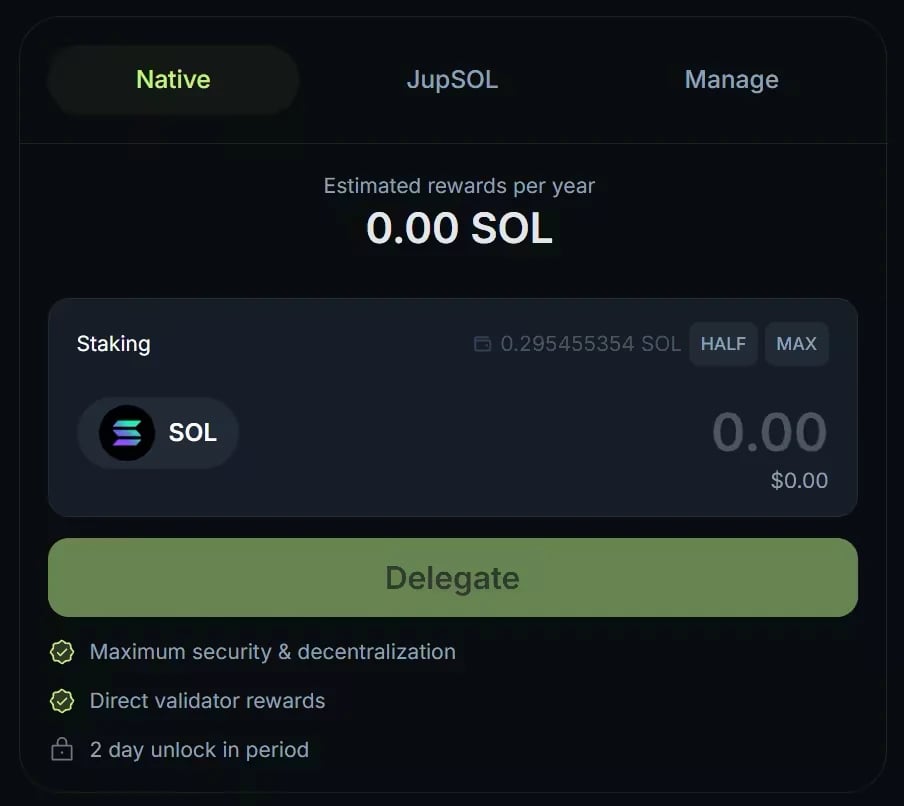
Staking is a cornerstone of the <Tooltip headline="Solana" tip="A high-performance blockchain designed for fast, low-cost transactions and scalable decentralized applications. Jupiter products use it as their main infrastructure." cta="Open the glossary" href="/user-docs/guides/glossary#solana">Solana</Tooltip> ecosystem. By delegating SOL to a validator, you help secure the network, and you are rewarded for committing your capital. Jupiter runs its own validator, and Jupiter Stake, at [jup.ag/stake](https://jup.ag/stake), lets you delegate to it. All staking actions are non-custodial and signed from your own wallet.

<Frame caption="The Native tab of Jupiter Stake on jup.ag.">
  <img src="https://mintcdn.com/jupiter-support/p5FdkagPcbEGL8wN/images/guides/jupiter-stake/native-stake-form.webp?fit=max&auto=format&n=p5FdkagPcbEGL8wN&q=85&s=62aae68dede4ec483daafedb7f2824be" alt="The Jupiter Stake form with the Native, JupSOL and Manage tabs, the SOL amount field and the Delegate button" width="904" height="806" data-path="images/guides/jupiter-stake/native-stake-form.webp" />
</Frame>

## Rewards and commission

Jupiter's fee structure is simple:

* Yield: variable, based on network conditions, validator performance and MEV activity. The Stake page shows an Estimated APY; it is not fixed and not guaranteed.
* Commission: 5% on inflation rewards, 0% on MEV rewards.

Jupiter keeps 5% of the inflation rewards your stake earns and passes on all of its MEV rewards. With native staking, both are added to your stake account every <Tooltip headline="Epoch" tip="A defined period in a blockchain protocol. On Solana, an epoch is a fixed number of slots (432,000). At the end of each epoch, staking rewards are distributed and stake changes take effect." cta="Open the glossary" href="/user-docs/guides/glossary#epoch">epoch</Tooltip>, with nothing to claim.
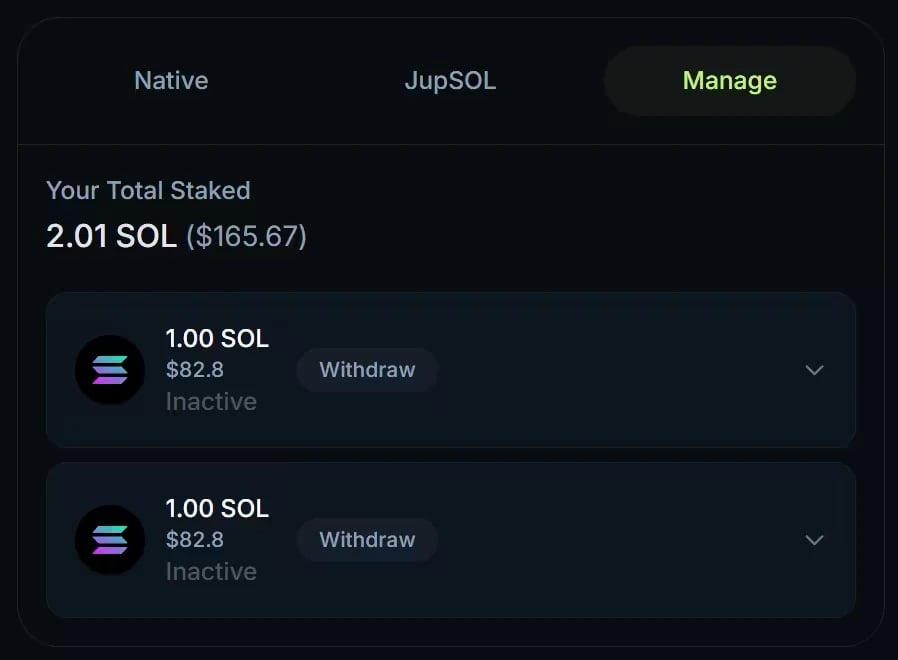
<Frame caption="The Manage tab of Jupiter Stake, from an earlier version of the interface: each stake account now also shows its validator, with a ⋯ menu for its actions.">
  <img src="https://mintcdn.com/jupiter-support/ZC__2LeEBkX19Blt/images/guides/jupiter-stake/manage-tab.webp?fit=max&auto=format&n=ZC__2LeEBkX19Blt&q=85&s=b268d5ba58d206d84f43e63d3f823749" alt="The Manage tab with Your Total Staked and two 1 SOL stake accounts, each marked Inactive with a Withdraw button" width="898" height="660" data-path="images/guides/jupiter-stake/manage-tab.webp" />
</Frame>

## Key concepts for staking

* The cool-down period: staked SOL is not instantly liquid. Native staking follows Solana's epochs. When you unstake, your stake deactivates at the end of the current epoch, so the wait depends on when you start, and it earns no rewards meanwhile. You then withdraw your SOL from the Manage tab. Activation works the same way: a new stake starts earning at the start of the next epoch.
* The validator: a [validator](/user-docs/guides/basics/consensus) is a [blockchain](/user-docs/guides/basics/blockchain) participant that keeps the network running by processing transactions and producing blocks. If a validator has downtime or performs poorly, its stakers' rewards for that period can be lower, and this applies to the Jupiter validator too.

If you would rather not wait for the cool-down, Jupiter also offers liquid staking through [JupSOL](/user-docs/guides/jupiter-tokens/tokens-and-assets), its liquid staking token. You receive JupSOL in exchange for your SOL and can trade it or use it in <Tooltip headline="DeFi" tip="Decentralized Finance. Financial services built on blockchain technology that operate without traditional intermediaries like banks." cta="Open the glossary" href="/user-docs/guides/glossary#defi">DeFi</Tooltip> at any time while it keeps earning. Besides the validator's commission, JupSOL carries an extra 5% fee on base staking rewards, split between Sanctum (2.5%) and the Jupiter DAO treasury (2.5%).
## Let's stake with Jupiter

<Steps>
  <Step title="Open Jupiter Stake">
    On a computer, go to [jup.ag/stake](https://jup.ag/stake) and connect your wallet. In the Jupiter Mobile app, tap the globe icon at the top right to open the dApp browser, go to jup.ag/stake, and connect your Jupiter Mobile wallet.
  </Step>

  <Step title="Choose how to stake">
    On the **Native** tab, enter the amount of SOL to stake (at least 1 SOL) and click **Delegate**. To stake liquid instead, open the **JupSOL** tab, enter the amount and click **Get JupSOL**.
  </Step>

  <Step title="Confirm and track">
    Approve the transaction in your wallet. A native stake starts earning at the next epoch; the **Manage** tab shows your total staked, the status of each stake account and the rewards earned.
  </Step>
</Steps>


<Frame caption="Staking 1 SOL on jup.ag from the dApp browser of an earlier version of the Jupiter Mobile app. The steps are the same in the current app.">
  <img src="https://mintcdn.com/jupiter-support/ZC__2LeEBkX19Blt/images/guides/jupiter-stake/mobile-stake.webp?fit=max&auto=format&n=ZC__2LeEBkX19Blt&q=85&s=83c3cfb1a3343135f0c362f4bb1c99b6" alt="Animation: from the Jupiter Mobile app, opening jup.ag in the dApp browser, choosing Stake SOL, entering 1 SOL on the Native tab, tapping Delegate, confirming the transaction, then the Manage tab showing the new stake activating" width="250" height="500" data-path="images/guides/jupiter-stake/mobile-stake.webp" />
</Frame>

## Go deeper

<CardGroup cols={2}>
  <Card title="Native staking" icon="lock" href="/user-docs/earn/stake-sol/native-staking">
    How to stake, rewards, unstaking, and managing your stake accounts.
  </Card>

  <Card title="JupSOL" icon="coins" href="/user-docs/earn/stake-sol/jupsol">
    How JupSOL accrues value, its fees, and the ways to exit.
  </Card>

  <Card title="Stake SOL FAQ" icon="circle-question" href="/user-docs/earn/stake-sol/faq">
    Minimums, activation, unstaking, and fees.
  </Card>

  <Card title="Open Stake on Jupiter" icon="arrow-up-right-from-square" href="https://jup.ag/stake" />
</CardGroup>


This documentation is built and hosted on [Mintlify](https://mintlify.com), a developer documentation platform.