> ## Documentation Index
> Fetch the complete documentation index at: https://docs.jup.ag/llms.txt
> Use this file to discover all available pages before exploring further.
# Copy Trading
Copy Trading lets you automatically mirror predictions from traders you follow. When they place a bet, the bot places the same bet for you — with your own size and risk settings.
Copy Trading is available for users in a clan. Copy trading by wallet address is coming soon.
## Dashboard
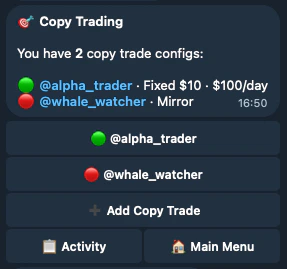
The dashboard lists all your active (🟢) and paused (🔴) copy trade configs — who you're following, their sizing strategy, and daily limits. Tap any config to manage it, or hit **➕ Add Copy Trade** to set up a new one.
 ## Setting Up a Copy Trade
The setup wizard walks you through each step.
### Choose a Target
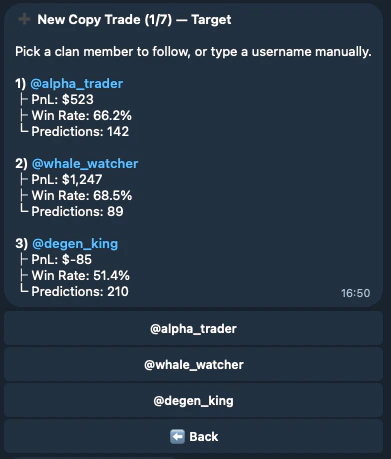
Pick a clan member from the list (shows their PnL, win rate, and total predictions) or type any username manually. You can only follow users who are registered with the bot.
## Setting Up a Copy Trade
The setup wizard walks you through each step.
### Choose a Target
Pick a clan member from the list (shows their PnL, win rate, and total predictions) or type any username manually. You can only follow users who are registered with the bot.
 ### Size Strategy
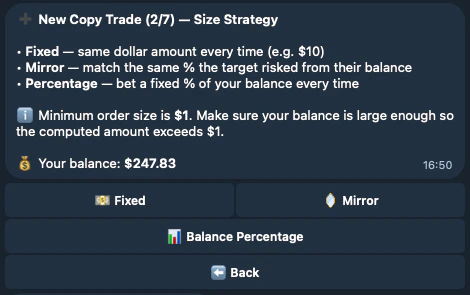
Three options:
* **Fixed** — Same dollar amount every time (e.g. \$10 per prediction)
* **Mirror** — Match the same percentage the target risked relative to their balance
* **Percentage** — Bet a fixed % of your own balance each time
Minimum order size is always \$5.
### Size Strategy
Three options:
* **Fixed** — Same dollar amount every time (e.g. \$10 per prediction)
* **Mirror** — Match the same percentage the target risked relative to their balance
* **Percentage** — Bet a fixed % of your own balance each time
Minimum order size is always \$5.
 ### Risk Limits
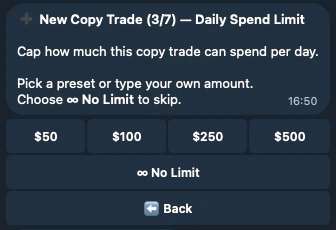
Cap how much this copy trade can spend per day. Pick a preset (\$50–\$500) or type a custom amount. You can also choose **No Limit** to skip.
### Risk Limits
Cap how much this copy trade can spend per day. Pick a preset (\$50–\$500) or type a custom amount. You can also choose **No Limit** to skip.
 Two additional optional steps:
* **Price Range** — Only copy predictions when the market price is within a range you set (e.g. \$0.10–\$0.90)
* **Top-ups** — Choose whether to copy repeated bets on a market the target already has a position in, or only the first bet
### Review & Confirm
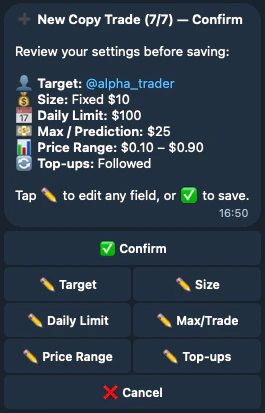
Review all your settings before saving. Every field has an ✏️ edit button to jump back and change it. Tap **✅ Confirm** to activate the copy trade.
Two additional optional steps:
* **Price Range** — Only copy predictions when the market price is within a range you set (e.g. \$0.10–\$0.90)
* **Top-ups** — Choose whether to copy repeated bets on a market the target already has a position in, or only the first bet
### Review & Confirm
Review all your settings before saving. Every field has an ✏️ edit button to jump back and change it. Tap **✅ Confirm** to activate the copy trade.
 ## Managing Copy Trades
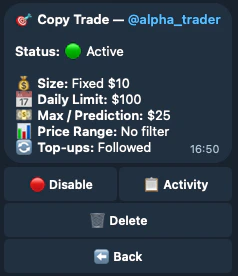
From the dashboard, tap any config to see its full settings. From here you can:
* **🔴 Disable / 🟢 Enable** — Pause or resume without deleting
* **📋 Activity** — See what the bot has done
* **🗑 Delete** — Remove the config entirely
## Managing Copy Trades
From the dashboard, tap any config to see its full settings. From here you can:
* **🔴 Disable / 🟢 Enable** — Pause or resume without deleting
* **📋 Activity** — See what the bot has done
* **🗑 Delete** — Remove the config entirely
 ## Activity Log
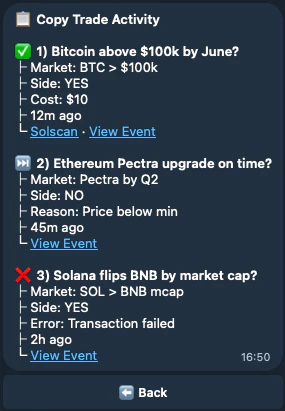
The activity log shows every action the bot took (or skipped) on your behalf:
* **✅ Executed** — Prediction was placed, with cost and transaction link
* **⏭️ Skipped** — Prediction was skipped, with a reason (e.g. "Price below min", "Daily limit reached")
* **❌ Failed** — Something went wrong (e.g. transaction failed)
Each entry links to the event on Jupiter and the transaction on Solscan.
## Activity Log
The activity log shows every action the bot took (or skipped) on your behalf:
* **✅ Executed** — Prediction was placed, with cost and transaction link
* **⏭️ Skipped** — Prediction was skipped, with a reason (e.g. "Price below min", "Daily limit reached")
* **❌ Failed** — Something went wrong (e.g. transaction failed)
Each entry links to the event on Jupiter and the transaction on Solscan.
 ## Finding Traders to Copy
Most group notifications — such as prediction alerts and resolved markets — include a **🎯 Copy** button, so you can start copying a trader directly from any notification.
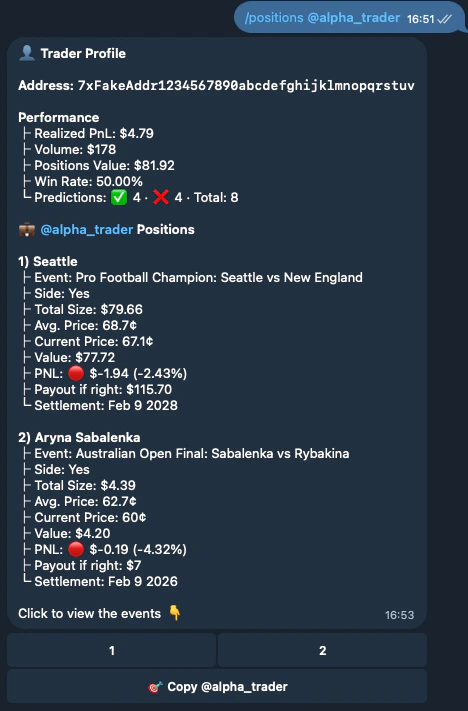
You can also use `/positions @username` if you already know who you want to follow. This shows their performance stats (PnL, win rate, volume) and active positions.
## Finding Traders to Copy
Most group notifications — such as prediction alerts and resolved markets — include a **🎯 Copy** button, so you can start copying a trader directly from any notification.
You can also use `/positions @username` if you already know who you want to follow. This shows their performance stats (PnL, win rate, volume) and active positions.