> ## Documentation Index
> Fetch the complete documentation index at: https://docs.jup.ag/llms.txt
> Use this file to discover all available pages before exploring further.
# Wallet Management
Your wallet is automatically created when you first use the bot in a private chat. It's managed securely by Privy.
Your wallet address is shown in the main menu, along with your balances.
## Accessing Wallet Settings
1. **🏠 Main menu**
2. **⚙️ Settings**
3. **💼 Wallet**
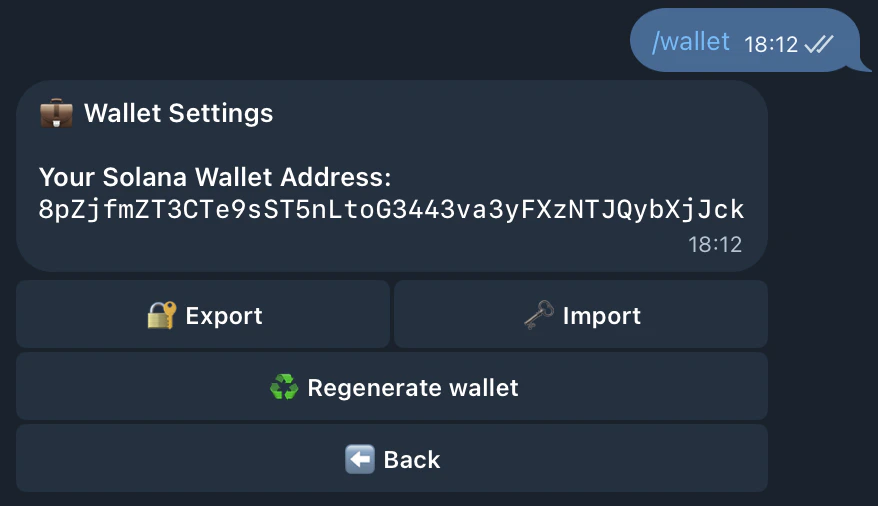 From here you can:
* **Export** your private key
* **Import** an existing wallet
* **Regenerate** a new wallet
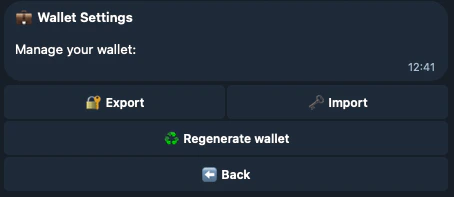
From here you can:
* **Export** your private key
* **Import** an existing wallet
* **Regenerate** a new wallet
 ## Export Your Private Key
### Step 1: Generate Export Link
1. **🔓 Export private key**
2. A secure, one-time link is generated (valid for 5 minutes)
### Step 2: Open the Link
1. **🔓 Open export page**
2. Your private key is decrypted **only in your browser** - it never leaves your device
### Step 3: Save Your Key
* Copy the private key shown
* Import it into your wallet:
* [Jupiter Mobile (iOS)](https://apps.apple.com/us/app/jupiter-mobile-solana-wallet/id6484069059)
* [Jupiter Mobile (Android)](https://play.google.com/store/apps/details?id=ag.jup.jupiter.android)
* [Jupiter Wallet (Chrome)](https://chromewebstore.google.com/detail/jupiter-wallet/iledlaeogohbilgbfhmbgkgmpplbfboh)
**Never share it with anyone**
## Import an Existing Wallet
### Step 1: Generate Import Link
1. **🗝️ Import private key**
2. A secure, one-time link is generated (valid for 5 minutes)
### Step 2: Open the Link
1. **🗝️ Open import page**
2. Paste your private key in the secure import page
3. Confirm the import
4. Your wallet will be linked to the bot
After importing, the bot will use that wallet. Your old bot wallet will no longer be used.
## Regenerate Your Wallet
Create a completely new wallet. **Important**: Backup your current wallet first!
**Important**: - Regenerating creates a NEW wallet - Your OLD wallet remains in Privy but the bot
stops using it - **Move any funds** from your old wallet before regenerating
## How Export and Import Work
The bot uses Privy's secure infrastructure with HPKE encryption:
1. **Export**: Your private key is encrypted with your browser's public key and sent to you. Only your browser can decrypt it.
2. **Import**: You paste your private key in the browser, which encrypts it before sending to the server. The server imports it securely to Privy.
All encryption happens in your browser - your private key never travels unencrypted.
## Export Your Private Key
### Step 1: Generate Export Link
1. **🔓 Export private key**
2. A secure, one-time link is generated (valid for 5 minutes)
### Step 2: Open the Link
1. **🔓 Open export page**
2. Your private key is decrypted **only in your browser** - it never leaves your device
### Step 3: Save Your Key
* Copy the private key shown
* Import it into your wallet:
* [Jupiter Mobile (iOS)](https://apps.apple.com/us/app/jupiter-mobile-solana-wallet/id6484069059)
* [Jupiter Mobile (Android)](https://play.google.com/store/apps/details?id=ag.jup.jupiter.android)
* [Jupiter Wallet (Chrome)](https://chromewebstore.google.com/detail/jupiter-wallet/iledlaeogohbilgbfhmbgkgmpplbfboh)
**Never share it with anyone**
## Import an Existing Wallet
### Step 1: Generate Import Link
1. **🗝️ Import private key**
2. A secure, one-time link is generated (valid for 5 minutes)
### Step 2: Open the Link
1. **🗝️ Open import page**
2. Paste your private key in the secure import page
3. Confirm the import
4. Your wallet will be linked to the bot
After importing, the bot will use that wallet. Your old bot wallet will no longer be used.
## Regenerate Your Wallet
Create a completely new wallet. **Important**: Backup your current wallet first!
**Important**: - Regenerating creates a NEW wallet - Your OLD wallet remains in Privy but the bot
stops using it - **Move any funds** from your old wallet before regenerating
## How Export and Import Work
The bot uses Privy's secure infrastructure with HPKE encryption:
1. **Export**: Your private key is encrypted with your browser's public key and sent to you. Only your browser can decrypt it.
2. **Import**: You paste your private key in the browser, which encrypts it before sending to the server. The server imports it securely to Privy.
All encryption happens in your browser - your private key never travels unencrypted.