> ## Documentation Index
> Fetch the complete documentation index at: https://docs.jup.ag/llms.txt
> Use this file to discover all available pages before exploring further.
# Portfolio & Holdings
View all your token holdings with PnL tracking aligned with [jup.ag](https://jup.ag). The holdings screen gives you a complete picture of your portfolio performance across every token you've traded.
## How to Access
* Type `/holdings` in the chat, or
* Tap the **Holdings** button on the main menu
## Holdings Screen
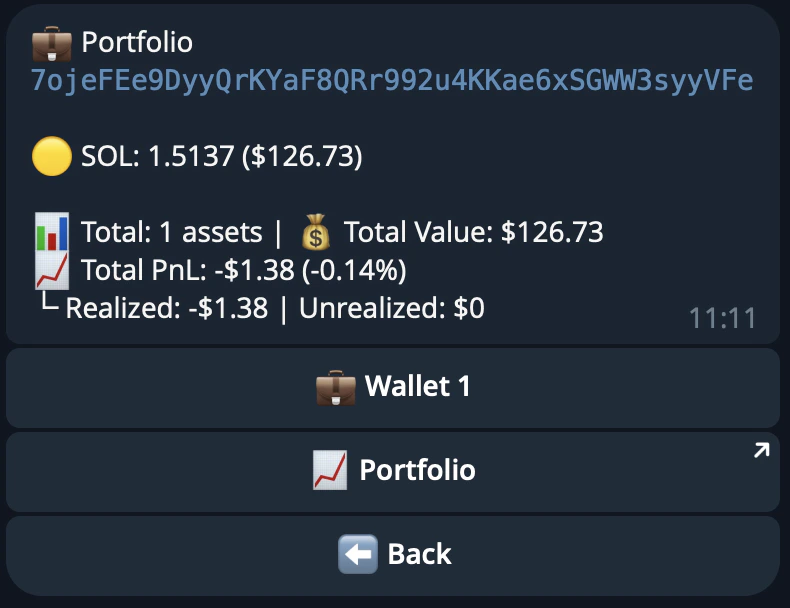 ### Wallet-Level Summary
The top of the screen shows an aggregated summary for your wallet:
| Field | Description |
| ------------------- | ------------------------------------------- |
| **Total PnL** | Combined profit/loss in USD and percentage |
| **Realized PnL** | Profit/loss from tokens you've sold |
| **Unrealized PnL** | Profit/loss on tokens you're still holding |
| **Total Assets** | Number of token positions in your portfolio |
| **Portfolio Value** | Total USD value of all holdings |
### Per-Token Information
Each token entry displays:
| Field | Description |
| ------------------ | --------------------------------------------------------------------------------------------------------------------------------------------------------------------- |
| **Token symbol** | Linked to Jupiter for quick access |
| **Balance** | Amount of tokens held |
| **USD value** | Current value in USD |
| **Unrealized PnL** | Profit/loss on currently held tokens (USD + percentage) |
| **Realized PnL** | Profit/loss on sold tokens (USD + percentage) |
| **Total PnL** | Combined realized + unrealized (USD + percentage) |
| **Position %** | What percentage of the originally bought amount is still held |
| **State label** | **Holding ✓** — all tokens still held
### Wallet-Level Summary
The top of the screen shows an aggregated summary for your wallet:
| Field | Description |
| ------------------- | ------------------------------------------- |
| **Total PnL** | Combined profit/loss in USD and percentage |
| **Realized PnL** | Profit/loss from tokens you've sold |
| **Unrealized PnL** | Profit/loss on tokens you're still holding |
| **Total Assets** | Number of token positions in your portfolio |
| **Portfolio Value** | Total USD value of all holdings |
### Per-Token Information
Each token entry displays:
| Field | Description |
| ------------------ | --------------------------------------------------------------------------------------------------------------------------------------------------------------------- |
| **Token symbol** | Linked to Jupiter for quick access |
| **Balance** | Amount of tokens held |
| **USD value** | Current value in USD |
| **Unrealized PnL** | Profit/loss on currently held tokens (USD + percentage) |
| **Realized PnL** | Profit/loss on sold tokens (USD + percentage) |
| **Total PnL** | Combined realized + unrealized (USD + percentage) |
| **Position %** | What percentage of the originally bought amount is still held |
| **State label** | **Holding ✓** — all tokens still held
**Sold All** — fully exited
Partially-sold positions show a position percentage (**Pos: X%**) rather than a label |
SOL and stablecoins (USDC, USDT, JupUSD) do not show PnL data. Tokens with dust-level value are
automatically excluded from the list.
***
## Navigation
Holdings are paginated with **5 tokens per page**.
* **Numbered buttons (1–5)** — tap to jump to the scan card for that token
* **Arrow buttons** — move between pages
* **X–Y of Z** — shows the current range and total token count
***
## Wallet Selector
If you have multiple wallets connected, use the **Wallet** selector to switch between them and view holdings for each wallet separately.