> ## Documentation Index
> Fetch the complete documentation index at: https://docs.jup.ag/llms.txt
> Use this file to discover all available pages before exploring further.
# Sniper Mode
Sniper Mode runs **automatic buys** when new tokens match your filters. Each config has its own wallet, amount, slippage, and filters; only **active** configs execute trades.
## Dashboard
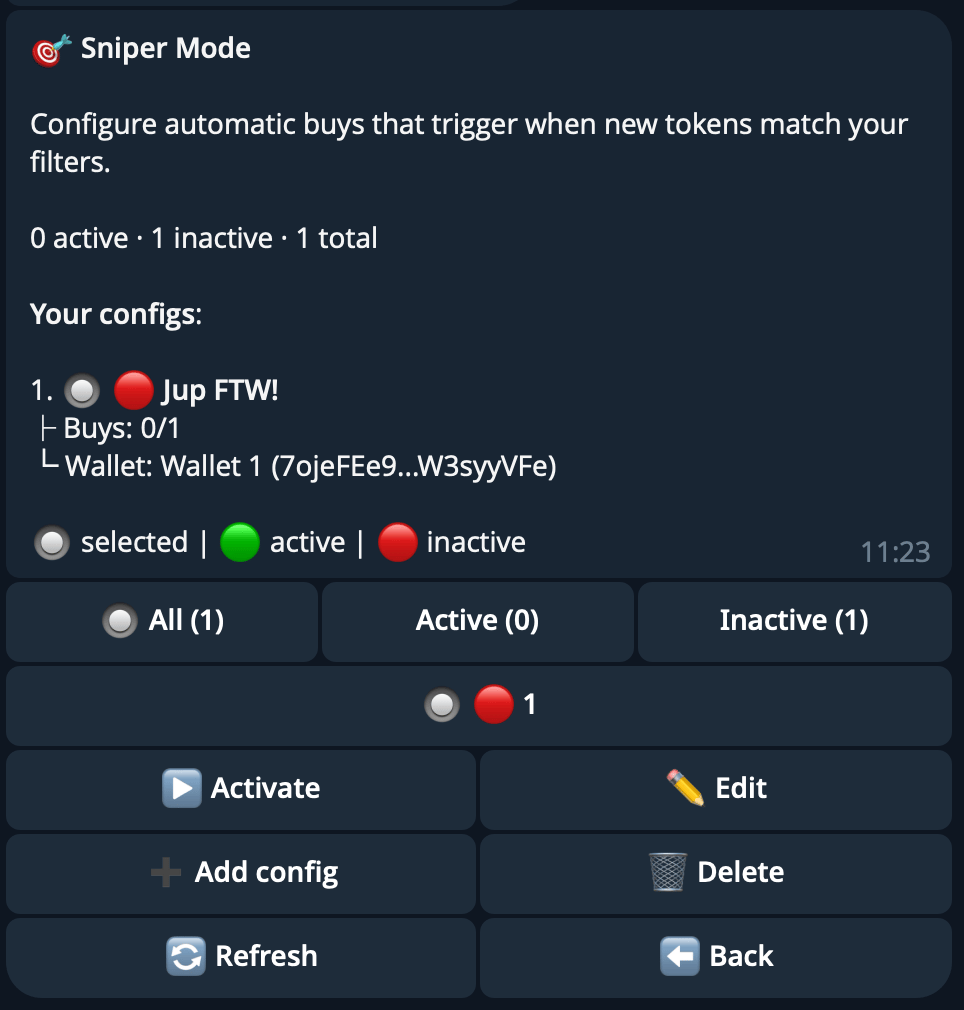 Each config displays a status indicator:
| Indicator | Meaning |
| ---------------- | -------------------------------------------------------------- |
| **Green circle** | **Active** — config is running and will buy when tokens match. |
| **Red circle** | **Inactive** — config is paused. |
Each row shows **Buys: X/Y** (executed / max). Use the filter tabs at the top of the dashboard to view **All**, **Active**, or **Inactive** configs (each tab shows a count). Configs are paginated (5 per page) and identified by memorable auto-generated names.
Tap **Add config** to create a new configuration.
***
## Config Screen
Each config displays a status indicator:
| Indicator | Meaning |
| ---------------- | -------------------------------------------------------------- |
| **Green circle** | **Active** — config is running and will buy when tokens match. |
| **Red circle** | **Inactive** — config is paused. |
Each row shows **Buys: X/Y** (executed / max). Use the filter tabs at the top of the dashboard to view **All**, **Active**, or **Inactive** configs (each tab shows a count). Configs are paginated (5 per page) and identified by memorable auto-generated names.
Tap **Add config** to create a new configuration.
***
## Config Screen
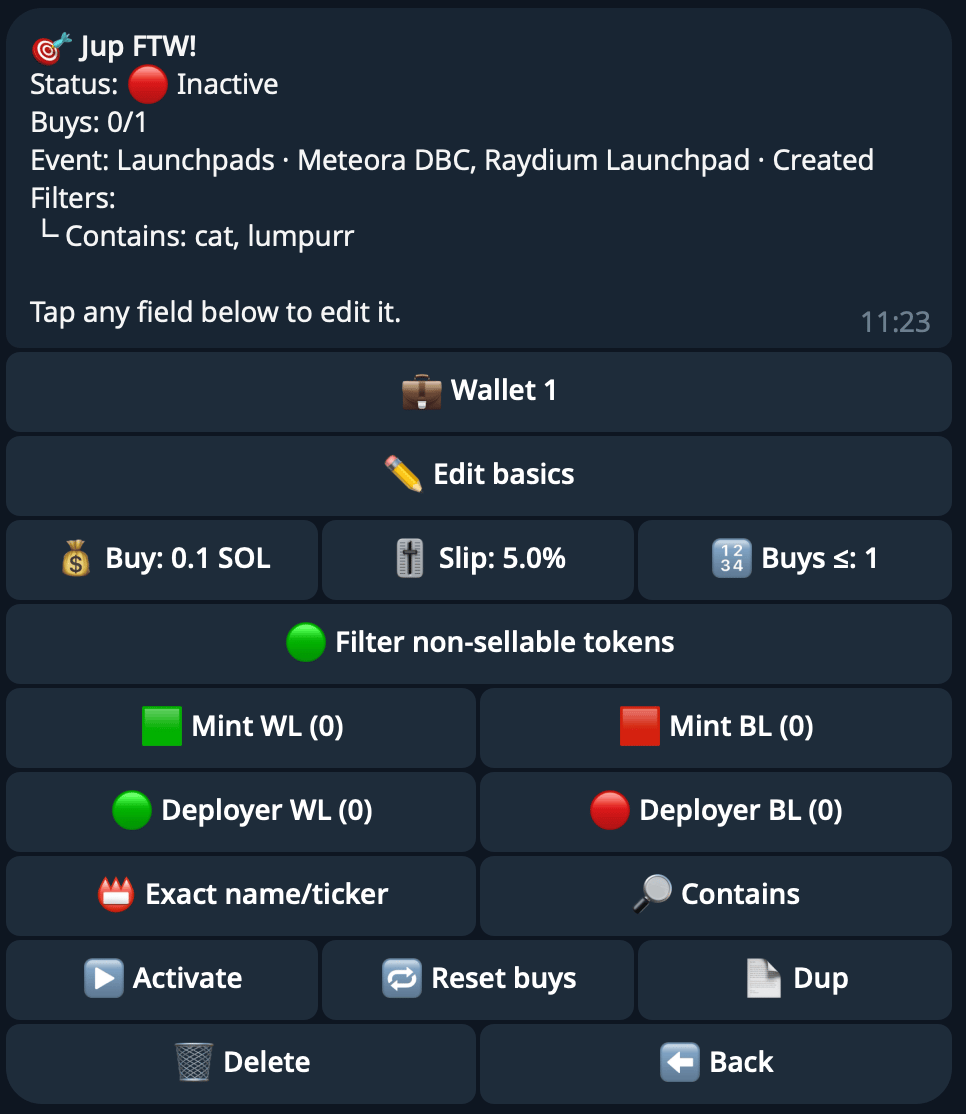 Tap any field to edit. The config screen is organized into sections: **Wallet**, **Basics**, **Trading**, **Liquidity Filters**, **Token Filters**, and **Name/Ticker Filters**.
### Wallet
Select a dedicated wallet for this config using the wallet selector.
### Basics
Tap **Edit Basics** to open the basics submenu.
| Field | Description |
| -------------------- | -------------------------------------------------------------------------------------------------- |
| **Name** | Config name (1-20 characters, must be unique across your configs). |
| **Event Type** | Radio select between **Liquidity Pools** or **Launchpads**. Determines available platforms. |
| **Platforms** | Multi-select list of platforms (see below). At least one must be selected. |
| **Launchpad Events** | Multi-select: **Token Created**, **Token Migrated**. Only available when Event Type is Launchpads. |
**Platforms for Liquidity Pools:**
| Platform | Identifier |
| --------------- | ----------------- |
| Pump.fun AMM | PUMP\_AMM |
| Meteora DAMM v1 | METEORA\_DAMM\_V1 |
| Meteora DAMM v2 | METEORA\_DAMM\_V2 |
**Platforms for Launchpads:**
| Platform | Identifier |
| ----------------- | ------------------ |
| Pump.fun | PUMPFUN |
| Meteora DBC | METEORA\_DBC |
| Raydium Launchpad | RAYDIUM\_LAUNCHPAD |
### Trading
| Field | Description |
| ---------------- | -------------------------------------------------------------------------------------------------------- |
| **Buy Amount** | SOL amount spent per trigger. |
| **Buy Slippage** | Slippage tolerance for buys, 0-100%. Set to **Auto** to let the bot calculate the optimal value. |
| **Max Buys** | Total maximum buys the config will execute (1-1,000). The config auto-pauses when this limit is reached. |
### Liquidity Filters
Liquidity filters are only available when the Event Type is **Liquidity Pools**.
| Field | Description |
| ----------------- | -------------------------------------------- |
| **Min Liquidity** | Minimum USD liquidity required for the pool. |
| **Max Liquidity** | Maximum USD liquidity allowed for the pool. |
### Token Filters
| Field | Description |
| ----------------------- | ---------------------------------------------------------------------- |
| **Filter Non-Sellable** | Toggle to skip tokens that cannot be sold. Recommended to keep **on**. |
| **Mint Whitelist** | Only buy these specific token mints. |
| **Mint Blacklist** | Never buy these token mints. |
| **Deployer Whitelist** | Only buy tokens from these deployer addresses. |
| **Deployer Blacklist** | Never buy tokens from these deployer addresses. |
### Name/Ticker Filters
| Field | Description |
| ------------------------ | ------------------------------------------------------------------------ |
| **Name/Ticker** | Comma-separated list of token name or ticker matches. (case insensitive) |
| **Name/Ticker Contains** | Substring search across token name or ticker. (case insensitive) |
***
## Activation Requirements
Before a config can be activated, the system validates:
* At least one **platform** is selected.
* If the event type is **Launchpads**, at least one **launchpad event** is selected.
* At least one **filter** is set (deployer whitelist/blacklist, mint whitelist/blacklist, name/ticker filter, or liquidity filter).
* The config has not reached its **max buys** limit (reset buys first if it has).
***
## Actions
| Action | Description |
| ------------------------- | ---------------------------------------------------------------------------------------- |
| **Activate / Deactivate** | Toggle the config on or off. Only active configs execute trades. |
| **Reset Buys** | Reset the buy counter so the config can resume trading after hitting its max buys limit. |
| **Duplicate** | Create a copy of the config with the same settings. |
| **Delete** | Permanently remove the config. |
Use **Filter non-sellable tokens**, **Min Liquidity**, and blacklists to reduce risk. Set **Max
buys** to cap exposure.
Tap any field to edit. The config screen is organized into sections: **Wallet**, **Basics**, **Trading**, **Liquidity Filters**, **Token Filters**, and **Name/Ticker Filters**.
### Wallet
Select a dedicated wallet for this config using the wallet selector.
### Basics
Tap **Edit Basics** to open the basics submenu.
| Field | Description |
| -------------------- | -------------------------------------------------------------------------------------------------- |
| **Name** | Config name (1-20 characters, must be unique across your configs). |
| **Event Type** | Radio select between **Liquidity Pools** or **Launchpads**. Determines available platforms. |
| **Platforms** | Multi-select list of platforms (see below). At least one must be selected. |
| **Launchpad Events** | Multi-select: **Token Created**, **Token Migrated**. Only available when Event Type is Launchpads. |
**Platforms for Liquidity Pools:**
| Platform | Identifier |
| --------------- | ----------------- |
| Pump.fun AMM | PUMP\_AMM |
| Meteora DAMM v1 | METEORA\_DAMM\_V1 |
| Meteora DAMM v2 | METEORA\_DAMM\_V2 |
**Platforms for Launchpads:**
| Platform | Identifier |
| ----------------- | ------------------ |
| Pump.fun | PUMPFUN |
| Meteora DBC | METEORA\_DBC |
| Raydium Launchpad | RAYDIUM\_LAUNCHPAD |
### Trading
| Field | Description |
| ---------------- | -------------------------------------------------------------------------------------------------------- |
| **Buy Amount** | SOL amount spent per trigger. |
| **Buy Slippage** | Slippage tolerance for buys, 0-100%. Set to **Auto** to let the bot calculate the optimal value. |
| **Max Buys** | Total maximum buys the config will execute (1-1,000). The config auto-pauses when this limit is reached. |
### Liquidity Filters
Liquidity filters are only available when the Event Type is **Liquidity Pools**.
| Field | Description |
| ----------------- | -------------------------------------------- |
| **Min Liquidity** | Minimum USD liquidity required for the pool. |
| **Max Liquidity** | Maximum USD liquidity allowed for the pool. |
### Token Filters
| Field | Description |
| ----------------------- | ---------------------------------------------------------------------- |
| **Filter Non-Sellable** | Toggle to skip tokens that cannot be sold. Recommended to keep **on**. |
| **Mint Whitelist** | Only buy these specific token mints. |
| **Mint Blacklist** | Never buy these token mints. |
| **Deployer Whitelist** | Only buy tokens from these deployer addresses. |
| **Deployer Blacklist** | Never buy tokens from these deployer addresses. |
### Name/Ticker Filters
| Field | Description |
| ------------------------ | ------------------------------------------------------------------------ |
| **Name/Ticker** | Comma-separated list of token name or ticker matches. (case insensitive) |
| **Name/Ticker Contains** | Substring search across token name or ticker. (case insensitive) |
***
## Activation Requirements
Before a config can be activated, the system validates:
* At least one **platform** is selected.
* If the event type is **Launchpads**, at least one **launchpad event** is selected.
* At least one **filter** is set (deployer whitelist/blacklist, mint whitelist/blacklist, name/ticker filter, or liquidity filter).
* The config has not reached its **max buys** limit (reset buys first if it has).
***
## Actions
| Action | Description |
| ------------------------- | ---------------------------------------------------------------------------------------- |
| **Activate / Deactivate** | Toggle the config on or off. Only active configs execute trades. |
| **Reset Buys** | Reset the buy counter so the config can resume trading after hitting its max buys limit. |
| **Duplicate** | Create a copy of the config with the same settings. |
| **Delete** | Permanently remove the config. |
Use **Filter non-sellable tokens**, **Min Liquidity**, and blacklists to reduce risk. Set **Max
buys** to cap exposure.