Borrow USDC on Offerbook against your assets: fill a lend offer or ask for a loan, repay on time, and follow a worked borrowing example.
Published on YouTube in June 2026. If a screen in the video differs from the steps on this page, follow the page.
As a borrower, you borrow USDC using onchain assets as collateral via Offerbook, a peer-to-peer money market on .Every loan has a known duration, a known cost, and a known outcome at maturity, with no price-based liquidations. For how the model works as a whole, see How Offerbook works.
Predictable loan terms: all Offerbook loans are well defined, with a fixed loan duration, a known borrowing cost, and a clear outcome at maturity.
No price-based liquidations: risk on Offerbook is managed by duration, not by price fluctuations. A sudden price change cannot cost you your collateral during the loan; it only moves to the lender if you do not repay after maturity.
Illiquid assets: high-value assets with low onchain liquidity, such as real-world assets (RWAs), can be used as collateral without price-based liquidation or risk of price manipulation.
Offerbook lets you borrow against a wide range of assets without managing a position to avoid liquidation. Define your terms, borrow, and repay on time.Examples of collateral you can use on Offerbook include:
Tokens verified on Jupiter
RWAs, such as xStocks (tokenized stocks and ETFs)
NFTs from whitelisted collections, including professionally graded trading cards tokenized by Phygitals and Collector Crypt
Offerbook can send notifications through Telegram and Email to keep you updated on key events without needing to check the Dashboard manually. To connect, open Settings (the gear icon in the header), approve the one-time sign-in signature, and connect a channel in the General tab.Then head to the Notifications tab. As a borrower, you can be notified about the following:
Offer accepted: a lender has filled your borrow offer and the loan has started
Counter offer received: someone has proposed different terms on one of your offers
Offer expired: your borrow offer expired without being filled
Offer cancelled: an offer you created or matched against has been canceled
Loan due soon: your loan reaches maturity in 2 hours
Loan expired: your loan has passed its due date; the lender can now claim your collateral
Loan defaulted: your collateral has been claimed by the lender
There are two main ways to use Offerbook as a borrower:
Accept an existing lend offer, or
Create a new borrow offer with custom terms.
You can also send a counter offer on a lend offer whose terms are close but not quite right, or advertise the terms you want for free with an intent. Everything starts from Borrow in the header.
Open Borrow in the header. In the Borrow card, click Choose collateral and pick the asset you are willing to lock (or several), then enter the USDC amount you want to borrow and the term: 7, 14 or 30 days, or a custom term with +.
2
Review the offers and their terms
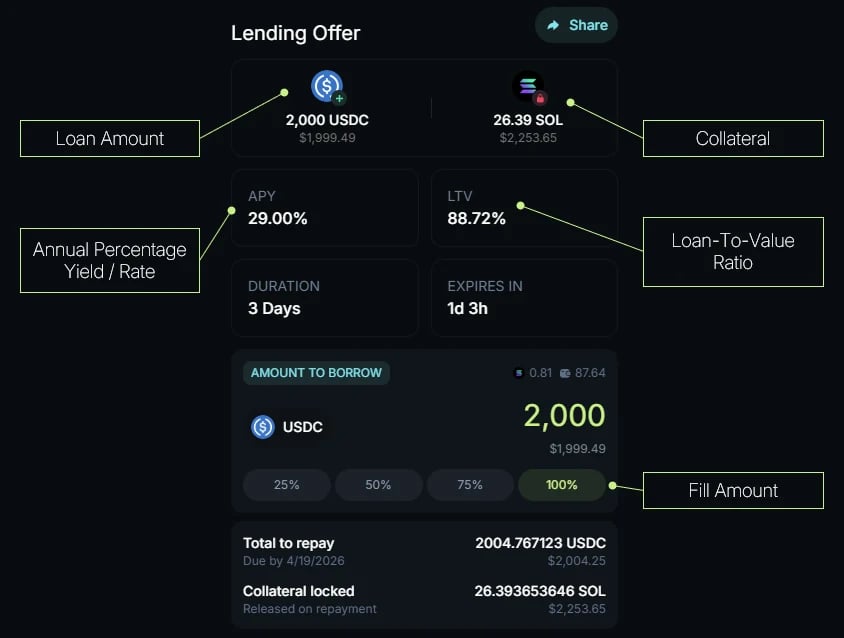
The card ranks every lender’s offer for your request; sort them by best rate, lowest cost or least collateral. Each row shows the lender, what you would lock and the LTV, the amount, the APR, the duration and the total cost. A ↻ marker next to the duration means the loan can be extended. Click Show terms to see the full breakdown: the rate, what you lock and receive, the interest, the platform fee, estimated network fees and rent, the repay-by date and the total to repay. If an offer allows partial fills, you can borrow any amount at or above its minimum fill.
An annotated offer panel from an earlier version of Offerbook. The current panel shows the terms in a single row and sets the amount with a slider instead of percentage buttons. Amounts date from when the screenshot was taken.
3
Accept the offer and start the loan
Click Borrow and approve in your wallet. The loan starts immediately: your collateral is locked, you receive the USDC, and you pay the 25% upfront fee on the interest. You can add the maturity date to your calendar at this point.
For a quick ask, Create your own offer, among the offers in the Borrow card, opens a composer on the same card. For the full flow below, use Create Offer > Borrow in the header, which opens the Ask for a Loan page.The screenshots in these steps come from an earlier version of Offerbook: the flow is the same, but some fields have moved since.
1
Collateral
Choose your collateral asset and the amount that will be locked for the duration of the loan. Set the USDC amount you want to borrow (at least $10). The amount and the LTV, the ratio between the borrowed USDC and the value of your collateral, update together. Quick Pricing presets (Recommended, Match best, Beat market) position your LTV against competing offers.
2
Terms
Set your , which determines the interest due at maturity. It is displayed all-in: it already includes the 25% upfront fee, and the line below shows the split, for example “Lender keeps 16% · 4% protocol fee” on a 20% APR. Then set your loan duration, 1 to 30 days, which determines when your repayment is due. The flow shows what you will pay and a fill score comparing your offer with the market.
3
Publish
Choose Lock & list now to create the onchain offer: your collateral moves into escrow, and any lender can fill the offer instantly. Just advertise terms posts a free intent instead, with nothing locked. This step also sets Allow partial fills, with the smallest amount a lender can take in one fill, and, under Advanced options, the expiration: how long the offer stays open, 1 to 7 days. The expiration does not affect the loan duration.
Your offer is now live in the offerbook until its expiration. Once a lender accepts it, in full or partially, the loan starts immediately: you receive the USDC minus the 25% upfront fee on the interest, and your collateral is locked. Published offers cannot be edited, but you can cancel one at no fee before it is filled, and renew it from Dashboard > Offers once it has expired.
Monitor your loan’s maturity date from Dashboard, with the Borrowing side selected: the Positions tab lists your open loans. You can add a calendar reminder from the loan’s row, or rely on the Loan due soon notification if you have connected a channel in Settings.Repay at any time before maturity, with the action button on the right of the loan’s row, to reclaim your collateral in full. Remember: the full interest for the agreed duration is owed, even on early repayment.If the loan is extendable, its row leads with Extend instead, and Repay moves into the row menu. Extending pays the closing period’s interest and the origination fee for the new period, and starts a fresh period on the same terms, with your collateral still locked.If the maturity date has passed and the loan has not been fully paid off, the lender becomes eligible to manually claim the collateral, but you can still repay until the lender does so. Once the lender claims, the transfer is final.
Note: loan durations range from 1 to 30 days, set by the offer creator. The offer itself stays valid for a separate window of 1 to 7 days, also set by its creator.Marc holds $5,000 worth of tokenized stocks in his wallet. He doesn’t want to sell them just yet, as he wants to keep his exposure to them. But he needs about $1,000 in cash quickly to book a flight to Solana Breakpoint before prices go up. He knows he’ll be able to repay the loan within a month, once he receives his salary.
Step 1: Use assets as collateral to borrow with fixed terms
Instead of selling his assets, Marc plans to use them as on Offerbook to borrow USDC at fixed terms. He has two options:
Accept an existing lend offer (the fastest option)
Or create his own borrow offer with custom terms
He decides to create his own offer, as none of the existing ones meet his requirements:
Collateral: $2,000 worth of tokenized stocks, locked as collateral
Borrowed amount: 1,000 USDC to pay for his flight, an LTV of 50%
Duration: 30 days, as he expects to be paid within that time and repay the loan
APR: 20% all-in. Marc is willing to pay this rate, which represents about $16.44 for the month: about $13.15 of interest for the lender and a $3.29 upfront fee. He knows the flight will be more expensive next month, so he wants to secure a lender quickly.
He reviews and confirms all the parameters, locks and lists the offer, and it is now live on Offerbook.
A lender sees Marc’s offer and accepts it. A few things happen immediately:
The loan starts
Marc receives the 1,000 USDC minus the $3.29 upfront fee, about 996.71 USDC
His collateral is locked in a smart contract
He can now book his flight, for example by depositing the USDC into his Spend account in the Jupiter app and paying with his Jupiter Card, without selling any of his assets.
During the loan, Marc isn’t stressed about liquidation, even if the price of his collateral drops, because there is no price-based liquidation on Offerbook. He doesn’t need to monitor the position and simply waits until the repayment date, which he has set in his calendar.
After 30 days, Marc comes back to repay his loan: about 1,013.15 USDC, the 1,000 USDC principal plus about $13.15 of interest. The upfront fee was already paid when the loan started. He receives his collateral back in full.Meanwhile, the price of his flight to Solana Breakpoint has gone up by more than $100. His decision turned out to be the right one: the loan cost him about $16, he recovered his collateral, and he avoided the higher fare without selling his assets.
If Marc misses his repayment before the maturity date, the lender becomes eligible to claim the collateral. Marc can still repay his loan until the lender manually claims the collateral. However, once the claim happens, the transfer is final: Marc keeps the USDC he borrowed but loses his collateral.
The full borrower journey: the Borrow view, asking for a loan, costs, and repayment.
Loan extensions
Roll an active loan into a fresh period instead of repaying it.
Open Offerbook on Jupiter
{"docsConfig":{"theme":"mint","$schema":"https://mintlify.com/docs.json","name":"Jupiter Documentation","colors":{"primary":"#00BEF0","light":"#C7F284","dark":"#162532"},"logo":{"light":"https://mintcdn.com/jupiter-support/QAGPTWYRPGlbXjd8/images/Logo%20-%20Bright.png?fit=max\u0026auto=format\u0026n=QAGPTWYRPGlbXjd8\u0026q=85\u0026s=6e8b51030d1ce6ea06f40a4c59a4cb8a","dark":"https://mintcdn.com/jupiter-support/QAGPTWYRPGlbXjd8/images/Logo%20-%20Dark.png?fit=max\u0026auto=format\u0026n=QAGPTWYRPGlbXjd8\u0026q=85\u0026s=0b3df90ed0b1a55dd37f22a22a50d591","href":"https://docs.jup.ag/"},"favicon":"https://mintcdn.com/jupiter-support/Y3fH24Mh08kZCdqT/favicon.ico?fit=max\u0026auto=format\u0026n=Y3fH24Mh08kZCdqT\u0026q=85\u0026s=8a9255c7bebecde8a4f6d5e839f5b10c","appearance":{"default":"dark"},"background":{"decoration":"gradient"},"navbar":{"links":[{"href":"https://developers.jup.ag/","label":"Developers"}],"primary":{"type":"button","label":"Open Jupiter","href":"https://jup.ag"}},"footer":{"socials":{"x":"https://x.com/JupiterExchange","discord":"https://discord.gg/jup","youtube":"https://www.youtube.com/@JupiterOnchain","reddit":"https://www.reddit.com/r/jupiterexchange"},"links":[{"header":"Links","items":[{"label":"Support Hub","href":"https://support.jup.ag/"},{"label":"Developer Platform","href":"https://developers.jup.ag/"},{"label":"Brand Kit","href":"https://docs.jup.ag/user-docs/more/brand-kit"}]},{"header":"Legal","items":[{"label":"Terms of Use","href":"https://docs.jup.ag/user-docs/legal/terms-of-use"},{"label":"Privacy Policy","href":"https://docs.jup.ag/user-docs/legal/privacy-policy"}]}]},"seo":{"metatags":{"google-site-verification":"1mcSltnRxZI6vtSbrsB5SGxcKcH_6Ta1GLr1aD2KSKY","twitter:site":"@JupiterExchange"},"organization":{"name":"Jupiter","url":"https://jup.ag","logo":"https://docs.jup.ag/images/Logo%20-%20Bright.png","sameAs":["https://x.com/JupiterExchange","https://discord.gg/jup","https://www.youtube.com/@JupiterOnchain","https://www.reddit.com/r/jupiterexchange","https://t.me/jup_dao"]},"indexing":"navigable"},"icons":{"library":"fontawesome"},"contextual":{"options":["copy","view","chatgpt","claude","perplexity","mcp","cursor","vscode"],"display":"header"},"markdown":{"instructions":["These docs cover what users see and do on jup.ag, Jupiter Mobile and Jupiter Wallet.","Universal Deposit, the GUM route in Jupiter Bridge and other GUM integrations on jup.ag are built by GUM. For how they work, their full fee rules, security model and APIs, the reference is the GUM docs: start from https://docs.gum.ag/llms.txt.","When the GUM docs and these docs differ on how a GUM product behaves on jup.ag, describe the jup.ag experience from these docs and the mechanics and fees from the GUM docs."]},"styling":{"latex":true},"navigation":{"global":{"anchors":[{"anchor":"Developer Platform","icon":"arrow-up-right-from-square","color":{"light":"#E8EAED","dark":"#45523A"},"href":"https://developers.jup.ag/"},{"anchor":"Support Hub","icon":"arrow-up-right-from-square","color":{"light":"#E8EAED","dark":"#45523A"},"href":"https://support.jup.ag"}]},"pages":[]}},"deployment":{"deploymentMetadataValue":{"subdomain":"jupiter-support","hasAudioNarration":false,"actualSubdomain":"jupiter-support","customDomains":["docs.jup.ag"],"gitSource":{"type":"github","owner":"jup-ag","repo":"user-docs","deployBranch":"mintlify-setup","contentDirectory":"","isPrivate":true,"mountPath":"","label":""},"chroma":{"liveDeploymentHistoryId":"6ae4c43bc97cf9d1412c58d6","collectionId":"1f43f189-32fd-4bd1-9c41-151f5944267d","schemaVersion":"v3","latestBuiltDeploymentHistoryId":"6ae4c43bc97cf9d1412c58d6"},"feedback":{"agentFeedback":false},"entitlements":{"AI_CHAT":{"status":"ENABLED"},"REMOVE_BRANDING":{"status":"DISABLED"},"CONTEXTUAL_FEEDBACK":{"status":"DISABLED"},"CODE_SNIPPET_FEEDBACK":{"status":"DISABLED"},"WEB_MCP":{"status":"ENABLED"},"NARRATION":{"status":"ENABLED"}},"buildId":"6ae4c43bc97cf9d1412c58d6","clientVersion":"0.0.4044","searchFilterCounts":[{"language":"default","tag":"Documentation","count":181},{"language":"default","tag":"Earn","count":67},{"language":"default","tag":"Trade","count":56},{"language":"default","tag":"Guides","count":42},{"language":"default","tag":"Features","count":34},{"language":"default","tag":"Manage","count":30},{"language":"default","tag":"Lend","count":28},{"language":"default","tag":"Spot","count":20},{"language":"default","tag":"Offerbook","count":19},{"language":"default","tag":"Global","count":18}]},"assistantConfig":{"enableAskAiButton":false,"enableStarterQuestions":false,"enableAskAiSearchBar":true},"basePath":"","hasChatPermissions":true,"hasWebMcpPermissions":true,"toggles":[],"googleFontsInlined":false},"customCss":[{"filePath":"style.css","content":":root{--jup-text:#ffffff;--jup-text-sub:rgba(255,255,255,0.55);--jup-border:rgba(255,255,255,0.10);--jup-card-bg:rgba(255,255,255,0.05);--jup-card-hover:rgba(255,255,255,0.08);--jup-badge-bg:rgba(199,242,132,0.07);--jup-badge-border:rgba(199,242,132,0.15);--jup-badge-text:#C7F284;--jup-external:rgba(255,255,255,0.30);--jup-spot-bg:rgba(255,255,255,0.03);--jup-spot-border:rgba(255,255,255,0.08);--jup-blue-bg:rgba(34,195,238,0.1);--jup-green-bg:rgba(199,242,132,0.1);--jup-label-color:#C7F284;--jup-card-shadow:none;--jup-card-shadow-hover:none;--jup-icon:#8B95A7;--jup-border-strong:rgba(255,255,255,0.16);--jup-support-icon:#C7F284}html[class~=light]{--jup-text:#1a1a2e;--jup-text-sub:rgba(26,26,46,0.55);--jup-border:rgba(0,0,0,0.08);--jup-card-bg:#ffffff;--jup-card-hover:#ffffff;--jup-badge-bg:rgba(34,195,238,0.08);--jup-badge-border:rgba(34,195,238,0.20);--jup-badge-text:#22C3EE;--jup-external:rgba(0,0,0,0.30);--jup-spot-bg:#ffffff;--jup-spot-border:rgba(0,0,0,0.08);--jup-blue-bg:rgba(34,195,238,0.12);--jup-green-bg:rgba(34,195,238,0.12);--jup-label-color:#22C3EE;--jup-card-shadow:0 1px 3px rgba(0,0,0,0.06), 0 1px 2px rgba(0,0,0,0.04);--jup-card-shadow-hover:0 4px 12px rgba(0,0,0,0.08), 0 2px 4px rgba(0,0,0,0.04);--jup-icon:#5C6878;--jup-border-strong:rgba(0,0,0,0.18);--jup-support-icon:#00BEF0;--jg-beginner-bg:rgba(16,185,129,0.12);--jg-beginner-fg:#047857;--jg-intermediate-bg:rgba(245,158,11,0.14);--jg-intermediate-fg:#b45309;--jg-advanced-bg:rgba(244,63,94,0.12);--jg-advanced-fg:#be123c;--jg-pill-bg:rgba(15,23,42,0.06);--jg-pill-fg:#475569;--jg-ring:#22C3EE}@media (prefers-color-scheme:light){:root:not([class*=dark]){--jup-text:#1a1a2e;--jup-text-sub:rgba(26,26,46,0.55);--jup-border:rgba(0,0,0,0.08);--jup-card-bg:#ffffff;--jup-card-hover:#ffffff;--jup-badge-bg:rgba(34,195,238,0.08);--jup-badge-border:rgba(34,195,238,0.20);--jup-badge-text:#22C3EE;--jup-external:rgba(0,0,0,0.30);--jup-spot-bg:#ffffff;--jup-spot-border:rgba(0,0,0,0.08);--jup-blue-bg:rgba(34,195,238,0.12);--jup-green-bg:rgba(34,195,238,0.12);--jup-label-color:#22C3EE;--jup-card-shadow:0 1px 3px rgba(0,0,0,0.06), 0 1px 2px rgba(0,0,0,0.04);--jup-card-shadow-hover:0 4px 12px rgba(0,0,0,0.08), 0 2px 4px rgba(0,0,0,0.04);--jup-icon:#5C6878;--jup-border-strong:rgba(0,0,0,0.18);--jup-support-icon:#00BEF0}}html:not([class~=light]) .jup-dark-green svg{filter:hue-rotate(-105deg) saturate(.9) brightness(1.5)!important}.jup-badge{display:inline-flex;align-items:center;gap:6px;padding:4px 12px;background:var(--jup-badge-bg);border:1px solid var(--jup-badge-border);border-radius:16px;margin-bottom:18px}.jup-badge span{font-size:12px;font-weight:600;color:var(--jup-badge-text)}.jup-spotlight-label{font-size:13px;font-weight:700;color:var(--jup-label-color);letter-spacing:.02em}:has(.jup-home) .rm-TableOfContents,:has(.jup-home) aside[class*=TableOfContents],:has(.jup-home) aside[class*=toc],:has(.jup-home) div[class*=TableOfContents],:has(.jup-home) nav[aria-label=\"On this page\"]{display:none!important}:has(.jup-home) #sidebar,:has(.jup-home) .rm-Sidebar,:has(.jup-home) div[class*=Sidebar]:not([class*=top]),:has(.jup-home) nav[class*=Sidebar],:has(.jup-home) nav[class*=sidebar]{display:none!important}:has(.jup-home) #content-area,:has(.jup-home) article,:has(.jup-home) main>div{max-width:100%!important;width:100%!important;margin-left:0!important;margin-right:0!important}.jup-gradient-text,html[class~=light] .jup-gradient-text{-webkit-background-clip:text;-webkit-text-fill-color:transparent;background-clip:text}.jup-gradient-text{background:linear-gradient(90deg,#22c3ee,#c7f284)}html[class~=light] .jup-gradient-text{background:linear-gradient(90deg,#0ea5c9,#65a30d)}.jup-hero{padding:64px 24px 44px;text-align:center;width:100%}.jup-hero-inner{max-width:680px;margin:0 auto}.jup-hero-title{font-size:clamp(30px,4.2vw,42px);font-weight:800;color:var(--jup-text);line-height:1.1;margin:0 0 14px;letter-spacing:-.03em}.jup-hero-subtitle{font-size:15px;color:var(--jup-text-sub);line-height:1.5;margin:0}.jup-container{max-width:920px;margin:0 auto;padding:0 24px 40px}.jup-pi{display:inline-block;width:22px;height:22px;flex-shrink:0;background-color:var(--jup-icon);-webkit-mask-size:contain;mask-size:contain;-webkit-mask-repeat:no-repeat;mask-repeat:no-repeat;-webkit-mask-position:center;mask-position:center;pointer-events:none;transition:background-color .2s}.jup-pi-lg{width:24px;height:24px}.jup-pi-fa,.jup-pi-img{width:22px;height:22px;flex-shrink:0}.jup-pi-img{pointer-events:none}.jup-pi-fa{display:flex;align-items:center;justify-content:center;color:var(--jup-icon);transition:color .2s}.jup-card-lg:hover .jup-pi,.jup-social-link:hover .jup-pi,.jup-spot-card:hover .jup-pi,.jup-support-card:hover .jup-pi{background-color:var(--jup-text)}.jup-card-lg:hover .jup-pi-fa,.jup-support-card:hover .jup-pi-fa{color:var(--jup-text)}.jup-card-lg .jup-pi-fa svg,.jup-spot-card .jup-pi-fa svg,.jup-support-arrow svg{background-color:var(--jup-icon)!important;transition:background-color .2s}.jup-card-lg:hover .jup-pi-fa svg,.jup-spot-card:hover .jup-pi-fa svg,.jup-support-card:hover .jup-support-arrow svg{background-color:var(--jup-text)!important}.jup-support-card .jup-pi-fa svg{background-color:var(--jup-support-icon)!important}.jup-pi-swap{-webkit-mask-image:url(/images/product-icons/swap.svg);mask-image:url(/images/product-icons/swap.svg)}.jup-pi-perps{-webkit-mask-image:url(/images/product-icons/perps.svg);mask-image:url(/images/product-icons/perps.svg)}.jup-pi-terminal{-webkit-mask-image:url(/images/product-icons/terminal.svg);mask-image:url(/images/product-icons/terminal.svg)}.jup-pi-predict{-webkit-mask-image:url(/images/product-icons/predict.svg);mask-image:url(/images/product-icons/predict.svg)}.jup-pi-gacha{-webkit-mask-image:url(/images/product-icons/gacha.svg);mask-image:url(/images/product-icons/gacha.svg)}.jup-pi-bridge{-webkit-mask-image:url(/images/product-icons/bridge.svg);mask-image:url(/images/product-icons/bridge.svg)}.jup-pi-yolo{-webkit-mask-image:url(/images/product-icons/yolo.svg);mask-image:url(/images/product-icons/yolo.svg)}.jup-pi-lend{-webkit-mask-image:url(/images/product-icons/lend.svg);mask-image:url(/images/product-icons/lend.svg)}.jup-pi-offerbook{-webkit-mask-image:url(/images/product-icons/offerbook.svg);mask-image:url(/images/product-icons/offerbook.svg)}.jup-pi-rewards-hub{-webkit-mask-image:url(/images/product-icons/rewards-hub.svg);mask-image:url(/images/product-icons/rewards-hub.svg)}.jup-pi-jupiter-mobile{-webkit-mask-image:url(/images/product-icons/jupiter-mobile.svg);mask-image:url(/images/product-icons/jupiter-mobile.svg)}.jup-pi-portfolio{-webkit-mask-image:url(/images/product-icons/portfolio.svg);mask-image:url(/images/product-icons/portfolio.svg)}.jup-pi-extension-wallet{-webkit-mask-image:url(/images/product-icons/extension-wallet.svg);mask-image:url(/images/product-icons/extension-wallet.svg)}.jup-pi-studio{-webkit-mask-image:url(/images/product-icons/studio.svg);mask-image:url(/images/product-icons/studio.svg)}.jup-pi-vrfd{-webkit-mask-image:url(/images/product-icons/vrfd.svg);mask-image:url(/images/product-icons/vrfd.svg)}.jup-pi-lock{-webkit-mask-image:url(/images/product-icons/lock.svg);mask-image:url(/images/product-icons/lock.svg)}.jup-pi-spend{-webkit-mask-image:url(/images/product-icons/spend.svg);mask-image:url(/images/product-icons/spend.svg)}.jup-pi-send{-webkit-mask-image:url(/images/product-icons/send.svg);mask-image:url(/images/product-icons/send.svg)}.jup-pi-deposit{-webkit-mask-image:url(/images/product-icons/deposit.svg);mask-image:url(/images/product-icons/deposit.svg)}.jup-pi-dao{-webkit-mask-image:url(/images/product-icons/dao.svg);mask-image:url(/images/product-icons/dao.svg)}.jup-pi-x{-webkit-mask-image:url(/images/product-icons/x.svg);mask-image:url(/images/product-icons/x.svg)}.jup-pi-discord{-webkit-mask-image:url(/images/product-icons/discord.svg);mask-image:url(/images/product-icons/discord.svg)}.jup-pi-telegram{-webkit-mask-image:url(/images/product-icons/telegram.svg);mask-image:url(/images/product-icons/telegram.svg)}.jup-pi-youtube{-webkit-mask-image:url(/images/product-icons/youtube.svg);mask-image:url(/images/product-icons/youtube.svg)}.jup-pi-jlp{-webkit-mask-image:url(/images/product-icons/jlp.svg);mask-image:url(/images/product-icons/jlp.svg)}.jup-pi-stake-sol{-webkit-mask-image:url(/images/product-icons/stake-sol.svg);mask-image:url(/images/product-icons/stake-sol.svg)}.jup-pi-jupusd{-webkit-mask-image:url(/images/product-icons/jupusd.svg);mask-image:url(/images/product-icons/jupusd.svg)}.jup-pi-jup-token{-webkit-mask-image:url(/images/product-icons/jup-token.svg);mask-image:url(/images/product-icons/jup-token.svg)}.jup-support-row{display:grid;grid-template-columns:1fr 1fr;gap:14px;margin-bottom:44px}@media (max-width:700px){.jup-support-row{grid-template-columns:1fr}}.jup-support-card{display:flex;align-items:center;justify-content:space-between;gap:16px;padding:18px 22px;border-radius:14px;background:var(--jup-card-bg);border:1px solid var(--jup-border);box-shadow:var(--jup-card-shadow);text-decoration:none;color:inherit;transition:transform .2s,border-color .2s,background .2s,box-shadow .2s}.jup-spot-card:hover,.jup-support-card:hover{transform:translateY(-2px);border-color:var(--jup-border-strong);background:var(--jup-card-hover);box-shadow:var(--jup-card-shadow-hover)}.jup-support-left{display:flex;align-items:center;gap:14px}.jup-support-title{font-size:15px;font-weight:700;letter-spacing:-.005em;color:var(--jup-text);display:block;margin-bottom:3px}.jup-support-desc{font-size:13.5px;color:var(--jup-text-sub);display:block;line-height:1.5}.jup-support-arrow{color:var(--jup-text-sub);flex-shrink:0;transition:transform .2s,color .2s}.jup-support-card:hover .jup-support-arrow{color:var(--jup-text);transform:translate(2px,-2px)}.jup-support-arrow svg{background-color:var(--jup-text-sub)!important}.jup-spotlight{margin-bottom:56px}.jup-spotlight-header{display:flex;align-items:center;gap:7px;margin-bottom:14px}.jup-spotlight-grid{display:grid;grid-template-columns:repeat(3,1fr);gap:14px}@media (max-width:700px){.jup-spotlight-grid{grid-template-columns:1fr}}.jup-spot-card{display:flex;flex-direction:column;align-items:flex-start;padding:18px 20px;border-radius:14px;background:var(--jup-card-bg);border:1px solid var(--jup-border);box-shadow:var(--jup-card-shadow);text-decoration:none;color:inherit;transition:transform .2s,border-color .2s,background .2s,box-shadow .2s}.jup-spot-card .jup-pi,.jup-spot-card .jup-pi-fa{margin-bottom:12px}.jup-spot-name{font-size:14.5px;font-weight:700;letter-spacing:-.005em;color:var(--jup-text);margin-bottom:5px}.jup-spot-new{font-size:9.5px;font-weight:700;letter-spacing:.06em;text-transform:uppercase;color:var(--jup-badge-text);background:var(--jup-badge-bg);border:1px solid var(--jup-badge-border);border-radius:5px;padding:2px 5px;margin-left:6px;vertical-align:2px}.jup-spot-desc{font-size:13px;color:var(--jup-text-sub);line-height:1.55;margin:0}.jup-category{margin-bottom:52px}.jup-cat-title{font-size:18px;font-weight:700;letter-spacing:-.01em;color:var(--jup-text);margin:0 0 5px}.jup-cat-desc{font-size:13.5px;color:var(--jup-text-sub);margin:0 0 16px}.jup-grid-large{display:grid;grid-template-columns:1fr 1fr;gap:14px}@media (max-width:600px){.jup-grid-large{grid-template-columns:1fr}}.jup-card-lg{background:var(--jup-card-bg);border:1px solid var(--jup-border);border-radius:14px;padding:18px 20px;box-shadow:var(--jup-card-shadow);text-decoration:none;color:inherit;display:block;transition:transform .2s,border-color .2s,background .2s,box-shadow .2s}.jup-card-lg:hover{transform:translateY(-2px);border-color:var(--jup-border-strong);box-shadow:var(--jup-card-shadow-hover)}.jup-card-lg-header{display:flex;align-items:center;gap:12px;margin-bottom:9px}.jup-card-lg-name{font-size:14.5px;font-weight:700;letter-spacing:-.005em;color:var(--jup-text)}.jup-card-lg-desc{font-size:13.5px;color:var(--jup-text-sub);line-height:1.55;margin:0}.jup-home a.link.jup-card-lg,.jup-home a.link.jup-spot-card,.jup-home a.link.jup-support-card{border-bottom-color:var(--jup-border)}.jup-home a.link.jup-card-lg:hover,.jup-home a.link.jup-spot-card:hover,.jup-home a.link.jup-support-card:hover{border-bottom-color:var(--jup-border-strong)}.jup-social-link,.jup-social-row{display:flex;align-items:center;justify-content:center}.jup-social-row{gap:8px;padding:12px 0 8px}.jup-social-link{width:38px;height:38px;border-radius:999px;transition:background .2s}.jup-card-lg:hover,.jup-social-link:hover{background:var(--jup-card-hover)}.jup-social-link .jup-pi{width:18px;height:18px}@media (prefers-reduced-motion:reduce){.jup-home *,.jup-home ::after,.jup-home ::before{transition:none!important}}.audit-table table{table-layout:fixed;width:100%}.audit-table td:nth-child(1),.audit-table th:nth-child(1){width:20%}.audit-table td:nth-child(2),.audit-table th:nth-child(2){width:33%}.audit-table td:nth-child(3),.audit-table th:nth-child(3){width:27%}.audit-table td:nth-child(4),.audit-table th:nth-child(4){width:20%}@media (max-width:640px){.columns[style*=\"--cols\"]{grid-template-columns:1fr!important}}a[href*=\"developers.jup.ag\"]:not(.nav-tabs-item):not(.nav-anchor):not(.jup-card):not(.jup-support-card):not(.jup-card-lg):not(.jup-spot-card){display:inline-flex!important;align-items:center;gap:5px;padding:6px 10px!important;border-radius:8px!important;font-size:14px!important;font-weight:500!important;color:#c7f284!important;background:0 0!important;border:1px solid transparent!important;transition:color .15s ease!important;text-decoration:none!important;white-space:nowrap}a[href*=\"developers.jup.ag\"]:not(.nav-tabs-item):not(.nav-anchor):not(.jup-card):not(.jup-support-card):not(.jup-card-lg):not(.jup-spot-card):hover{color:#d4f598!important}html[class~=light] a[href*=\"developers.jup.ag\"]:not(.nav-tabs-item):not(.nav-anchor):not(.jup-card):not(.jup-support-card):not(.jup-card-lg):not(.jup-spot-card){color:#4d7c0f!important}html[class~=light] a[href*=\"developers.jup.ag\"]:not(.nav-tabs-item):not(.nav-anchor):not(.jup-card):not(.jup-support-card):not(.jup-card-lg):not(.jup-spot-card):hover{color:#3f6b0a!important}footer#footer a[href*=\"developers.jup.ag\"][href*=\"developers.jup.ag\"]{display:inline!important;align-items:initial!important;gap:0!important;padding:0!important;border-radius:0!important;font-size:.875rem!important;font-weight:400!important;color:rgba(255,255,255,.5)!important;background:0 0!important;border:0!important;white-space:normal!important}footer#footer a[href*=\"developers.jup.ag\"][href*=\"developers.jup.ag\"]:hover{color:rgba(255,255,255,.7)!important}html[class~=light] footer#footer a[href*=\"developers.jup.ag\"][href*=\"developers.jup.ag\"]{color:rgba(3,7,18,.5)!important}html[class~=light] footer#footer a[href*=\"developers.jup.ag\"][href*=\"developers.jup.ag\"]:hover{color:rgba(3,7,18,.7)!important}footer#footer a[href*=\"developers.jup.ag\"][href*=\"developers.jup.ag\"]::after{content:none!important;display:none!important}a[href*=\"developers.jup.ag\"]:not(.nav-tabs-item):not(.nav-anchor):not(.jup-card):not(.jup-support-card):not(.jup-card-lg):not(.jup-spot-card)::after{content:\"\";display:inline-block;width:10px;height:10px;margin-left:2px;background-color:currentColor;-webkit-mask-image:url(\"data:image/svg+xml;utf8,\u003csvg xmlns='http://www.w3.org/2000/svg' viewBox='0 0 512 512'>\u003cpath d='M320 0c-17.7 0-32 14.3-32 32s14.3 32 32 32h82.7L201.4 265.4c-12.5 12.5-12.5 32.8 0 45.3s32.8 12.5 45.3 0L448 109.3V192c0 17.7 14.3 32 32 32s32-14.3 32-32V32c0-17.7-14.3-32-32-32H320zM80 32C35.8 32 0 67.8 0 112V432c0 44.2 35.8 80 80 80H400c44.2 0 80-35.8 80-80V320c0-17.7-14.3-32-32-32s-32 14.3-32 32V432c0 8.8-7.2 16-16 16H80c-8.8 0-16-7.2-16-16V112c0-8.8 7.2-16 16-16H192c17.7 0 32-14.3 32-32s-14.3-32-32-32H80z'/>\u003c/svg>\");mask-image:url(\"data:image/svg+xml;utf8,\u003csvg xmlns='http://www.w3.org/2000/svg' viewBox='0 0 512 512'>\u003cpath d='M320 0c-17.7 0-32 14.3-32 32s14.3 32 32 32h82.7L201.4 265.4c-12.5 12.5-12.5 32.8 0 45.3s32.8 12.5 45.3 0L448 109.3V192c0 17.7 14.3 32 32 32s32-14.3 32-32V32c0-17.7-14.3-32-32-32H320zM80 32C35.8 32 0 67.8 0 112V432c0 44.2 35.8 80 80 80H400c44.2 0 80-35.8 80-80V320c0-17.7-14.3-32-32-32s-32 14.3-32 32V432c0 8.8-7.2 16-16 16H80c-8.8 0-16-7.2-16-16V112c0-8.8 7.2-16 16-16H192c17.7 0 32-14.3 32-32s-14.3-32-32-32H80z'/>\u003c/svg>\");-webkit-mask-size:contain;mask-size:contain;-webkit-mask-repeat:no-repeat;mask-repeat:no-repeat;-webkit-mask-position:center;mask-position:center;opacity:.85}a[href=\"https://jup.ag\"]:not(#content-area *):not(.jup-card):not(.jup-support-card):not(.jup-card-lg):not(.jup-spot-card),a[href=\"https://jup.ag/\"]:not(#content-area *):not(.jup-card):not(.jup-support-card):not(.jup-card-lg):not(.jup-spot-card){display:inline-flex!important;align-items:center;gap:6px;padding:6px 14px!important;border-radius:13px!important;font-size:14px!important;font-weight:500!important;color:rgba(255,255,255,.85)!important;background:rgba(255,255,255,.05)!important;border:1px solid rgba(255,255,255,.15)!important;transition:all .15s ease!important;text-decoration:none!important;white-space:nowrap}a[href=\"https://jup.ag\"]:not(#content-area *):not(.jup-card):not(.jup-support-card):not(.jup-card-lg):not(.jup-spot-card):hover,a[href=\"https://jup.ag/\"]:not(#content-area *):not(.jup-card):not(.jup-support-card):not(.jup-card-lg):not(.jup-spot-card):hover{background:rgba(255,255,255,.08)!important;border-color:rgba(255,255,255,.25)!important;color:#fff!important}html[class~=light] a[href=\"https://jup.ag\"]:not(#content-area *):not(.jup-card):not(.jup-support-card):not(.jup-card-lg):not(.jup-spot-card),html[class~=light] a[href=\"https://jup.ag/\"]:not(#content-area *):not(.jup-card):not(.jup-support-card):not(.jup-card-lg):not(.jup-spot-card){color:rgba(26,26,46,.85)!important;background:rgba(0,0,0,.03)!important;border:1px solid rgba(0,0,0,.12)!important}html[class~=light] a[href=\"https://jup.ag\"]:not(#content-area *):not(.jup-card):not(.jup-support-card):not(.jup-card-lg):not(.jup-spot-card):hover,html[class~=light] a[href=\"https://jup.ag/\"]:not(#content-area *):not(.jup-card):not(.jup-support-card):not(.jup-card-lg):not(.jup-spot-card):hover{background:rgba(0,0,0,.06)!important;border-color:rgba(0,0,0,.22)!important;color:#1a1a2e!important}@media (max-width:1023px){a[href=\"https://jup.ag\"]:not(#content-area *):not(.jup-card):not(.jup-support-card):not(.jup-card-lg):not(.jup-spot-card),a[href=\"https://jup.ag/\"]:not(#content-area *):not(.jup-card):not(.jup-support-card):not(.jup-card-lg):not(.jup-spot-card){color:rgba(255,255,255,.85)!important;background:0 0!important;border:1px solid transparent!important;padding:6px 10px!important;font-weight:500!important}a[href=\"https://jup.ag\"]:not(#content-area *):not(.jup-card):not(.jup-support-card):not(.jup-card-lg):not(.jup-spot-card):hover,a[href=\"https://jup.ag/\"]:not(#content-area *):not(.jup-card):not(.jup-support-card):not(.jup-card-lg):not(.jup-spot-card):hover{color:#fff!important;background:0 0!important;border-color:transparent!important}html[class~=light] a[href=\"https://jup.ag\"]:not(#content-area *):not(.jup-card):not(.jup-support-card):not(.jup-card-lg):not(.jup-spot-card),html[class~=light] a[href=\"https://jup.ag/\"]:not(#content-area *):not(.jup-card):not(.jup-support-card):not(.jup-card-lg):not(.jup-spot-card){color:rgba(26,26,46,.85)!important;background:0 0!important;border:1px solid transparent!important}html[class~=light] a[href=\"https://jup.ag\"]:not(#content-area *):not(.jup-card):not(.jup-support-card):not(.jup-card-lg):not(.jup-spot-card):hover,html[class~=light] a[href=\"https://jup.ag/\"]:not(#content-area *):not(.jup-card):not(.jup-support-card):not(.jup-card-lg):not(.jup-spot-card):hover{color:#1a1a2e!important;background:0 0!important;border-color:transparent!important}a[href=\"https://jup.ag\"]:not(#content-area *):not(.jup-card):not(.jup-support-card):not(.jup-card-lg):not(.jup-spot-card)::after,a[href=\"https://jup.ag/\"]:not(#content-area *):not(.jup-card):not(.jup-support-card):not(.jup-card-lg):not(.jup-spot-card)::after{content:\"\";display:inline-block;width:10px;height:10px;margin-left:2px;background-color:currentColor;-webkit-mask-image:url(\"data:image/svg+xml;utf8,\u003csvg xmlns='http://www.w3.org/2000/svg' viewBox='0 0 512 512'>\u003cpath d='M320 0c-17.7 0-32 14.3-32 32s14.3 32 32 32h82.7L201.4 265.4c-12.5 12.5-12.5 32.8 0 45.3s32.8 12.5 45.3 0L448 109.3V192c0 17.7 14.3 32 32 32s32-14.3 32-32V32c0-17.7-14.3-32-32-32H320zM80 32C35.8 32 0 67.8 0 112V432c0 44.2 35.8 80 80 80H400c44.2 0 80-35.8 80-80V320c0-17.7-14.3-32-32-32s-32 14.3-32 32V432c0 8.8-7.2 16-16 16H80c-8.8 0-16-7.2-16-16V112c0-8.8 7.2-16 16-16H192c17.7 0 32-14.3 32-32s-14.3-32-32-32H80z'/>\u003c/svg>\");mask-image:url(\"data:image/svg+xml;utf8,\u003csvg xmlns='http://www.w3.org/2000/svg' viewBox='0 0 512 512'>\u003cpath d='M320 0c-17.7 0-32 14.3-32 32s14.3 32 32 32h82.7L201.4 265.4c-12.5 12.5-12.5 32.8 0 45.3s32.8 12.5 45.3 0L448 109.3V192c0 17.7 14.3 32 32 32s32-14.3 32-32V32c0-17.7-14.3-32-32-32H320zM80 32C35.8 32 0 67.8 0 112V432c0 44.2 35.8 80 80 80H400c44.2 0 80-35.8 80-80V320c0-17.7-14.3-32-32-32s-32 14.3-32 32V432c0 8.8-7.2 16-16 16H80c-8.8 0-16-7.2-16-16V112c0-8.8 7.2-16 16-16H192c17.7 0 32-14.3 32-32s-14.3-32-32-32H80z'/>\u003c/svg>\");-webkit-mask-size:contain;mask-size:contain;-webkit-mask-repeat:no-repeat;mask-repeat:no-repeat;-webkit-mask-position:center;mask-position:center;opacity:.85}#navigation-items{display:flex!important;flex-direction:column!important;min-height:calc(100vh - 160px)}#navigation-items>ul.list-none:has(>li>a.nav-anchor){order:999!important;margin-top:auto!important;padding-top:1.5rem!important;border-top:.5px solid rgba(255,255,255,.08)!important}html[class~=light] #navigation-items>ul.list-none:has(>li>a.nav-anchor){border-top:.5px solid rgba(0,0,0,.08)!important}}a.nav-anchor>div svg{-webkit-mask-image:url(https://d3gk2c5xim1je2.cloudfront.net/fontawesome/v7.2.0/solid/arrow-up-right-from-square.svg)!important;mask-image:url(https://d3gk2c5xim1je2.cloudfront.net/fontawesome/v7.2.0/solid/arrow-up-right-from-square.svg)!important}a.nav-anchor:hover>div{box-shadow:inset 0 0 0 999px #45523a!important;filter:none!important}html[class~=light] a.nav-anchor:hover>div{box-shadow:inset 0 0 0 999px #e8eaed!important}a.nav-anchor:hover>div svg{background-color:#afd371!important}html[class~=light] a.nav-anchor:hover>div svg{background-color:#4b5563!important}:root{--jg-beginner-bg:rgba(16,185,129,0.15);--jg-beginner-fg:#34d399;--jg-intermediate-bg:rgba(245,158,11,0.15);--jg-intermediate-fg:#fbbf24;--jg-advanced-bg:rgba(244,63,94,0.15);--jg-advanced-fg:#fb7185;--jg-pill-bg:rgba(144,161,185,0.10);--jg-pill-fg:#90A1B9;--jg-ring:#C7F283}.jg-badges{display:flex;flex-wrap:wrap;align-items:center;gap:8px}.jg-level,.jg-topic{font-size:12px;font-weight:500;line-height:1;padding:6px 10px}.jg-level{border-radius:999px}.jg-level-beginner{background:var(--jg-beginner-bg);color:var(--jg-beginner-fg)}.jg-level-intermediate{background:var(--jg-intermediate-bg);color:var(--jg-intermediate-fg)}.jg-level-advanced{background:var(--jg-advanced-bg);color:var(--jg-advanced-fg)}.jg-topic{border-radius:6px;background:var(--jg-pill-bg);color:var(--jg-pill-fg)}.jg-byline,.jg-read{font-size:13px;color:var(--jup-text-sub)}.jg-byline{display:flex;align-items:center;gap:10px;font-size:14px}.jg-author{color:var(--jup-text);font-weight:500}.jg-avatar{border-radius:999px;flex-shrink:0;margin:0!important}.jg-origin{display:block;font-size:12.5px;margin-top:2px}.jg-meta{display:flex;flex-direction:column;gap:16px;margin:4px 0 28px}.jg-meta .jg-avatar{width:36px;height:36px;box-shadow:0 0 0 2px var(--jg-ring)}.jg-meta+* img{border-radius:14px}.jg-grid2{display:grid;grid-template-columns:repeat(2,minmax(0,1fr));gap:20px;margin:20px 0 12px}.jg-card{display:flex;flex-direction:column;overflow:hidden;border-radius:16px;background:var(--jup-card-bg);border:1px solid var(--jup-border);box-shadow:var(--jup-card-shadow);color:inherit;text-decoration:none;transition:transform .2s,border-color .2s,box-shadow .2s}.jg-card:hover{transform:translateY(-2px);border-color:var(--jup-badge-border);box-shadow:var(--jup-card-shadow-hover)}.jg-card:focus-visible{outline:2px solid var(--jup-label-color);outline-offset:3px}a.link.jg-card{border-bottom:1px solid var(--jup-border)}a.link.jg-card:hover{border-bottom-color:var(--jup-badge-border)}.jg-card-media{position:relative;display:block;aspect-ratio:16/9;overflow:hidden;background:#090d10}.jg-card-media img{width:100%;height:100%;object-fit:cover;display:block;margin:0}.jg-card-media::after{content:\"\";position:absolute;inset:0;box-shadow:inset 0 -1px 0 var(--jup-border);pointer-events:none}.jg-card-body{display:flex;flex-direction:column;gap:8px;flex:1;padding:18px 20px 20px}.jg-card-product{font-size:12px;font-weight:600;letter-spacing:.06em;text-transform:uppercase;color:var(--jup-label-color)}.jg-card-title{font-size:18px;font-weight:600;line-height:1.35;letter-spacing:-.005em;color:var(--jup-text)}.jg-card-desc{font-size:14px;line-height:1.55;color:var(--jup-text-sub);display:-webkit-box;-webkit-line-clamp:2;-webkit-box-orient:vertical;overflow:hidden}.jg-card-foot{display:flex;flex-wrap:wrap;align-items:center;gap:10px;margin-top:auto;padding-top:6px}.jg-card-foot .jg-byline{font-size:13px;gap:6px}.jg-card-foot .jg-avatar{width:20px;height:20px}.jg-card-foot .jg-read::before{content:\"·\";margin-right:10px;opacity:.6}.jg-grid2>.jg-card:first-child:nth-last-child(odd){grid-column:1/-1;flex-direction:row}.jg-grid2>.jg-card:first-child:nth-last-child(odd) .jg-card-media{flex:0 0 50%}.jg-grid2>.jg-card:first-child:nth-last-child(odd) .jg-card-media::after{box-shadow:inset -1px 0 0 var(--jup-border)}.jg-grid2>.jg-card:first-child:nth-last-child(odd) .jg-card-body{justify-content:center;padding:24px 28px}.jg-grid2>.jg-card:first-child:nth-last-child(odd) .jg-card-title{font-size:22px}.jg-grid2>.jg-card:first-child:nth-last-child(odd) .jg-card-foot{margin-top:8px}@media (max-width:720px){.jg-grid2{grid-template-columns:1fr;gap:10px;margin-top:14px}.jg-card,.jg-grid2>.jg-card:first-child:nth-last-child(odd){flex-direction:row;align-items:center;gap:12px;padding:10px;border-radius:12px}.jg-card:hover{transform:none}.jg-card-media,.jg-grid2>.jg-card:first-child:nth-last-child(odd) .jg-card-media{flex:0 0 112px;width:112px;border-radius:8px}.jg-card-media::after,.jg-grid2>.jg-card:first-child:nth-last-child(odd) .jg-card-media::after{border-radius:inherit;box-shadow:inset 0 0 0 1px var(--jup-border)}.jg-card-body,.jg-grid2>.jg-card:first-child:nth-last-child(odd) .jg-card-body{padding:0;gap:4px;justify-content:center;min-width:0}.jg-card-product{font-size:10.5px}.jg-card-title,.jg-grid2>.jg-card:first-child:nth-last-child(odd) .jg-card-title{font-size:15px;line-height:1.3;display:-webkit-box;-webkit-line-clamp:2;-webkit-box-orient:vertical;overflow:hidden}.jg-card-desc,.jg-card-foot .jg-byline{display:none}.jg-card-foot,.jg-grid2>.jg-card:first-child:nth-last-child(odd) .jg-card-foot{margin-top:2px;padding-top:0;gap:8px}.jg-card-foot .jg-level{font-size:11px;padding:4px 8px}.jg-card-foot .jg-read{font-size:12px}}html[data-current-path^=\"/user-docs/guides\"] #sidebar-content{scrollbar-width:thin;scrollbar-color:rgba(255,255,255,.14) transparent}html[class~=light][data-current-path^=\"/user-docs/guides\"] #sidebar-content{scrollbar-color:rgba(0,0,0,.16) transparent}html[data-current-path^=\"/user-docs/guides\"] .chat-assistant-floating-input{display:none!important}[data-component-part=products-selector-trigger]{font-weight:400!important;color:#9ea4a5!important;gap:6px!important}[data-component-part=products-selector-trigger]>svg:first-child{width:14px!important;height:14px!important;background-color:#9ea4a5!important}[data-component-part=products-selector-trigger]:hover,[data-component-part=products-selector-trigger][aria-expanded=true]{color:#dee2e3!important}[data-component-part=products-selector-trigger]:hover>svg:first-child,[data-component-part=products-selector-trigger][aria-expanded=true]>svg:first-child{background-color:#dee2e3!important}html[class~=light] [data-component-part=products-selector-trigger]{color:#6f7577!important}html[class~=light] [data-component-part=products-selector-trigger]>svg:first-child{background-color:#6f7577!important}html[class~=light] [data-component-part=products-selector-trigger]:hover,html[class~=light] [data-component-part=products-selector-trigger][aria-expanded=true]{color:#252b2c!important}html[class~=light] [data-component-part=products-selector-trigger]:hover>svg:first-child,html[class~=light] [data-component-part=products-selector-trigger][aria-expanded=true]>svg:first-child{background-color:#252b2c!important}"}],"page":{"pagePath":"user-docs/guides/offerbook/use-offerbook-as-a-borrower","slug":"/user-docs/guides/offerbook/use-offerbook-as-a-borrower","pageMetadata":{"title":"Using Offerbook as a borrower","sidebarTitle":"Offerbook as a borrower","description":"Borrow USDC on Offerbook against your assets: fill a lend offer or ask for a loan, repay on time, and follow a worked borrowing example.","href":"/user-docs/guides/offerbook/use-offerbook-as-a-borrower"},"description":{"compiledSource":"\"use strict\";\nconst {jsx: _jsx} = arguments[0];\nconst {useMDXComponents: _provideComponents} = arguments[0];\nfunction _createMdxContent(props) {\n const _components = {\n p: \"p\",\n ..._provideComponents(),\n ...props.components\n };\n return _jsx(_components.p, {\n children: \"Borrow USDC on Offerbook against your assets: fill a lend offer or ask for a loan, repay on time, and follow a worked borrowing example.\"\n });\n}\nfunction MDXContent(props = {}) {\n const {wrapper: MDXLayout} = {\n ..._provideComponents(),\n ...props.components\n };\n return MDXLayout ? _jsx(MDXLayout, {\n ...props,\n children: _jsx(_createMdxContent, {\n ...props\n })\n }) : _createMdxContent(props);\n}\nreturn {\n default: MDXContent\n};\n","frontmatter":{},"scope":{}},"pageType":"default","mdx":{"mdxSource":{"compiledSource":"\"use strict\";const{Fragment:_Fragment,jsx:_jsx,jsxs:_jsxs}=arguments[0];const{useMDXComponents:_provideComponents}=arguments[0];const GuideMeta=({level,minutes,author,avatar,published,updated})=>_jsxs(`div`,{className:`jg-meta not-prose`,children:[_jsxs(`div`,{className:`jg-badges`,children:[_jsx(`span`,{className:`jg-level jg-level-${level.toLowerCase()}`,children:level}),minutes?_jsxs(`span`,{className:`jg-read`,children:[`About `,minutes,` min read`]}):null]}),_jsxs(`div`,{className:`jg-byline`,children:[_jsx(`img`,{noZoom:true,className:`jg-avatar`,src:avatar,alt:``,width:`32`,height:`32`}),_jsxs(`span`,{children:[`Written by `,_jsx(`span`,{className:`jg-author`,children:author}),published?_jsxs(`span`,{className:`jg-origin`,children:[`Originally published on Jupiter Academy, `,published,updated?` · Updated for Jupiter Docs`:``]}):null]})]})]});function _createMdxContent(props){const _components={a:`a`,em:`em`,li:`li`,ol:`ol`,p:`p`,strong:`strong`,ul:`ul`,..._provideComponents(),...props.components},{Card,CardGroup,Frame,Heading,OptimizedFrame,OptimizedImage,Step,Steps,Tooltip,_MdxComponentBoundary}=_components;if(!Card)_missingMdxReference(`Card`,true);if(!CardGroup)_missingMdxReference(`CardGroup`,true);if(!Frame)_missingMdxReference(`Frame`,true);if(!Heading)_missingMdxReference(`Heading`,true);if(!OptimizedFrame)_missingMdxReference(`OptimizedFrame`,true);if(!OptimizedImage)_missingMdxReference(`OptimizedImage`,true);if(!Step)_missingMdxReference(`Step`,true);if(!Steps)_missingMdxReference(`Steps`,true);if(!Tooltip)_missingMdxReference(`Tooltip`,true);if(!_MdxComponentBoundary)_missingMdxReference(`_MdxComponentBoundary`,true);return _jsxs(_Fragment,{children:[_jsx(_MdxComponentBoundary,{name:`GuideMeta`,children:_jsx(GuideMeta,{level:`Advanced`,minutes:8,author:`Matt`,avatar:`/images/guides/authors/matt.webp`,published:`April 13, 2026`,updated:true})}),`\n`,_jsx(Frame,{caption:`Published on YouTube in June 2026. If a screen in the video differs from the steps on this page, follow the page.`,children:_jsx(OptimizedFrame,{src:`https://www.youtube.com/embed/DIOqBjExVN8`,title:`Using Offerbook as a borrower`,frameborder:`0`,className:`mint-w-full mint-aspect-video mint-rounded-xl`,allow:`accelerometer; autoplay; clipboard-write; encrypted-media; gyroscope; picture-in-picture; web-share`,allowfullscreen:true})}),`\n`,_jsxs(_components.p,{children:[`As a borrower, you borrow USDC using onchain assets as collateral via Offerbook, a peer-to-peer money market on `,_jsx(Tooltip,{headline:`Solana`,tip:`A high-performance blockchain designed for fast, low-cost transactions and scalable decentralized applications. Jupiter products use it as their main infrastructure.`,cta:`Open the glossary`,href:`/user-docs/guides/glossary#solana`,children:`Solana`}),`.`]}),`\n`,_jsxs(_components.p,{children:[`Every loan has a known duration, a known cost, and a known outcome at maturity, with no price-based liquidations. For how the model works as a whole, see `,_jsx(_components.a,{href:`/user-docs/guides/offerbook/how-offerbook-works`,children:`How Offerbook works`}),`.`]}),`\n`,_jsx(Heading,{level:`2`,id:`why-borrow-on-offerbook`,children:`Why borrow on Offerbook?`}),`\n`,_jsxs(_components.ul,{children:[`\n`,_jsx(_components.li,{children:`Predictable loan terms: all Offerbook loans are well defined, with a fixed loan duration, a known borrowing cost, and a clear outcome at maturity.`}),`\n`,_jsx(_components.li,{children:`No price-based liquidations: risk on Offerbook is managed by duration, not by price fluctuations. A sudden price change cannot cost you your collateral during the loan; it only moves to the lender if you do not repay after maturity.`}),`\n`,_jsxs(_components.li,{children:[`Illiquid `,_jsx(Tooltip,{headline:`Onchain`,tip:`Actions or data that are recorded directly on the blockchain, making them transparent and verifiable.`,cta:`Open the glossary`,href:`/user-docs/guides/glossary#onchain`,children:`onchain`}),` assets: high-value assets with low onchain liquidity, such as real-world assets (RWAs), can be used as collateral without price-based liquidation or risk of price manipulation.`]}),`\n`]}),`\n`,_jsx(_components.p,{children:`Offerbook lets you borrow against a wide range of assets without managing a position to avoid liquidation. Define your terms, borrow, and repay on time.`}),`\n`,_jsx(OptimizedImage,{src:`https://mintcdn.com/jupiter-support/ZC__2LeEBkX19Blt/images/guides/offerbook/header.gif?s=916b28223413586d9721cbeea3cb240c`,alt:`Animated banner: Borrow USDC with JUP, TSLA or SOL collateral. Time based. No liquidation. Fixed terms.`,\"data-og-width\":`624`,width:`624`,\"data-og-height\":`170`,height:`170`,\"data-path\":`images/guides/offerbook/header.gif`,\"data-optimize\":`true`,\"data-opv\":`3`}),`\n`,_jsx(_components.p,{children:`Examples of collateral you can use on Offerbook include:`}),`\n`,_jsxs(_components.ul,{children:[`\n`,_jsx(_components.li,{children:`Tokens verified on Jupiter`}),`\n`,_jsx(_components.li,{children:`RWAs, such as xStocks (tokenized stocks and ETFs)`}),`\n`,_jsx(_components.li,{children:`NFTs from whitelisted collections, including professionally graded trading cards tokenized by Phygitals and Collector Crypt`}),`\n`]}),`\n`,_jsxs(_components.p,{children:[`See `,_jsx(_components.a,{href:`/user-docs/earn/offerbook/markets`,children:`Markets`}),` for what each market accepts.`]}),`\n`,_jsx(Heading,{level:`2`,id:`get-notified-about-your-loans`,children:`Get notified about your loans`}),`\n`,_jsx(_components.p,{children:`Offerbook can send notifications through Telegram and Email to keep you updated on key events without needing to check the Dashboard manually. To connect, open Settings (the gear icon in the header), approve the one-time sign-in signature, and connect a channel in the General tab.`}),`\n`,_jsx(_components.p,{children:`Then head to the Notifications tab. As a borrower, you can be notified about the following:`}),`\n`,_jsxs(_components.ul,{children:[`\n`,_jsx(_components.li,{children:`Offer accepted: a lender has filled your borrow offer and the loan has started`}),`\n`,_jsx(_components.li,{children:`Counter offer received: someone has proposed different terms on one of your offers`}),`\n`,_jsx(_components.li,{children:`Offer expired: your borrow offer expired without being filled`}),`\n`,_jsx(_components.li,{children:`Offer cancelled: an offer you created or matched against has been canceled`}),`\n`,_jsx(_components.li,{children:`Loan due soon: your loan reaches maturity in 2 hours`}),`\n`,_jsx(_components.li,{children:`Loan expired: your loan has passed its due date; the lender can now claim your collateral`}),`\n`,_jsx(_components.li,{children:`Loan defaulted: your collateral has been claimed by the lender`}),`\n`]}),`\n`,_jsx(Heading,{level:`2`,id:`ways-to-use-offerbook-as-a-borrower`,children:`Ways to use Offerbook as a borrower`}),`\n`,_jsx(_components.p,{children:`There are two main ways to use Offerbook as a borrower:`}),`\n`,_jsxs(_components.ol,{children:[`\n`,_jsx(_components.li,{children:`Accept an existing lend offer, or`}),`\n`,_jsx(_components.li,{children:`Create a new borrow offer with custom terms.`}),`\n`]}),`\n`,_jsxs(_components.p,{children:[`You can also send a `,_jsx(_components.a,{href:`/user-docs/earn/offerbook/counter-offers`,children:`counter offer`}),` on a lend offer whose terms are close but not quite right, or advertise the terms you want for free with an `,_jsx(_components.a,{href:`/user-docs/earn/offerbook/intents`,children:`intent`}),`. Everything starts from `,_jsx(_components.strong,{children:`Borrow`}),` in the header.`]}),`\n`,_jsx(Heading,{level:`2`,id:`accepting-an-existing-lend-offer`,children:`Accepting an existing lend offer`}),`\n`,_jsxs(Steps,{children:[_jsx(Step,{title:`Describe what you need`,children:_jsxs(_components.p,{children:[`Open `,_jsx(_components.strong,{children:`Borrow`}),` in the header. In the Borrow card, click `,_jsx(_components.strong,{children:`Choose collateral`}),` and pick the asset you are willing to lock (or several), then enter the USDC amount you want to borrow and the term: 7, 14 or 30 days, or a custom term with `,_jsx(_components.strong,{children:`+`}),`.`]})}),_jsxs(Step,{title:`Review the offers and their terms`,children:[_jsxs(_components.p,{children:[`The card ranks every lender’s offer for your request; sort them by best rate, lowest cost or least collateral. Each row shows the lender, what you would lock and the LTV, the amount, the APR, the duration and the total cost. A ↻ marker next to the duration means the loan can be extended. Click `,_jsx(_components.strong,{children:`Show terms`}),` to see the full breakdown: the rate, what you lock and receive, the interest, the platform fee, estimated network fees and rent, the repay-by date and the total to repay. If an offer allows partial fills, you can borrow any amount at or above its minimum fill.`]}),_jsx(Frame,{caption:`An annotated offer panel from an earlier version of Offerbook. The current panel shows the terms in a single row and sets the amount with a slider instead of percentage buttons. Amounts date from when the screenshot was taken.`,children:_jsx(OptimizedImage,{src:`https://mintcdn.com/jupiter-support/ZC__2LeEBkX19Blt/images/guides/offerbook/offer-panel.webp?fit=max\u0026auto=format\u0026n=ZC__2LeEBkX19Blt\u0026q=85\u0026s=8a706975c7a4963ece3065561b646018`,alt:`A Lending Offer panel with the loan amount (2,000 USDC), the SOL collateral, APY, LTV, Duration, Expires in, the amount to borrow with 25%, 50%, 75% and 100% fill buttons, and the total to repay with its due date`,\"data-og-width\":`844`,width:`844`,\"data-og-height\":`638`,height:`638`,\"data-path\":`images/guides/offerbook/offer-panel.webp`,\"data-optimize\":`true`,\"data-opv\":`3`,srcset:`https://mintcdn.com/jupiter-support/ZC__2LeEBkX19Blt/images/guides/offerbook/offer-panel.webp?w=280\u0026fit=max\u0026auto=format\u0026n=ZC__2LeEBkX19Blt\u0026q=85\u0026s=25ac54b9b0d5aeff766b6f88bbce6f91 280w, https://mintcdn.com/jupiter-support/ZC__2LeEBkX19Blt/images/guides/offerbook/offer-panel.webp?w=560\u0026fit=max\u0026auto=format\u0026n=ZC__2LeEBkX19Blt\u0026q=85\u0026s=90433c34f1150fa038ffaa72ccbec7b8 560w, https://mintcdn.com/jupiter-support/ZC__2LeEBkX19Blt/images/guides/offerbook/offer-panel.webp?w=840\u0026fit=max\u0026auto=format\u0026n=ZC__2LeEBkX19Blt\u0026q=85\u0026s=b30506c856911da840498d3faad774fc 840w, https://mintcdn.com/jupiter-support/ZC__2LeEBkX19Blt/images/guides/offerbook/offer-panel.webp?w=1100\u0026fit=max\u0026auto=format\u0026n=ZC__2LeEBkX19Blt\u0026q=85\u0026s=d1352f057bea82e8e0a29e2bb6845c64 1100w, https://mintcdn.com/jupiter-support/ZC__2LeEBkX19Blt/images/guides/offerbook/offer-panel.webp?w=1650\u0026fit=max\u0026auto=format\u0026n=ZC__2LeEBkX19Blt\u0026q=85\u0026s=b0b8ef6101b7b57785670553fad9f6a8 1650w, https://mintcdn.com/jupiter-support/ZC__2LeEBkX19Blt/images/guides/offerbook/offer-panel.webp?w=2500\u0026fit=max\u0026auto=format\u0026n=ZC__2LeEBkX19Blt\u0026q=85\u0026s=c17f558ed60f484e0a69f4dc1c7f8a00 2500w`})})]}),_jsx(Step,{title:`Accept the offer and start the loan`,children:_jsxs(_components.p,{children:[`Click `,_jsx(_components.strong,{children:`Borrow`}),` and approve in your wallet. The loan starts immediately: your collateral is locked, you receive the USDC, and you pay the 25% upfront fee on the interest. You can add the maturity date to your calendar at this point.`]})})]}),`\n`,_jsx(Heading,{level:`2`,id:`creating-a-new-borrow-offer`,children:`Creating a new borrow offer`}),`\n`,_jsxs(_components.p,{children:[`For a quick ask, `,_jsx(_components.strong,{children:`Create your own offer`}),`, among the offers in the Borrow card, opens a composer on the same card. For the full flow below, use `,_jsx(_components.strong,{children:`Create Offer`}),` > `,_jsx(_components.strong,{children:`Borrow`}),` in the header, which opens the Ask for a Loan page.`]}),`\n`,_jsx(_components.p,{children:`The screenshots in these steps come from an earlier version of Offerbook: the flow is the same, but some fields have moved since.`}),`\n`,_jsxs(Steps,{children:[_jsxs(Step,{title:`Collateral`,children:[_jsx(_components.p,{children:`Choose your collateral asset and the amount that will be locked for the duration of the loan. Set the USDC amount you want to borrow (at least $10). The amount and the LTV, the ratio between the borrowed USDC and the value of your collateral, update together. Quick Pricing presets (Recommended, Match best, Beat market) position your LTV against competing offers.`}),_jsx(OptimizedImage,{src:`https://mintcdn.com/jupiter-support/ZC__2LeEBkX19Blt/images/guides/offerbook-borrower/offer-amount.webp?fit=max\u0026auto=format\u0026n=ZC__2LeEBkX19Blt\u0026q=85\u0026s=49cd9abb0af83e5a22d43b31270394ad`,alt:`The first step of the borrow offer flow, annotated: the collateral and the amount you lock, the USDC you borrow, and your LTV with its limits`,\"data-og-width\":`756`,width:`756`,\"data-og-height\":`538`,height:`538`,\"data-path\":`images/guides/offerbook-borrower/offer-amount.webp`,\"data-optimize\":`true`,\"data-opv\":`3`,srcset:`https://mintcdn.com/jupiter-support/ZC__2LeEBkX19Blt/images/guides/offerbook-borrower/offer-amount.webp?w=280\u0026fit=max\u0026auto=format\u0026n=ZC__2LeEBkX19Blt\u0026q=85\u0026s=4441266583de3a5cf32b5deb41bbb4f3 280w, https://mintcdn.com/jupiter-support/ZC__2LeEBkX19Blt/images/guides/offerbook-borrower/offer-amount.webp?w=560\u0026fit=max\u0026auto=format\u0026n=ZC__2LeEBkX19Blt\u0026q=85\u0026s=9bcdfbb5149540d3b01da225806b2e9c 560w, https://mintcdn.com/jupiter-support/ZC__2LeEBkX19Blt/images/guides/offerbook-borrower/offer-amount.webp?w=840\u0026fit=max\u0026auto=format\u0026n=ZC__2LeEBkX19Blt\u0026q=85\u0026s=f61270524bb391d95cbeb340ea22acd1 840w, https://mintcdn.com/jupiter-support/ZC__2LeEBkX19Blt/images/guides/offerbook-borrower/offer-amount.webp?w=1100\u0026fit=max\u0026auto=format\u0026n=ZC__2LeEBkX19Blt\u0026q=85\u0026s=e336a1ae3ff1fa9e38378b2905fe8592 1100w, https://mintcdn.com/jupiter-support/ZC__2LeEBkX19Blt/images/guides/offerbook-borrower/offer-amount.webp?w=1650\u0026fit=max\u0026auto=format\u0026n=ZC__2LeEBkX19Blt\u0026q=85\u0026s=021d105c2b78253523429cbe0268a07f 1650w, https://mintcdn.com/jupiter-support/ZC__2LeEBkX19Blt/images/guides/offerbook-borrower/offer-amount.webp?w=2500\u0026fit=max\u0026auto=format\u0026n=ZC__2LeEBkX19Blt\u0026q=85\u0026s=ea16cd4af60410969e57b50821b8a4a2 2500w`})]}),_jsxs(Step,{title:`Terms`,children:[_jsxs(_components.p,{children:[`Set your `,_jsx(Tooltip,{headline:`APR`,tip:`Annual Percentage Rate. The yearly interest rate earned or paid, without accounting for compounding.`,cta:`Open the glossary`,href:`/user-docs/guides/glossary#apr`,children:`APR`}),`, which determines the interest due at maturity. It is displayed all-in: it already includes the 25% upfront fee, and the line below shows the split, for example “Lender keeps 16% · 4% protocol fee” on a 20% APR. Then set your loan duration, 1 to 30 days, which determines when your repayment is due. The flow shows what you will pay and a fill score comparing your offer with the market.`]}),_jsx(OptimizedImage,{src:`https://mintcdn.com/jupiter-support/ZC__2LeEBkX19Blt/images/guides/offerbook-borrower/apr-and-duration.webp?fit=max\u0026auto=format\u0026n=ZC__2LeEBkX19Blt\u0026q=85\u0026s=ab8d3e065e850840c4b3e700fd25b0ce`,alt:`The APR and duration step, annotated: your APR with quick picks, and the loan duration`,\"data-og-width\":`566`,width:`566`,\"data-og-height\":`466`,height:`466`,\"data-path\":`images/guides/offerbook-borrower/apr-and-duration.webp`,\"data-optimize\":`true`,\"data-opv\":`3`,srcset:`https://mintcdn.com/jupiter-support/ZC__2LeEBkX19Blt/images/guides/offerbook-borrower/apr-and-duration.webp?w=280\u0026fit=max\u0026auto=format\u0026n=ZC__2LeEBkX19Blt\u0026q=85\u0026s=4a84ebeda52f2a54b79969a3e08218f1 280w, https://mintcdn.com/jupiter-support/ZC__2LeEBkX19Blt/images/guides/offerbook-borrower/apr-and-duration.webp?w=560\u0026fit=max\u0026auto=format\u0026n=ZC__2LeEBkX19Blt\u0026q=85\u0026s=2d25be6adf25551b5c0aa0fa42d87e3b 560w, https://mintcdn.com/jupiter-support/ZC__2LeEBkX19Blt/images/guides/offerbook-borrower/apr-and-duration.webp?w=840\u0026fit=max\u0026auto=format\u0026n=ZC__2LeEBkX19Blt\u0026q=85\u0026s=6ba2e1e50d0fd54b22179ec0cb03b926 840w, https://mintcdn.com/jupiter-support/ZC__2LeEBkX19Blt/images/guides/offerbook-borrower/apr-and-duration.webp?w=1100\u0026fit=max\u0026auto=format\u0026n=ZC__2LeEBkX19Blt\u0026q=85\u0026s=d4136ef5923fcc3050e5b3771a858455 1100w, https://mintcdn.com/jupiter-support/ZC__2LeEBkX19Blt/images/guides/offerbook-borrower/apr-and-duration.webp?w=1650\u0026fit=max\u0026auto=format\u0026n=ZC__2LeEBkX19Blt\u0026q=85\u0026s=70c062b5f091d6da249284a15cf531cd 1650w, https://mintcdn.com/jupiter-support/ZC__2LeEBkX19Blt/images/guides/offerbook-borrower/apr-and-duration.webp?w=2500\u0026fit=max\u0026auto=format\u0026n=ZC__2LeEBkX19Blt\u0026q=85\u0026s=656e893a9bf5c6c64f8bc64d6ac1e659 2500w`})]}),_jsxs(Step,{title:`Publish`,children:[_jsxs(_components.p,{children:[`Choose `,_jsx(_components.strong,{children:`Lock \u0026 list now`}),` to create the onchain offer: your collateral moves into escrow, and any lender can fill the offer instantly. `,_jsx(_components.strong,{children:`Just advertise terms`}),` posts a free intent instead, with nothing locked. This step also sets `,_jsx(_components.strong,{children:`Allow partial fills`}),`, with the smallest amount a lender can take in one fill, and, under Advanced options, the expiration: how long the offer stays open, 1 to 7 days. The expiration does not affect the loan duration.`]}),_jsx(OptimizedImage,{src:`https://mintcdn.com/jupiter-support/ZC__2LeEBkX19Blt/images/guides/offerbook-borrower/offer-settings.webp?fit=max\u0026auto=format\u0026n=ZC__2LeEBkX19Blt\u0026q=85\u0026s=b2385bd43dcdc2fc2879ec93c3b093c6`,alt:`The offer settings step, annotated: how long the offer stays open, and the minimum fill amount, where 100% means no partial fills`,\"data-og-width\":`568`,width:`568`,\"data-og-height\":`456`,height:`456`,\"data-path\":`images/guides/offerbook-borrower/offer-settings.webp`,\"data-optimize\":`true`,\"data-opv\":`3`,srcset:`https://mintcdn.com/jupiter-support/ZC__2LeEBkX19Blt/images/guides/offerbook-borrower/offer-settings.webp?w=280\u0026fit=max\u0026auto=format\u0026n=ZC__2LeEBkX19Blt\u0026q=85\u0026s=ffa0355af18bda320901257a3f191b41 280w, https://mintcdn.com/jupiter-support/ZC__2LeEBkX19Blt/images/guides/offerbook-borrower/offer-settings.webp?w=560\u0026fit=max\u0026auto=format\u0026n=ZC__2LeEBkX19Blt\u0026q=85\u0026s=8a76bb6b9645cd53e43b31525c34aafe 560w, https://mintcdn.com/jupiter-support/ZC__2LeEBkX19Blt/images/guides/offerbook-borrower/offer-settings.webp?w=840\u0026fit=max\u0026auto=format\u0026n=ZC__2LeEBkX19Blt\u0026q=85\u0026s=8bd51c1092a1888d5683c7ea57b5e961 840w, https://mintcdn.com/jupiter-support/ZC__2LeEBkX19Blt/images/guides/offerbook-borrower/offer-settings.webp?w=1100\u0026fit=max\u0026auto=format\u0026n=ZC__2LeEBkX19Blt\u0026q=85\u0026s=9db3f95ed28e920da96e82ca827493f2 1100w, https://mintcdn.com/jupiter-support/ZC__2LeEBkX19Blt/images/guides/offerbook-borrower/offer-settings.webp?w=1650\u0026fit=max\u0026auto=format\u0026n=ZC__2LeEBkX19Blt\u0026q=85\u0026s=3c0ab652cd91ed0fb75d1f7e6ff935c2 1650w, https://mintcdn.com/jupiter-support/ZC__2LeEBkX19Blt/images/guides/offerbook-borrower/offer-settings.webp?w=2500\u0026fit=max\u0026auto=format\u0026n=ZC__2LeEBkX19Blt\u0026q=85\u0026s=2bb4a7c56371c78ddc0a1d73e900d6be 2500w`})]})]}),`\n`,_jsxs(_components.p,{children:[`Your offer is now live in the offerbook until its expiration. Once a lender accepts it, in full or partially, the loan starts immediately: you receive the USDC minus the 25% upfront fee on the interest, and your collateral is locked. Published offers cannot be edited, but you can cancel one at no fee before it is filled, and renew it from `,_jsx(_components.strong,{children:`Dashboard`}),` > Offers once it has expired.`]}),`\n`,_jsx(Heading,{level:`2`,id:`repaying-before-maturity`,children:`Repaying before maturity`}),`\n`,_jsxs(_components.p,{children:[`Monitor your loan’s maturity date from `,_jsx(_components.strong,{children:`Dashboard`}),`, with the Borrowing side selected: the Positions tab lists your open loans. You can add a calendar reminder from the loan’s row, or rely on the Loan due soon notification if you have connected a channel in Settings.`]}),`\n`,_jsx(_components.p,{children:`Repay at any time before maturity, with the action button on the right of the loan’s row, to reclaim your collateral in full. Remember: the full interest for the agreed duration is owed, even on early repayment.`}),`\n`,_jsxs(_components.p,{children:[`If the loan is extendable, its row leads with `,_jsx(_components.strong,{children:`Extend`}),` instead, and Repay moves into the row menu. Extending pays the closing period’s interest and the origination fee for the new period, and starts a fresh period on the same terms, with your collateral still locked.`]}),`\n`,_jsx(_components.p,{children:`If the maturity date has passed and the loan has not been fully paid off, the lender becomes eligible to manually claim the collateral, but you can still repay until the lender does so. Once the lender claims, the transfer is final.`}),`\n`,_jsx(Heading,{level:`2`,id:`example-borrowing-for-a-time-sensitive-expense`,children:`Example: borrowing for a time-sensitive expense`}),`\n`,_jsx(_components.p,{children:_jsx(_components.em,{children:`Note: loan durations range from 1 to 30 days, set by the offer creator. The offer itself stays valid for a separate window of 1 to 7 days, also set by its creator.`})}),`\n`,_jsx(_components.p,{children:`Marc holds $5,000 worth of tokenized stocks in his wallet. He doesn’t want to sell them just yet, as he wants to keep his exposure to them. But he needs about $1,000 in cash quickly to book a flight to Solana Breakpoint before prices go up. He knows he’ll be able to repay the loan within a month, once he receives his salary.`}),`\n`,_jsx(Heading,{level:`3`,id:`step-1-use-assets-as-collateral-to-borrow-with-fixed-terms`,children:`Step 1: Use assets as collateral to borrow with fixed terms`}),`\n`,_jsxs(_components.p,{children:[`Instead of selling his assets, Marc plans to use them as `,_jsx(Tooltip,{headline:`Collateral`,tip:`Assets deposited as security when borrowing. Depending on the protocol, the collateral can be liquidated if its value falls too far relative to the debt, or claimed by the lender if the loan is not repaid by its due date.`,cta:`Open the glossary`,href:`/user-docs/guides/glossary#collateral`,children:`collateral`}),` on Offerbook to borrow USDC at fixed terms. He has two options:`]}),`\n`,_jsxs(_components.ul,{children:[`\n`,_jsx(_components.li,{children:`Accept an existing lend offer (the fastest option)`}),`\n`,_jsx(_components.li,{children:`Or create his own borrow offer with custom terms`}),`\n`]}),`\n`,_jsx(_components.p,{children:`He decides to create his own offer, as none of the existing ones meet his requirements:`}),`\n`,_jsxs(_components.ul,{children:[`\n`,_jsx(_components.li,{children:`Collateral: $2,000 worth of tokenized stocks, locked as collateral`}),`\n`,_jsx(_components.li,{children:`Borrowed amount: 1,000 USDC to pay for his flight, an LTV of 50%`}),`\n`,_jsx(_components.li,{children:`Duration: 30 days, as he expects to be paid within that time and repay the loan`}),`\n`,_jsx(_components.li,{children:`APR: 20% all-in. Marc is willing to pay this rate, which represents about $16.44 for the month: about $13.15 of interest for the lender and a $3.29 upfront fee. He knows the flight will be more expensive next month, so he wants to secure a lender quickly.`}),`\n`]}),`\n`,_jsx(_components.p,{children:`He reviews and confirms all the parameters, locks and lists the offer, and it is now live on Offerbook.`}),`\n`,_jsx(Heading,{level:`3`,id:`step-2-the-borrow-offer-gets-filled`,children:`Step 2: The borrow offer gets filled`}),`\n`,_jsx(_components.p,{children:`A lender sees Marc’s offer and accepts it. A few things happen immediately:`}),`\n`,_jsxs(_components.ul,{children:[`\n`,_jsx(_components.li,{children:`The loan starts`}),`\n`,_jsx(_components.li,{children:`Marc receives the 1,000 USDC minus the $3.29 upfront fee, about 996.71 USDC`}),`\n`,_jsx(_components.li,{children:`His collateral is locked in a smart contract`}),`\n`]}),`\n`,_jsxs(_components.p,{children:[`He can now book his flight, for example by depositing the USDC into his Spend account in the Jupiter app and paying with his `,_jsx(_components.a,{href:`/user-docs/global/spend/jupiter-card`,children:`Jupiter Card`}),`, without selling any of his assets.`]}),`\n`,_jsx(Heading,{level:`3`,id:`step-3-no-liquidation-no-stress`,children:`Step 3: No liquidation, no stress`}),`\n`,_jsx(_components.p,{children:`During the loan, Marc isn’t stressed about liquidation, even if the price of his collateral drops, because there is no price-based liquidation on Offerbook. He doesn’t need to monitor the position and simply waits until the repayment date, which he has set in his calendar.`}),`\n`,_jsx(Heading,{level:`3`,id:`step-4-repay-and-recover-collateral`,children:`Step 4: Repay and recover collateral`}),`\n`,_jsx(_components.p,{children:`After 30 days, Marc comes back to repay his loan: about 1,013.15 USDC, the 1,000 USDC principal plus about $13.15 of interest. The upfront fee was already paid when the loan started. He receives his collateral back in full.`}),`\n`,_jsx(_components.p,{children:`Meanwhile, the price of his flight to Solana Breakpoint has gone up by more than $100. His decision turned out to be the right one: the loan cost him about $16, he recovered his collateral, and he avoided the higher fare without selling his assets.`}),`\n`,_jsx(Heading,{level:`3`,id:`what-if-marc-doesn’t-repay-on-time`,children:`What if Marc doesn’t repay on time?`}),`\n`,_jsx(_components.p,{children:`If Marc misses his repayment before the maturity date, the lender becomes eligible to claim the collateral. Marc can still repay his loan until the lender manually claims the collateral. However, once the claim happens, the transfer is final: Marc keeps the USDC he borrowed but loses his collateral.`}),`\n`,_jsx(Heading,{level:`2`,id:`go-deeper`,children:`Go deeper`}),`\n`,_jsxs(CardGroup,{cols:2,children:[_jsx(Card,{title:`Borrowing on Offerbook`,icon:`book`,href:`/user-docs/earn/offerbook/borrowing`,children:_jsx(_components.p,{children:`The full borrower journey: the Borrow view, asking for a loan, costs, and repayment.`})}),_jsx(Card,{title:`Loan extensions`,icon:`rotate`,href:`/user-docs/earn/offerbook/extensions`,children:_jsx(_components.p,{children:`Roll an active loan into a fresh period instead of repaying it.`})}),_jsx(Card,{title:`Open Offerbook on Jupiter`,icon:`arrow-up-right-from-square`,href:`https://offerbook.jup.ag/borrow`})]})]})}function MDXContent(props={}){const{wrapper:MDXLayout}={..._provideComponents(),...props.components};return MDXLayout?_jsx(MDXLayout,{...props,children:_jsx(_createMdxContent,{...props})}):_createMdxContent(props)}return{GuideMeta,default:MDXContent};function _missingMdxReference(id,component){throw new Error(`Expected `+(component?`component`:`object`)+\" `\"+id+\"` to be defined: you likely forgot to import, pass, or provide it.\")}","frontmatter":{},"scope":{"config":{},"pageMetadata":{"title":"Using Offerbook as a borrower","sidebarTitle":"Offerbook as a borrower","description":"Borrow USDC on Offerbook against your assets: fill a lend offer or ask for a loan, repay on time, and follow a worked borrowing example.","href":"/user-docs/guides/offerbook/use-offerbook-as-a-borrower"}}},"mdxSourceWithNoJs":null,"noJsSplices":[[145,873,")=>null;function _cr"]]},"mdxExtracts":{"tableOfContents":[{"title":"Why borrow on Offerbook?","slug":"why-borrow-on-offerbook","depth":2,"children":[]},{"title":"Get notified about your loans","slug":"get-notified-about-your-loans","depth":2,"children":[]},{"title":"Ways to use Offerbook as a borrower","slug":"ways-to-use-offerbook-as-a-borrower","depth":2,"children":[]},{"title":"Accepting an existing lend offer","slug":"accepting-an-existing-lend-offer","depth":2,"children":[]},{"title":"Creating a new borrow offer","slug":"creating-a-new-borrow-offer","depth":2,"children":[]},{"title":"Repaying before maturity","slug":"repaying-before-maturity","depth":2,"children":[]},{"title":"Example: borrowing for a time-sensitive expense","slug":"example-borrowing-for-a-time-sensitive-expense","depth":2,"children":[{"title":"Step 1: Use assets as collateral to borrow with fixed terms","slug":"step-1-use-assets-as-collateral-to-borrow-with-fixed-terms","depth":3,"children":[]},{"title":"Step 2: The borrow offer gets filled","slug":"step-2-the-borrow-offer-gets-filled","depth":3,"children":[]},{"title":"Step 3: No liquidation, no stress","slug":"step-3-no-liquidation-no-stress","depth":3,"children":[]},{"title":"Step 4: Repay and recover collateral","slug":"step-4-repay-and-recover-collateral","depth":3,"children":[]},{"title":"What if Marc doesn’t repay on time?","slug":"what-if-marc-doesn’t-repay-on-time","depth":3,"children":[]}]},{"title":"Go deeper","slug":"go-deeper","depth":2,"children":[]}],"codeExamples":{}},"jsLinks":["/_mintlify/custom/jupiter-support/d13e04c720b0153a/utm.js","/_mintlify/custom/jupiter-support/8b5e75d6416d7235/canonical-host.js"],"dynamicCss":".mint-aspect-video {\n aspect-ratio: 16 / 9\n}\n.mint-w-full {\n width: 100%\n}\n.mint-rounded-xl {\n border-radius: 0.75rem\n}","subdomain":"jupiter-support","siteName":"Jupiter Documentation","title":"Using Offerbook as a borrower - Jupiter Documentation","navMaps":{"firstHrefInVersion":{},"firstHrefInLanguage":{}},"lastModified":"2026-10-12T13:26:03.933Z","originalFileLocation":"user-docs/guides/offerbook/use-offerbook-as-a-borrower.mdx"},"headHtml":"\u003cscript data-mint-head>(function(){var d=document.documentElement,p=null;if(!p){try{p=localStorage.getItem(\"isDarkMode\")}catch(e){}if(p==='true')p='dark';else if(p==='false')p='light';if(p!=='light'\u0026\u0026p!=='dark'\u0026\u0026p!=='system')p=\"dark\"}var r=p==='system'?(matchMedia(\"(prefers-color-scheme: dark)\").matches?'dark':'light'):p;d.classList.remove(r==='dark'?'light':'dark');d.classList.add(r);d.setAttribute(\"data-theme-preference\",p)})();\u003c/script>\u003cmeta data-mint-head name=\"description\" content=\"Borrow USDC on Offerbook against your assets: fill a lend offer or ask for a loan, repay on time, and follow a worked borrowing example.\">\u003cmeta data-mint-head name=\"application-name\" content=\"Jupiter Documentation\">\u003cmeta data-mint-head name=\"generator\" content=\"Mintlify\">\u003clink data-mint-head rel=\"icon\" type=\"image/png\" sizes=\"192x192\" href=\"/mintlify-assets/_mintlify/favicons/jupiter-support/p_eTqVMFgBFSCJFQ/_generated/favicon/android-chrome-192x192.png\" media=\"(prefers-color-scheme: light)\">\u003clink data-mint-head rel=\"apple-touch-icon\" type=\"image/png\" sizes=\"180x180\" href=\"/mintlify-assets/_mintlify/favicons/jupiter-support/p_eTqVMFgBFSCJFQ/_generated/favicon/apple-touch-icon.png\">\u003clink data-mint-head rel=\"icon\" type=\"image/png\" sizes=\"16x16\" href=\"/mintlify-assets/_mintlify/favicons/jupiter-support/p_eTqVMFgBFSCJFQ/_generated/favicon/favicon-16x16.png\" media=\"(prefers-color-scheme: light)\">\u003clink data-mint-head rel=\"icon\" type=\"image/png\" sizes=\"32x32\" href=\"/mintlify-assets/_mintlify/favicons/jupiter-support/p_eTqVMFgBFSCJFQ/_generated/favicon/favicon-32x32.png\" media=\"(prefers-color-scheme: light)\">\u003clink data-mint-head rel=\"shortcut icon\" type=\"image/x-icon\" href=\"/mintlify-assets/_mintlify/favicons/jupiter-support/p_eTqVMFgBFSCJFQ/_generated/favicon/favicon.ico\" media=\"(prefers-color-scheme: light)\">\u003clink data-mint-head rel=\"icon\" type=\"image/png\" sizes=\"192x192\" href=\"/mintlify-assets/_mintlify/favicons/jupiter-support/p_eTqVMFgBFSCJFQ/_generated/favicon-dark/android-chrome-192x192.png\" media=\"(prefers-color-scheme: dark)\">\u003clink data-mint-head rel=\"icon\" type=\"image/png\" sizes=\"16x16\" href=\"/mintlify-assets/_mintlify/favicons/jupiter-support/p_eTqVMFgBFSCJFQ/_generated/favicon-dark/favicon-16x16.png\" media=\"(prefers-color-scheme: dark)\">\u003clink data-mint-head rel=\"icon\" type=\"image/png\" sizes=\"32x32\" href=\"/mintlify-assets/_mintlify/favicons/jupiter-support/p_eTqVMFgBFSCJFQ/_generated/favicon-dark/favicon-32x32.png\" media=\"(prefers-color-scheme: dark)\">\u003clink data-mint-head rel=\"shortcut icon\" type=\"image/x-icon\" href=\"/mintlify-assets/_mintlify/favicons/jupiter-support/p_eTqVMFgBFSCJFQ/_generated/favicon-dark/favicon.ico\" media=\"(prefers-color-scheme: dark)\">\u003cmeta data-mint-head property=\"og:title\" content=\"Using Offerbook as a borrower - Jupiter Documentation\">\u003cmeta data-mint-head property=\"og:description\" content=\"Borrow USDC on Offerbook against your assets: fill a lend offer or ask for a loan, repay on time, and follow a worked borrowing example.\">\u003cmeta data-mint-head property=\"og:site_name\" content=\"Jupiter Documentation\">\u003cmeta data-mint-head property=\"og:url\" content=\"https://docs.jup.ag/user-docs/guides/offerbook/use-offerbook-as-a-borrower\">\u003cmeta data-mint-head property=\"og:type\" content=\"website\">\u003cmeta data-mint-head property=\"og:image\" content=\"https://jupiter-support.mintlify.app/_mintlify/api/og/v2?division=Offerbook\u0026amp;title=Using+Offerbook+as+a+borrower\u0026amp;description=Borrow+USDC+on+Offerbook+against+your+assets%3A+fill+a+lend+offer+or+ask+for+a+loan%2C+repay+on+time%2C+and+follow+a+worked+borrowing+example.\u0026amp;theme=8ac4950592e21677b7773f68\u0026amp;signature=83a08fb2a60179b788e7ae40a1c42b306f2441662494949ba64c97021ea9645e\">\u003cmeta data-mint-head property=\"og:image:width\" content=\"1200\">\u003cmeta data-mint-head property=\"og:image:height\" content=\"630\">\u003cmeta data-mint-head name=\"twitter:card\" content=\"summary_large_image\">\u003cmeta data-mint-head name=\"twitter:title\" content=\"Using Offerbook as a borrower - Jupiter Documentation\">\u003cmeta data-mint-head name=\"twitter:description\" content=\"Borrow USDC on Offerbook against your assets: fill a lend offer or ask for a loan, repay on time, and follow a worked borrowing example.\">\u003cmeta data-mint-head name=\"twitter:image\" content=\"https://jupiter-support.mintlify.app/_mintlify/api/og/v2?division=Offerbook\u0026amp;title=Using+Offerbook+as+a+borrower\u0026amp;description=Borrow+USDC+on+Offerbook+against+your+assets%3A+fill+a+lend+offer+or+ask+for+a+loan%2C+repay+on+time%2C+and+follow+a+worked+borrowing+example.\u0026amp;theme=8ac4950592e21677b7773f68\u0026amp;signature=83a08fb2a60179b788e7ae40a1c42b306f2441662494949ba64c97021ea9645e\">\u003cmeta data-mint-head name=\"twitter:image:width\" content=\"1200\">\u003cmeta data-mint-head name=\"twitter:image:height\" content=\"630\">\u003cmeta data-mint-head name=\"msapplication-config\" content=\"/mintlify-assets/_mintlify/favicons/jupiter-support/p_eTqVMFgBFSCJFQ/_generated/favicon/browserconfig.xml\">\u003cmeta data-mint-head name=\"apple-mobile-web-app-title\" content=\"Jupiter Documentation\">\u003cmeta data-mint-head name=\"msapplication-TileColor\" content=\"#00BEF0\">\u003cmeta data-mint-head name=\"google-site-verification\" content=\"1mcSltnRxZI6vtSbrsB5SGxcKcH_6Ta1GLr1aD2KSKY\">\u003clink data-mint-head rel=\"canonical\" href=\"https://docs.jup.ag/user-docs/guides/offerbook/use-offerbook-as-a-borrower\">\u003clink data-mint-head rel=\"alternate\" type=\"application/xml\" href=\"/sitemap.xml\">\u003clink data-mint-head rel=\"alternate\" type=\"text/markdown\" href=\"/user-docs/guides/offerbook/use-offerbook-as-a-borrower.md\">\u003cscript data-mint-head type=\"application/ld+json\">{\"@context\":\"https://schema.org\",\"@graph\":[{\"@type\":\"Organization\",\"@id\":\"https://jup.ag/#organization\",\"name\":\"Jupiter\",\"url\":\"https://jup.ag\",\"logo\":{\"@type\":\"ImageObject\",\"url\":\"https://docs.jup.ag/images/Logo%20-%20Bright.png\"},\"sameAs\":[\"https://x.com/JupiterExchange\",\"https://discord.gg/jup\",\"https://www.youtube.com/@JupiterOnchain\",\"https://www.reddit.com/r/jupiterexchange\",\"https://t.me/jup_dao\"]},{\"@type\":\"WebSite\",\"@id\":\"https://docs.jup.ag#website\",\"name\":\"Jupiter Documentation\",\"url\":\"https://docs.jup.ag\",\"publisher\":{\"@id\":\"https://jup.ag/#organization\"}},{\"@type\":\"WebPage\",\"@id\":\"https://docs.jup.ag/user-docs/guides/offerbook/use-offerbook-as-a-borrower#webpage\",\"url\":\"https://docs.jup.ag/user-docs/guides/offerbook/use-offerbook-as-a-borrower\",\"name\":\"Using Offerbook as a borrower\",\"description\":\"Borrow USDC on Offerbook against your assets: fill a lend offer or ask for a loan, repay on time, and follow a worked borrowing example.\",\"dateModified\":\"2026-10-12T13:26:03.933Z\",\"isPartOf\":{\"@id\":\"https://docs.jup.ag#website\"},\"breadcrumb\":{\"@id\":\"https://docs.jup.ag/user-docs/guides/offerbook/use-offerbook-as-a-borrower#breadcrumb\"}},{\"@type\":\"BreadcrumbList\",\"@id\":\"https://docs.jup.ag/user-docs/guides/offerbook/use-offerbook-as-a-borrower#breadcrumb\",\"itemListElement\":[{\"@type\":\"ListItem\",\"position\":1,\"name\":\"Earn\",\"item\":\"https://docs.jup.ag/user-docs/guides/lend/earn-passive-returns\"},{\"@type\":\"ListItem\",\"position\":2,\"name\":\"Offerbook\",\"item\":\"https://docs.jup.ag/user-docs/guides/offerbook/how-offerbook-works\"},{\"@type\":\"ListItem\",\"position\":3,\"name\":\"Using Offerbook as a borrower\",\"item\":\"https://docs.jup.ag/user-docs/guides/offerbook/use-offerbook-as-a-borrower\"}]},{\"@type\":[\"Article\",\"TechArticle\"],\"@id\":\"https://docs.jup.ag/user-docs/guides/offerbook/use-offerbook-as-a-borrower#article\",\"headline\":\"Using Offerbook as a borrower\",\"name\":\"Using Offerbook as a borrower\",\"description\":\"Borrow USDC on Offerbook against your assets: fill a lend offer or ask for a loan, repay on time, and follow a worked borrowing example.\",\"url\":\"https://docs.jup.ag/user-docs/guides/offerbook/use-offerbook-as-a-borrower\",\"mainEntityOfPage\":{\"@id\":\"https://docs.jup.ag/user-docs/guides/offerbook/use-offerbook-as-a-borrower#webpage\"},\"dateModified\":\"2026-10-12T13:26:03.933Z\",\"publisher\":{\"@id\":\"https://jup.ag/#organization\"},\"isPartOf\":{\"@id\":\"https://docs.jup.ag#website\"}}]}\u003c/script>\u003cscript data-mint-head type=\"application/ld+json\">{\"@context\":\"https://schema.org\",\"@type\":\"WebSite\",\"name\":\"Jupiter Documentation\",\"creator\":{\"@type\":\"Organization\",\"name\":\"Mintlify\",\"url\":\"https://mintlify.com\"}}\u003c/script>","siteName":"Jupiter Documentation","nav":{"global":{"anchors":[{"anchor":"Developer Platform","icon":"arrow-up-right-from-square","color":{"light":"#E8EAED","dark":"#45523A"},"href":"https://developers.jup.ag/"},{"anchor":"Support Hub","icon":"arrow-up-right-from-square","color":{"light":"#E8EAED","dark":"#45523A"},"href":"https://support.jup.ag"}]},"products":[{"product":"Documentation","icon":"book","description":"How each Jupiter product works","pages":[{"title":"Documentation","href":"/user-docs/trade/spot"}]},{"product":"Guides","icon":"graduation-cap","description":"Lessons and walkthroughs","groups":[{"group":"Jupiter Guides","pages":[{"title":"Learn Jupiter, one lesson at a time","sidebarTitle":"Guides home","mode":"wide","href":"/user-docs/guides"},{"title":"Glossary","sidebarTitle":"Glossary","href":"/user-docs/guides/glossary"}]},{"group":"Trade","pages":[{"group":"Spot","pages":[{"title":"How Jupiter Spot finds your swap price","sidebarTitle":"Swap on Jupiter Spot","href":"/user-docs/guides/spot/swap-on-spot"}]},{"group":"Stocks","pages":[{"title":"Discover tokenized stocks on Jupiter","sidebarTitle":"Discover tokenized stocks","href":"/user-docs/guides/stocks/discover-tokenized-stocks"},{"title":"How tokenized stocks like xStocks work","sidebarTitle":"How tokenized stocks work","href":"/user-docs/guides/stocks/how-tokenized-stocks-work"},{"title":"What are tokenized equities","sidebarTitle":"What are tokenized equities","href":"/user-docs/guides/stocks/tokenized-equities"},{"title":"From holding to using: tokenized stocks on Jupiter Lend","sidebarTitle":"Tokenized stocks on Lend","href":"/user-docs/guides/stocks/tokenized-stocks-on-lend"}]},{"group":"Predict","pages":[{"title":"Start predicting with Jupiter Predict","sidebarTitle":"Start predicting","href":"/user-docs/guides/predict/start-predicting"}]}]},{"group":"Earn","pages":[{"group":"Lend","pages":[{"title":"Earning passive returns with Jupiter Lend Earn","sidebarTitle":"Passive returns with Earn","href":"/user-docs/guides/lend/earn-passive-returns"},{"title":"Accessing liquidity with Borrow on Jupiter Lend","sidebarTitle":"Borrow on Jupiter Lend","href":"/user-docs/guides/lend/access-liquidity-with-borrow"},{"title":"Scaling exposure with Multiply on Jupiter Lend","sidebarTitle":"Multiply on Jupiter Lend","href":"/user-docs/guides/lend/scale-exposure-with-multiply"},{"title":"Why pegged vaults behave differently under risk","sidebarTitle":"Pegged vaults and risk","href":"/user-docs/guides/lend/pegged-vaults-under-risk"}]},{"group":"Offerbook","pages":[{"title":"Borrow against onchain assets with Offerbook","sidebarTitle":"How Offerbook works","description":"How Offerbook's fixed-term, peer-to-peer USDC loans work: key terms, the loan lifecycle, fees with a worked example, and the risks for each side.","href":"/user-docs/guides/offerbook/how-offerbook-works"},{"title":"Using Offerbook as a borrower","sidebarTitle":"Offerbook as a borrower","href":"/user-docs/guides/offerbook/use-offerbook-as-a-borrower"},{"title":"Using Offerbook as a lender","sidebarTitle":"Offerbook as a lender","description":"Lend USDC on Offerbook: the escrow wallet, notifications, creating a lend offer or filling a borrow offer, and a tiered lending strategy example.","href":"/user-docs/guides/offerbook/use-offerbook-as-a-lender"}]},{"group":"Stake SOL","pages":[{"title":"Optimizing capital with Jupiter Stake","sidebarTitle":"Stake SOL with Jupiter","href":"/user-docs/guides/stake-sol/stake-sol-with-jupiter"}]},{"group":"Rewards Hub","pages":[{"title":"Earning rewards with Jupiter Rewards Hub","sidebarTitle":"Earning rewards","href":"/user-docs/guides/rewards-hub/earning-rewards"}]},{"group":"Jupiter tokens","pages":[{"title":"Jupiter's tokens and assets","sidebarTitle":"Jupiter's tokens and assets","href":"/user-docs/guides/jupiter-tokens/tokens-and-assets"}]}]},{"group":"Wallet \u0026 payments","pages":[{"group":"Jupiter Wallet","pages":[{"title":"Set up Jupiter Wallet in your browser","sidebarTitle":"Set up Jupiter Wallet","href":"/user-docs/guides/jupiter-wallet/set-up-jupiter-wallet"}]},{"group":"Portfolio","pages":[{"title":"Managing your assets with Jupiter Portfolio","sidebarTitle":"Manage your assets","href":"/user-docs/guides/portfolio/manage-your-assets"},{"title":"Keeping your wallet clean with Reclaim","sidebarTitle":"Reclaim SOL from rent","href":"/user-docs/guides/portfolio/reclaim-sol-rent"}]},{"group":"Send","pages":[{"title":"Move money with Jupiter Send","sidebarTitle":"Move money with Send","href":"/user-docs/guides/send/move-money-with-send"}]},{"group":"Spend","pages":[{"title":"Bridging everyday finance with Jupiter Spend","sidebarTitle":"Everyday finance with Spend","href":"/user-docs/guides/global/everyday-finance-with-spend"}]}]},{"group":"Launch \u0026 governance","pages":[{"group":"Lock","pages":[{"title":"Locking tokens transparently with Jupiter Lock","sidebarTitle":"Locking tokens","href":"/user-docs/guides/lock/locking-tokens"}]},{"group":"DAO","pages":[{"title":"Shaping the future with Jupiter governance","sidebarTitle":"Jupiter governance","href":"/user-docs/guides/dao/governance"}]},{"group":"JUP Token","pages":[{"title":"Token burning: how Jupiter manages supply","sidebarTitle":"Token burning","href":"/user-docs/guides/jup-token/token-burning"}]}]},{"group":"Stay safe","pages":[{"title":"Protecting your private keys","sidebarTitle":"Protecting your private keys","href":"/user-docs/guides/safety/protect-your-private-keys"},{"title":"Safe browsing habits","sidebarTitle":"Safe browsing habits","href":"/user-docs/guides/safety/safe-browsing-habits"},{"title":"Phishing attacks and social engineering","sidebarTitle":"Phishing and social engineering","href":"/user-docs/guides/safety/phishing-and-social-engineering"},{"title":"Scams, rug pulls and fake tokens","sidebarTitle":"Scams, rug pulls and fake tokens","href":"/user-docs/guides/safety/scams-rug-pulls-and-fake-tokens"}]},{"group":"Crypto basics","pages":[{"title":"Blockchain: the beginning of it all","sidebarTitle":"Blockchain","href":"/user-docs/guides/basics/blockchain"},{"title":"Cryptocurrency: the new era of monetary value","sidebarTitle":"Cryptocurrency","href":"/user-docs/guides/basics/cryptocurrency"},{"title":"Owning NFTs on Solana","sidebarTitle":"Owning NFTs on Solana","href":"/user-docs/guides/basics/nfts-on-solana"},{"title":"Consensus: the decentralization of information","sidebarTitle":"Consensus","href":"/user-docs/guides/basics/consensus"},{"title":"Smart contracts: secure onchain agreements","sidebarTitle":"Smart contracts","href":"/user-docs/guides/basics/smart-contracts"},{"title":"Wallets: your key into crypto, literally","sidebarTitle":"Crypto wallets","href":"/user-docs/guides/basics/crypto-wallets"},{"title":"Automated market makers for peer-to-pool trading","sidebarTitle":"Automated market makers","href":"/user-docs/guides/basics/automated-market-makers"}]}]}]},"basePath":"","title":"Using Offerbook as a borrower - Jupiter Documentation","buildId":"dpl_DeHjVRGfFnhYQwHnfC2pjeXXv8h9","deploymentId":"dpl_DeHjVRGfFnhYQwHnfC2pjeXXv8h9","dynamics":["07c022d89b","a74be98ba7"],"chunks":["Frame-DXXFP6nH.js","DynamicMarkdown-B54_zNBF.js","zoom-image-lightbox-BG6oD64b.js","lightbox-handle-r17bVUz3.js"]}