

Published on YouTube in April 2026. If a screen in the video differs from the steps on this page, follow the page.
Hello, Ultra
By default, Spot executes your swap in Ultra Mode (Jupiter Ultra), shown as Ultra V3 in the Swap Settings dialog. Ultra optimizes the route of every swap, balancing price, speed and success rate, and sets the trade parameters for you.- Price discovery: Ultra’s Juno liquidity engine aggregates the leading Solana AMMs, third-party liquidity sources such as DFlow, Hashflow and OKX, and Jupiter’s own routers, Metis and JupiterZ. It can split your trade across several venues when that gives a better result.
- Real-Time Slippage Estimation (RTSE): sets your slippage tolerance for each swap, the lowest one that still lets the trade land. It looks at the token, its recent volatility, the depth of liquidity and network conditions, to balance trade success and price protection.
- Gasless: when your wallet cannot pay the network fee, Jupiter can pay it for you and deduct its value from your swap. There is no separate gasless fee.
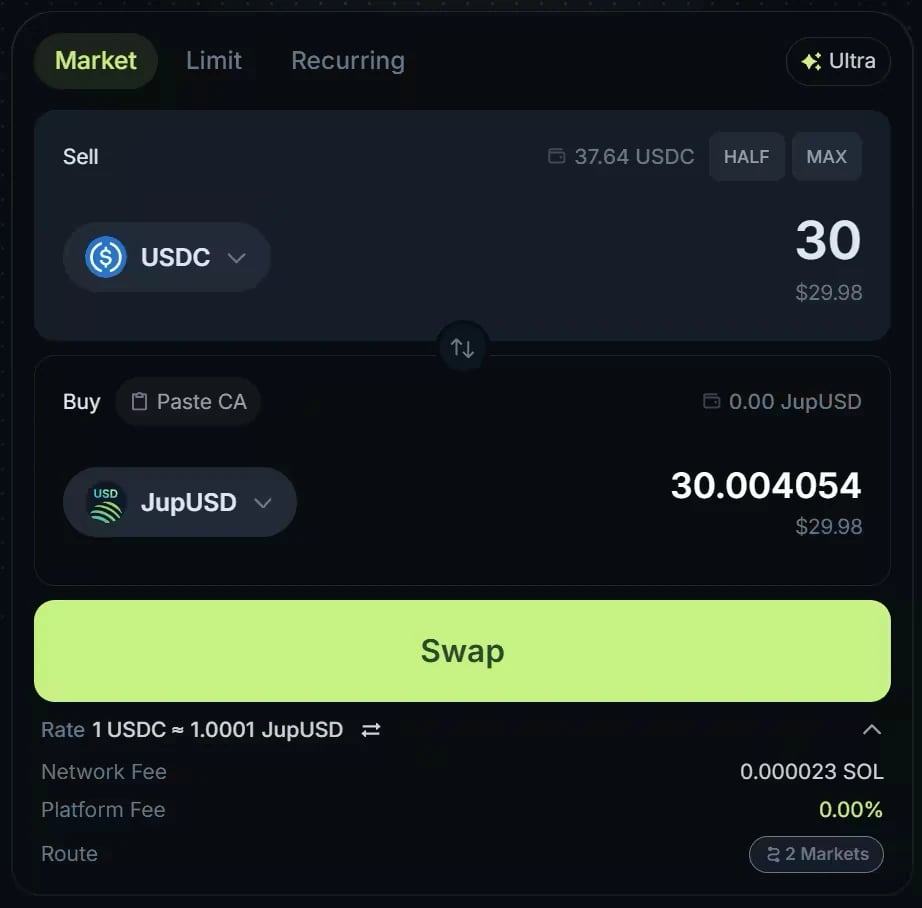
The swap form on jup.ag, from an earlier version of the interface: the Recurring tab is now called DCA. Amounts and fees date from when the screenshot was taken.
What qualifies for gasless?
Gasless is a last resort, designed for onboarding: for example, a new wallet that holds USDC but no SOL yet. It activates automatically when all of these are true:- Your wallet holds less than 0.01 SOL.
- The trade is worth at least about $10. The minimum moves with network fees.
- The token you sell is verified, as major tokens such as USDC are.
Key concepts for swaps
- Liquidity: the depth of the market. Deep liquidity lets you trade larger amounts without moving the price much; the price move your own trade causes is its price impact. Jupiter routes across many liquidity sources and splits a trade when needed to reach deeper liquidity.
- Slippage: the difference between your quoted price and the final execution price. The price can move between the quote and the execution, especially in volatile markets. Your slippage tolerance is the most you accept: if the price moves further, the swap fails instead of executing at a worse price. In Ultra Mode, RTSE sets this tolerance for you, and values such as 0.73% are normal for non-stable pairs. To set it yourself, use Manual Mode.
Let’s swap on Jupiter
1
Open the swap form
Go to the jup.ag homepage or to jup.ag/swap, connect your wallet, and stay on the Market tab.
2
Select the pair
Choose the token you sell under Sell and the token you want under Buy, then enter the amount. Paste CA, next to Buy, sets the token you buy from a contract address in your clipboard. Check the contract address of the token you buy: anyone can create a token on Solana, including one with a familiar name.
3
Review the execution path
A rate line appears under Buy. Expand it to see the Network Fee, the Platform Fee (Jupiter’s fee on this swap, from 0 to 0.5% depending on the pair) and the Route. Click Route to open Swap route, which shows the path your trade takes and how it is split across venues.
4
Confirm the swap
Click Swap and approve the transaction in your wallet.
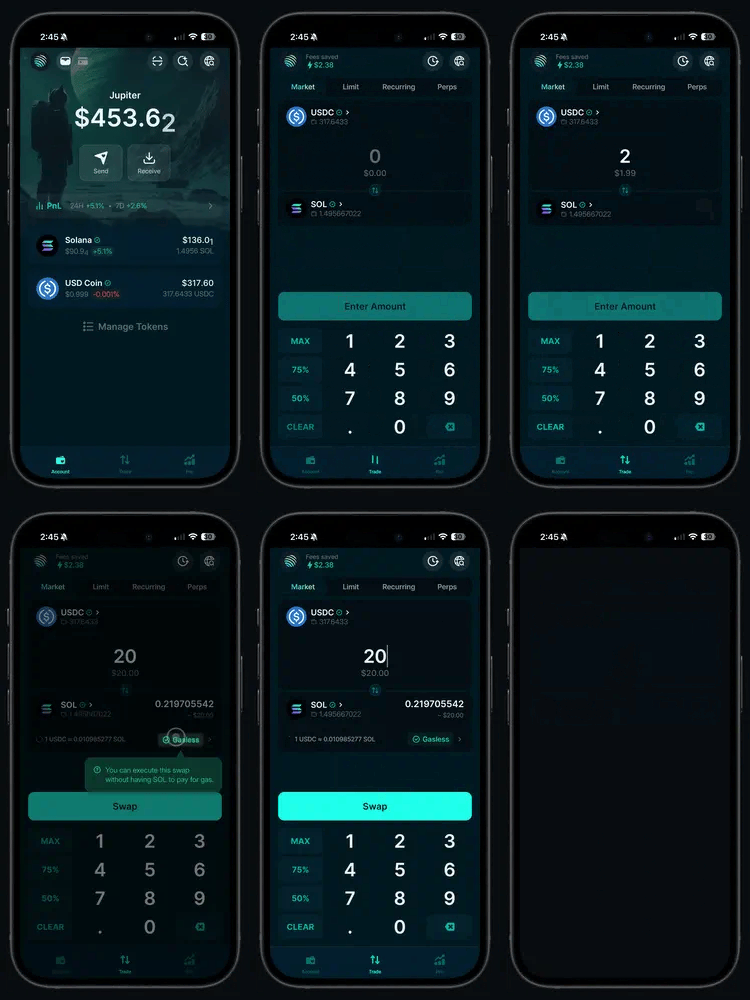
A Market swap in an earlier version of the Jupiter Mobile app. In the current app, open Trade → Swap → Market; the steps are the same.
Post-trade analysis and history
Transparency is a core tenet of cryptocurrency: every swap is an onchain transaction you can look up later.- On jup.ag, your swaps are in the Portfolio drawer (top right), under the Activity tab. V2 limit and DCA orders keep their history in the same drawer; legacy V1 orders remain viewable on jup.ag/limit and jup.ag/recurring.
- For your profit and loss per token, open Jupiter Portfolio and its Spot tab.
- For a full record, view your wallet on a block explorer such as Solscan.
- In the Jupiter Mobile app, open the Portfolio tab (Account in the Android app) → History.
Go deeper
Ultra Mode
Routing, RTSE, gasless rules, fees and everything the swap form shows.
Spot fees
Jupiter’s commission, network fees and what gasless costs.