

Published on YouTube in March 2026. If a screen in the video differs from the steps on this page, follow the page.
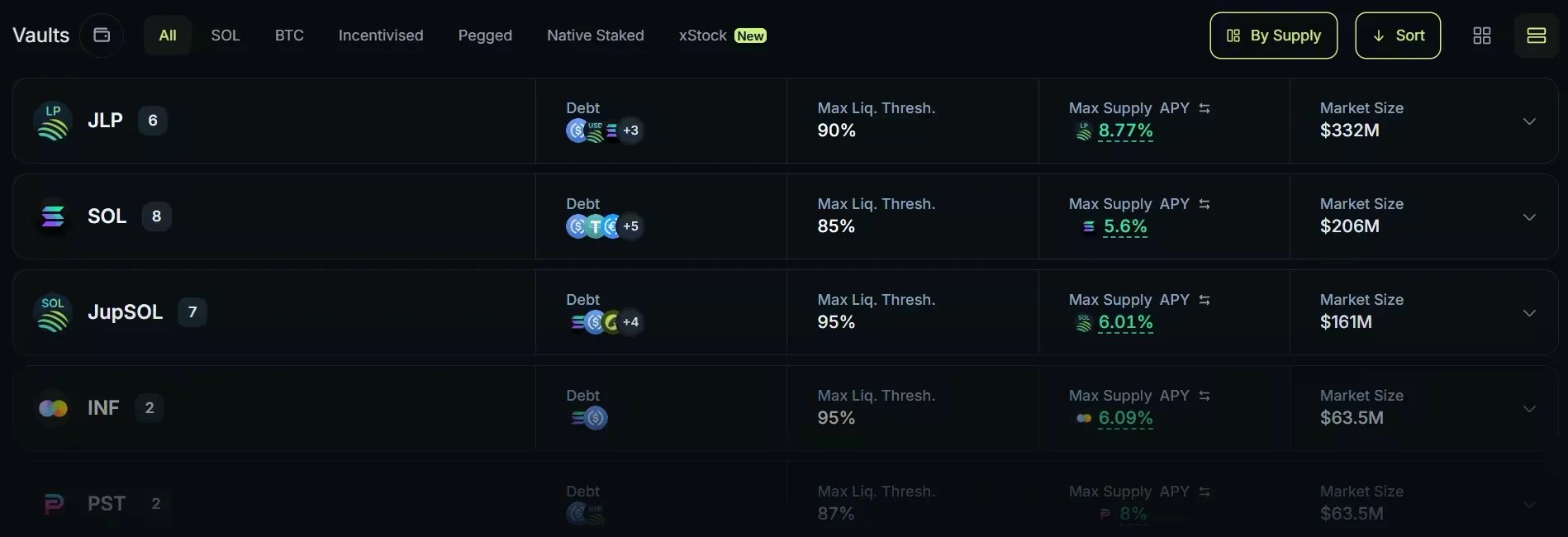
The Borrow vault list on jup.ag, grouped by collateral asset. Rates and market sizes date from when the screenshot was taken.
The collateralization model
Borrowing on Jupiter Lend is non-custodial and governed by smart contracts. To take out a loan, you must first over-collateralize your position: the value of the assets you deposit must be higher than the value of the assets you borrow.- Collateral held in the vault: your collateral stays in your position’s vault while the loan is open (you can withdraw part of it as long as the position stays within the vault’s limits), and the Position NFT in your wallet represents your ownership of that position (see below).
- Flexible repayment: there are no monthly minimum payments or fixed terms. You can repay your loan in partial installments or all at once, at any time that suits your strategy.
- Interest accrual: borrowing costs follow the Borrow APY, which is dynamically calculated from the demand for the specific asset you borrow, that is, its utilization: how much of that asset’s supply on Jupiter Lend, Earn deposits included, is already borrowed. Some vaults apply a borrow discount that lowers the rate; the Borrow APY shown always includes it.
Strategic use cases
Why borrow instead of selling? Common reasons include:- Working capital: accessing cash for real-world expenses or other onchain opportunities while keeping a long-term position on an asset like .
- Leverage: building a custom leveraged position yourself, by borrowing, swapping and depositing again, or with the Leverage action in the vault’s Actions tab. Multiply runs this loop for you at the multiplier you choose.
Managing your loan-to-value (LTV)
The most critical metric for any borrower is the relationship between your borrowed amount and the market value of your collateral. Each vault sets a maximum Loan-to-Value (LTV), and your position shows its current debt-to-collateral ratio next to the vault’s limits.- Keep a buffer: borrowing at or near the maximum leaves almost no margin before liquidation. The Position Health label (Safe, Risky, Very Risky, plus Medium on pegged vaults) shows how close your ratio is to the threshold.
- Maximum LTV: each vault has a specific borrowing limit. However, liquidation does not occur at max LTV. Each vault also has a Threshold (LT), which is always higher than the LTV. If your debt-to-collateral ratio reaches the LT, for example after a price drop, the position becomes eligible for liquidation.
- Liquidation: to protect the lenders who provided the capital, third-party liquidators can then repay part of your debt and receive part of your collateral in exchange, plus a penalty. The penalty applies only to the liquidated portion and varies by vault, and the protocol caps the liquidation at what brings your ratio back to the Liquidation Threshold. A liquidation may not happen the moment the threshold is crossed, so the position stays at risk until you repay debt or add collateral.
- Liquidation Max Limit (LML): there is a second, higher threshold above the LT called the Liquidation Max Limit. If your ratio crosses the LML, your position exits the partial-liquidation system entirely and is closed out completely, liquidated to zero. Keeping a healthy buffer well below the LT is the most reliable way to avoid ever reaching this point.
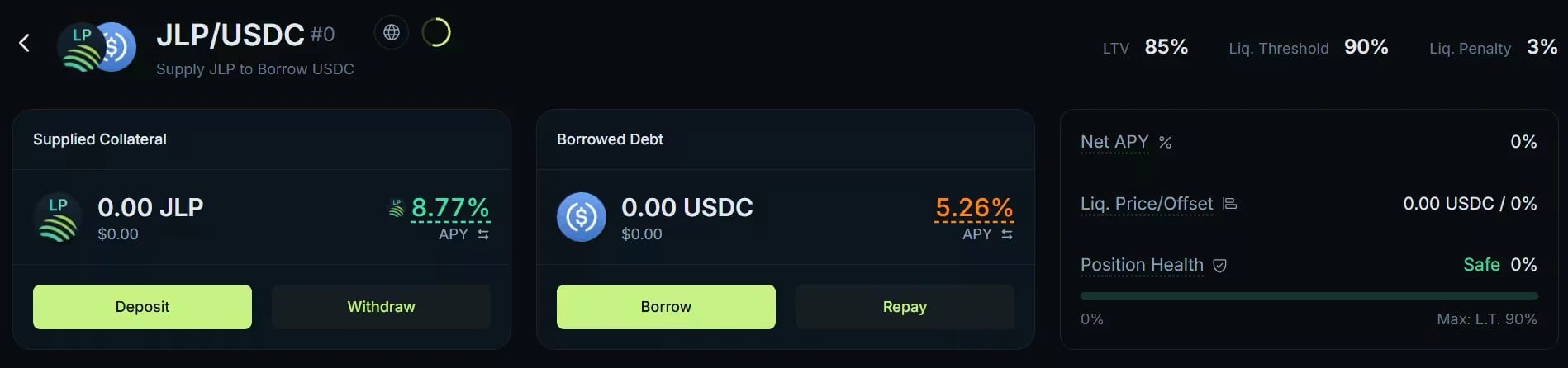
A Borrow vault page on jup.ag, from an earlier version of the interface: the summary panel now also shows Net USD and Position PNL. Rates date from when the screenshot was taken.
Your position as an NFT
When you open a position on Borrow, the protocol automatically mints a Position NFT to your wallet. This NFT is how the protocol identifies your loan onchain: whoever holds it controls the position, including the right to manage, repay, and close it. Do not transfer or burn the Position NFT, even after closing the loan, as it can be reused for future positions in the same vault pair.Let’s start borrowing
Step 1: Deposit collateral
Open the Borrow tab at jup.ag/lend/borrow and find the vault for your pair: the collateral you deposit, such as SOL or JupSOL, and the asset you want to borrow, such as USDC. The Collateral and Debt dropdowns and the category bar narrow the list. Open the vault: the Deposit form opens. Enter the amount of collateral, click Deposit and approve the transaction. This first transaction creates your position and deposits your collateral.Step 2: Draw your loan
Back on the vault page, click Borrow on the Borrowed Debt card and enter the amount. Review the status bar: it shows your resulting debt-to-collateral ratio next to the vault’s Liquidation Threshold, with its Position Health label. The further you are from the threshold, the safer your position. Confirm and approve: the borrowed assets are sent to your wallet. To deposit and borrow in a single transaction instead, use Deposit & Borrow in the vault’s Actions tab.Step 3: Monitor and repay
The vault page gives you a real-time view of your collateral, your debt (which grows as interest accrues), your Net APY, your liquidation price, and your Position Health. You can add collateral at any time to improve your Position Health, or repay part or all of the debt with Repay, then withdraw your collateral.Go deeper
Borrow on Jupiter Lend
Rates, LTV, liquidation, the Position NFT, and fees.
Using Borrow
The Borrow page, step by step: open, manage, and close a position.
Liquidation mechanism
Partial liquidations, penalties, and the Liquidation Max Limit.