

Published on YouTube in March 2026. If a screen in the video differs from the steps on this page, follow the page.
What is Earn?
Think of Earn as the supply side of the Jupiter lending engine. When you deposit assets into a , they are pooled together to provide liquidity for other users who want to borrow or use leverage on the network. Earn is designed to be simple: you deposit tokens and start earning yield. It is also transparent: the Statistics page shows each pool’s utilization and available liquidity in real time.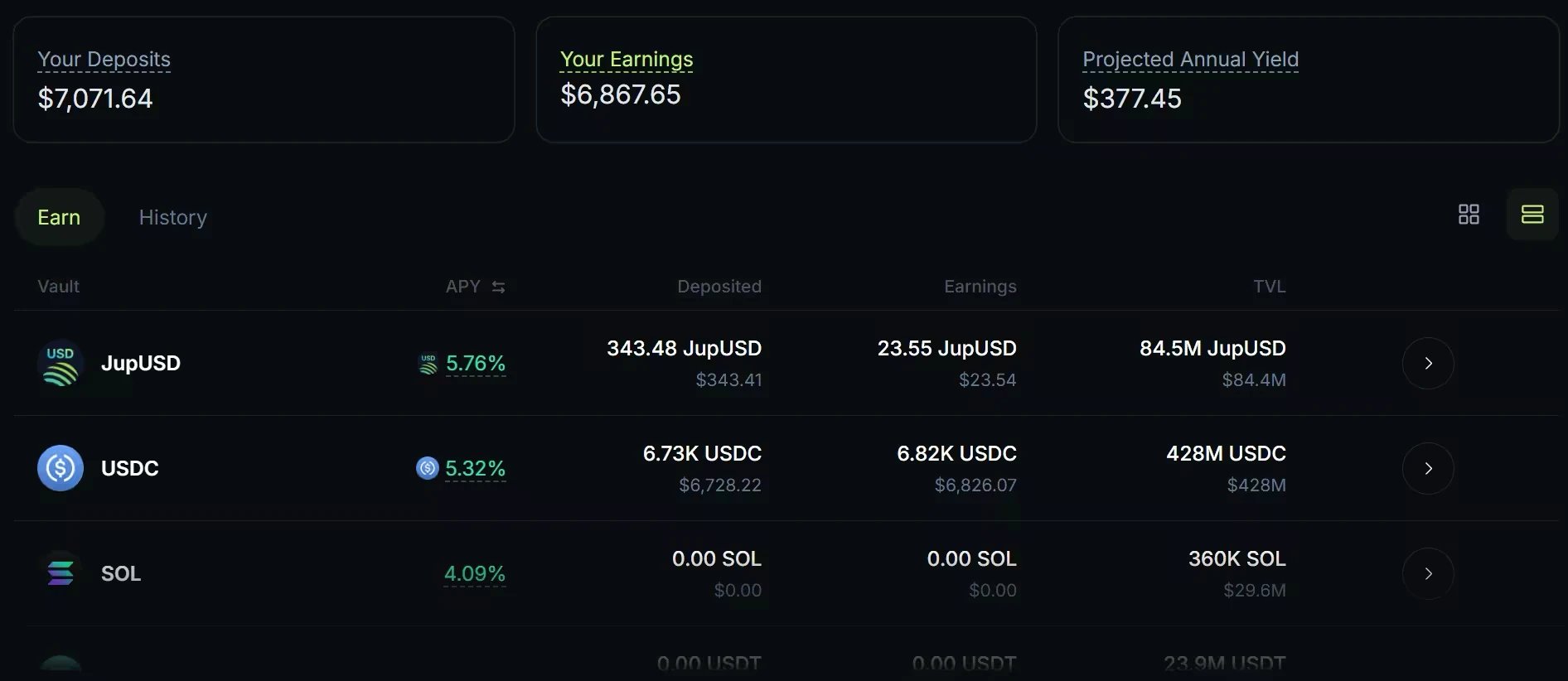
The Earn page on jup.ag. APYs and balances date from when the screenshot was taken.
Core principles
- How you earn: your yield (APY) is driven by utilization, the share of the pool’s supply that is currently borrowed. When demand from borrowers goes up, your interest rate increases. Borrowers pay the full rate; lenders receive 90% of that interest, and 10% goes to the protocol treasury.
- Unified liquidity: Earn deposits sit in Jupiter Lend’s Liquidity Layer, a shared pool that the Borrow and Multiply products both draw from. Your capital supports all of them at once instead of sitting in a separate pool for each product.
- Earn and collateral: Earn is primarily designed for generating yield. Most JL Tokens are purely yield-bearing. JUICED, the JL Token for JupUSD, is the exception: it can also be used as collateral to borrow on Jupiter Lend.
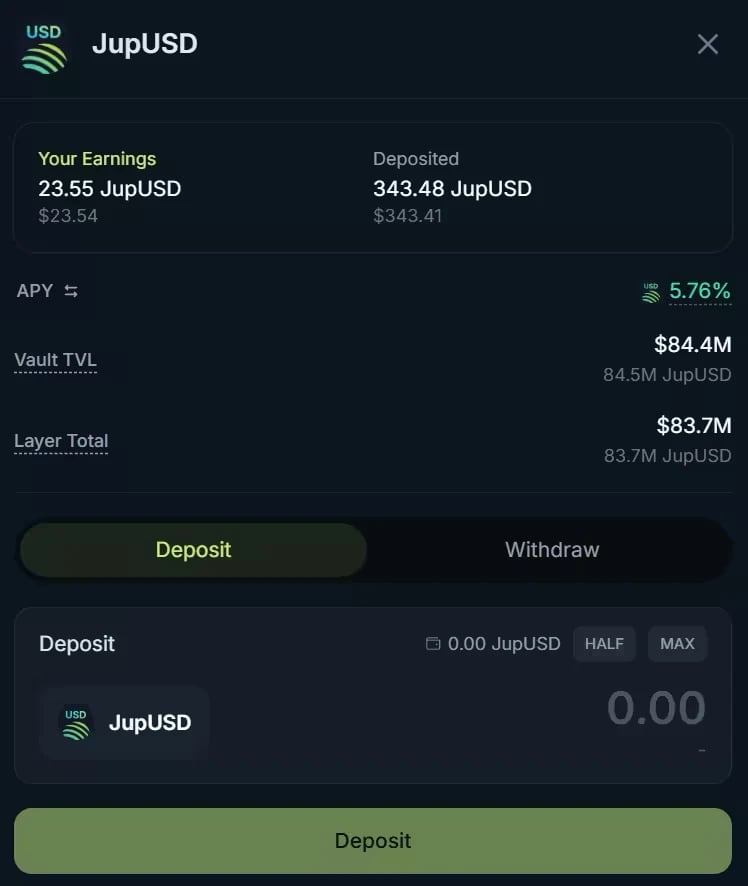
A vault on jup.ag, from an earlier version of the interface: the Layer Total row is gone, and a chart now projects your earnings over 12 months. Balances and APY date from when the screenshot was taken.
JL Tokens, your receipt tokens
When you make a deposit, Jupiter Lend sends you a receipt: a JL Token (Jupiter Lend Token), such as jlUSDC for a USDC deposit or jlWSOL for a SOL deposit.- Earning over time: these tokens represent your share of the vault. As borrowers pay interest, that value is added back into the pool, so each JL Token is worth more of the original asset over time. This is also why you typically receive fewer JL Tokens than the amount you deposited.
- Withdrawing: when you’re ready to exit, you withdraw from the vault. Your JL Tokens are redeemed for your original asset plus all the interest you’ve earned.
- Keeping them safe: JL Tokens should not be burned, discarded, or transferred to addresses you do not control. Whoever holds the JL Token holds the claim on your deposit and can withdraw the underlying funds. Without these receipts, you cannot redeem your supplied assets.
Key concepts to keep in mind
- Variable rates: isn’t fixed. It moves up and down with supply and demand, and it falls when fewer users borrow.
- Code security: you are interacting with onchain smart contracts. Jupiter Lend’s contracts have been audited by several independent security firms (see the Lend audits), but no audit rules out every vulnerability.
Let’s earn with Jupiter
- Pick your vault: head over to jup.ag/lend/earn to see the available options, such as SOL, USDC or JupUSD. The list shows each vault’s current APY, your deposits and earnings, and its TVL. To compare how much of each pool is currently borrowed (utilization), open the Statistics page.
- Make a deposit: open the vault and enter the amount you want to supply, or use HALF or MAX. A 12-month chart projects your earnings at the current rate; it is a projection, not a guarantee. Click Deposit and approve the transaction in your wallet. Your JL Token arrives in your wallet, and you’re all set.
- Manage your position: the Earn page shows your deposits, your earnings and your projected annual yield at any time. Deposits are generally liquid, though Jupiter Lend uses dynamic withdrawal limits that adjust over time to keep things running smoothly even when the market gets volatile. When most of an asset is borrowed, you may need to withdraw in smaller amounts or wait for liquidity to return.
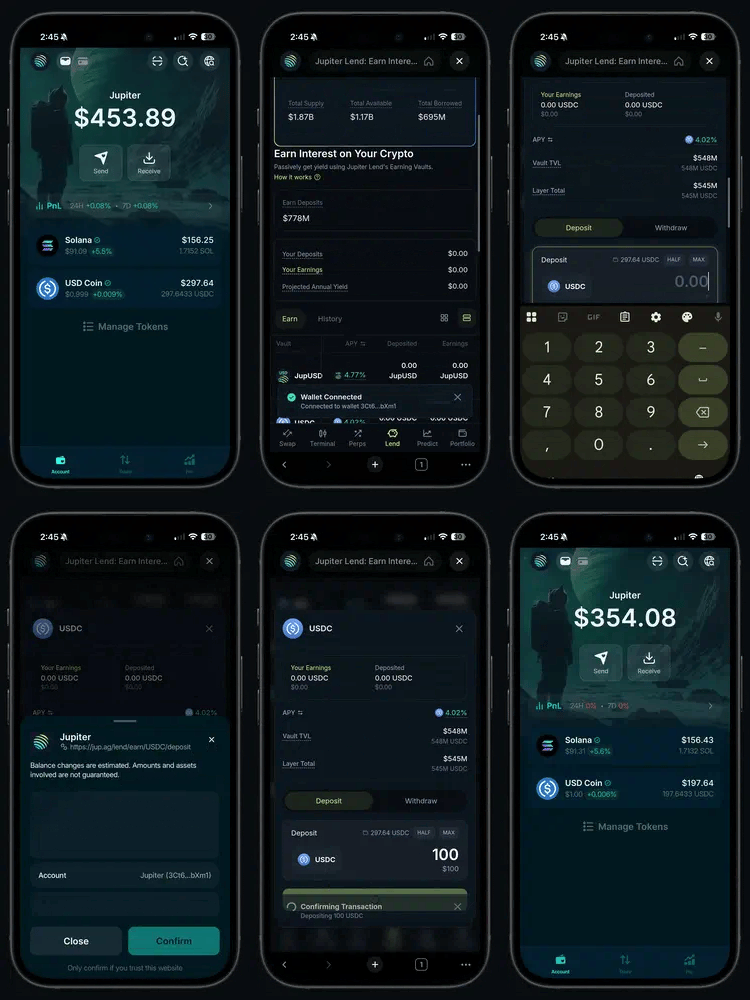
A 100 USDC deposit on jup.ag, opened from an earlier version of the Jupiter Mobile app. In the current app, Earn on the Home tab opens Jupiter Lend directly.
Go deeper
Earn on Jupiter Lend
How Earn works, its fees, and its risks.
Using Earn
Every part of the Earn page: deposit, withdraw, and history.