



Top Loops on the Multiply page. Max Leverage APY values date from when the screenshot was taken and change constantly.
The mechanics of automated leverage
At its core, Multiply automates the process of leveraging up. On other platforms, increasing exposure usually requires multiple steps: depositing collateral, borrowing a stablecoin, swapping for more of the original asset, and repeating.- Automated looping: Multiply does not repeat the loop step by step. In a single atomic transaction, it flash-borrows the full debt needed for your target multiplier, swaps it into more of the target asset, deposits it with your own deposit, borrows the same amount against the position, and repays the flashloan. Either the whole position is built, or nothing changes.
- The factor: while your position is leveraged, the underlying assets often still benefit from staking yields or rewards, which can help offset the cost of the borrowed capital.
- Simplified UX: unlike standard margin trading, which can require managing several accounts, Multiply gives each position a single page with its net value, current multiplier, rates and profit or loss, and a status bar that shows how close it is to liquidation.
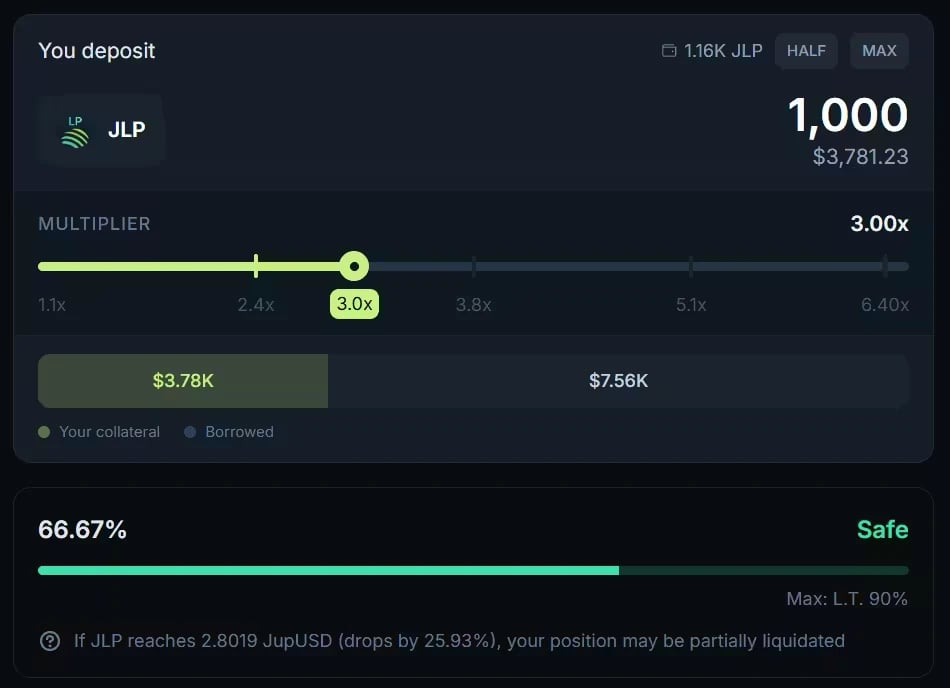
The Multiply form: your deposit, the multiplier slider, and the projected status of the position. Prices date from when the screenshot was taken.
The infrastructure: powered by Jupiter Lend
Multiply isn’t a standalone product: it is built on top of Jupiter Lend.- Liquidity sourcing: when you multiply a position, the capital you borrow comes from the same lending pools that Earn depositors supply.
- Variable interest: the cost of your leverage (the borrow rate) is dynamic. It shifts with the utilization of the lending pools, so your costs may decrease when liquidity is abundant or increase during periods of high demand.
- Fees: Multiply adds no protocol fee, and the flashloan it uses is free. Each time it buys or sells collateral, the swap goes through Jupiter, so you bear its price impact and route fees.
Risk management: LTV and liquidation
Leverage multiplies potential gains, but it also multiplies potential losses, and it introduces risks that every participant must manage.Key risk metrics
- Loan-to-value (LTV): the ratio of your borrowed debt to the value of your collateral, shown as your debt-to-collateral ratio. If the price of your asset drops, your rises.
- Liquidation price: the price at which your debt-to-collateral ratio reaches the vault’s Threshold (LT). The LT is always higher than the vault’s max LTV, creating a safety buffer between your borrowing limit and the liquidation point. Once the ratio reaches it, the position becomes eligible for partial liquidation: part of your collateral repays part of the debt, plus a penalty that varies by vault, protecting the lenders in the ecosystem. On pegged loops such as JupSOL/SOL, market price moves do not drive liquidation; borrow rates do (see Why pegged vaults behave differently under risk).
- Position Health: Multiply provides a real-time status: Safe, Medium (pegged vaults only), Risky or Very Risky. Keeping it on Safe, with lower leverage or more collateral, is the primary way to defend against market volatility.
Hands-on with Multiply
Step 1: Asset selection and leverage
Open the Multiply tab at jup.ag/lend/borrow/multiply and pick a loop: the asset you want to leverage and the asset you borrow against it, for example SOL against USDC, or JitoSOL against SOL. On the vault page, enter your deposit and use the slider to set your desired multiplier (for example 2x or 3x). The highest multiplier available depends on the vault’s LTV.Step 2: Reviewing the details
Before confirming, review the After Multiply panel, in particular the Liquidation Price and the Final . The Final APY is the return on your net value (total collateral minus total debt), not on your total collateral. With leverage, your net value is only a fraction of your total position, so the Final APY applied to your net value earns less in absolute terms than the same percentage would on the full position.Step 3: Execution and monitoring
Click Multiply (the button shows your multiplier), confirm the acknowledgement, and approve the transactions in your wallet. A new position takes two: the first creates your Position NFT, the second applies the leverage. If the second one fails, click Multiply again and the app reuses the position created by the first. Later increases on the same position take a single transaction. Once both are confirmed, your multiplied position is active. You can monitor your and Position Health from the position page, and use the Unwind tab at any time to reduce leverage or close the position fully, to take profit or reduce risk.Go deeper
Multiply on Jupiter Lend
How the loop is built, Unwind, fees, and risks.
Using Multiply
Open, manage, and close a Multiply position, step by step.